Summary: in this tutorial, you will learn how to use the Oracle RIGHT JOIN to merge rows from two tables.
Introduction to Oracle RIGHT JOIN clause #
Like INNER JOIN and LEFT JOIN, The RIGHT JOIN is also an optional clause of a SELECT statement.
A RIGHT JOIN clause allows you to merge rows from two tables. The first table is a left table, and the second table is a right table.
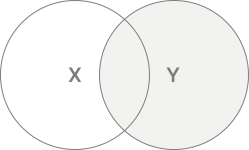
A RIGHT JOIN returns all rows from the right table and matching rows from the left table.
Here’s the syntax of the RIGHT JOIN clause:
SELECT column_list FROM X RIGHT JOIN Y ON X.id = Y.id;Code language: SQL (Structured Query Language) (sql)In this syntax:
- First, provide the left table (
X) in theFROMclause. - Second, specify the right table (
Y) in theRIGHT JOINclause. - Third, define a join condition (
X.id = Y.id) after theONkeyword
In this syntax, the RIGHT JOIN matches the values in the id column of the left table (X) with the values in the id column of the right table (Y).
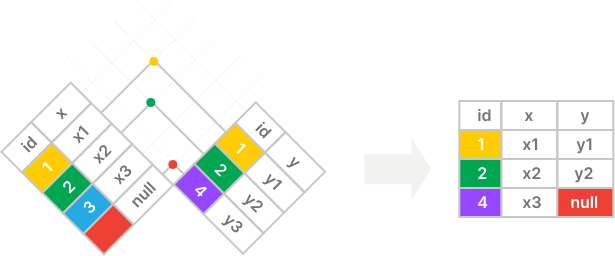
If they are equal, the RIGHT JOIN merges two rows from both tables into one and includes it in an intermediate row.
If the row from the right table does not have a matching row in the left table, the RIGHT JOIN merges the row in the right table with the row in the left table, with the columns from the left table filled with NULLs.
The whole statement returns a result set that includes columns specified in the SELECT clause.
Besides using the equal to operator (=) for matching values, you can use other comparison operators such as >, >=, <, and <=.
Additionally, you can use multiple expressions in the join condition by combining them using the AND and OR operators.
Visualizing how the Oracle RIGHT JOIN works #
Suppose you have two tables X and Y, and want to merge rows from both tables using a right join:
- The
Xtable has two columns:id(key) andx. - The
Ytable has two columns:id(key) andy.
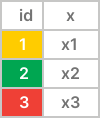
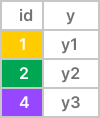
The right join returns all rows from the right table (Y) and matching rows from the left table (X). If a row in the right table does not have a matching row in the left table (X), it uses null for columns of the left table (X):
The following Venn diagram is another way to depict how an Oracle right join works:
Oracle RIGHT OUTER JOIN examples #
We’ll use the orders and employees tables in the sample database for the demonstration:
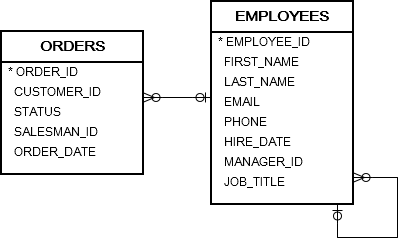
In this diagram, a salesperson is responsible for one or more sales orders. However, some sales orders may not be in charge to any salesman.
The following statement uses a RIGHT JOIN clause to retrieve all salesmen and the sales orders that they are in charge of:
SELECT first_name, last_name, order_id, status FROM orders RIGHT JOIN employees ON employee_id = salesman_id WHERE job_title = 'Sales Representative' ORDER BY first_name, last_name;Code language: SQL (Structured Query Language) (sql)Output:
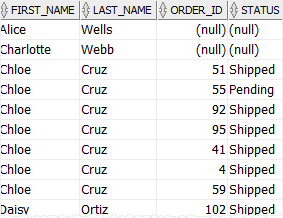
The result includes all employees whose job title is Sales Representative and their orders.
If a salesman is not in charge of any sales order, such as Alice Wells, Charlotte Webb, the order_id and status columns are filled with NULL values.
Oracle RIGHT OUTER JOIN with USING syntax. #
Similar to other joins, such as INNER JOIN, LEFT JOIN, you can use the USING option to specify which column to test for equality when joining tables.
The following illustrates the syntax of the RIGHT OUTER JOIN with the USING clause:
SELECT column_list FROM X RIGHT JOIN Y USING(id);Code language: SQL (Structured Query Language) (sql)In this query, the columns listed in the USING clause must be presented in both T1 and T2 tables.
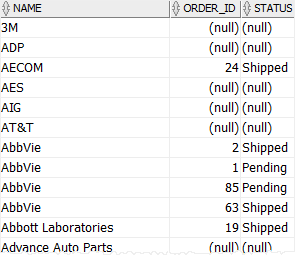
In this example, all customers are included in the result set. If a customer does not have a sales order, the order_id and status columns are filled with NULL values.
Condition in the ON vs. WHERE clause #
The following statement uses a RIGHT JOIN clause to merge rows between the orders and employees table:
SELECT employee_id, last_name, first_name, order_id, status FROM orders RIGHT JOIN employees ON employee_id = salesman_id WHERE employee_id = 57;Code language: SQL (Structured Query Language) (sql)Output:
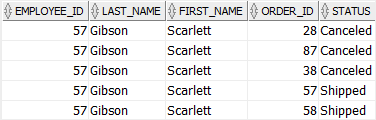
How the query works:
- First, the
WHEREclause includes one employee with id57. - Second, the
RIGHT JOINclause includes the filtered row from theemployeestable (one row with id 57) and matches the id57with the id from rows in theorderstable. - Third, the statement returns rows with the employee id
57.
The following statement uses the RIGHT JOIN clause, but places the condition in the ON clause instead:
SELECT employee_id, last_name, first_name, order_id, status FROM orders RIGHT JOIN employees ON employee_id = salesman_id AND employee_id = 57;Code language: SQL (Structured Query Language) (sql)Output:
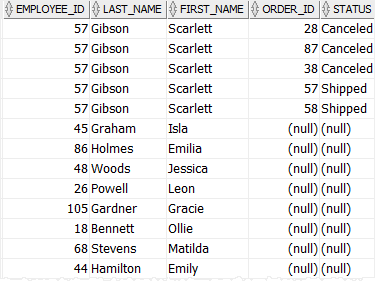
In this example, the statement returns all employees but only the employee with id 57 has the related order data.
How the query works:
- First, the
RIGHT JOINinclude all rows from theemployeetables. - Second, the
RIGHT JOINmatches the values in theidin theemployeestable with the values in theidcolumns of theorderstable based on the condition:employee_id = salesman_id. Since the condition selects only employee id 57, the result set only includes order data with
AND employee_id = 57employee_id57.
Summary #
- Use the
RIGHT JOINto include all rows from the right table and matching rows from the left table.

