Summary: in this tutorial, you will learn how to use the Oracle PIVOT clause to transpose rows to columns to generate result sets in crosstab format.
Introduction to Oracle PIVOT clause #
Oracle 11g introduced the new PIVOT clause that allows you to write cross-tabulation queries which transpose rows into columns, aggregating data in the process of the transposing. As a result, the output of a pivot operation returns more columns and fewer rows than the starting data set.
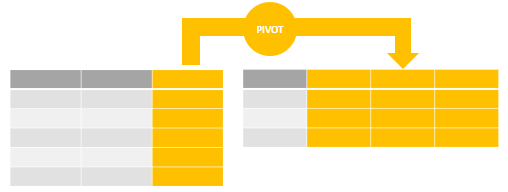
The following illustrates the basic syntax of the Oracle PIVOT clause:
SELECT select_list FROM table_name PIVOT [XML] ( pivot_clause pivot_for_clause pivot_in_clause ); Code language: SQL (Structured Query Language) (sql)In this syntax, following the PIVOT keyword are three clauses:
pivot_clausespecifies the column(s) that you want to aggregate. Thepivot_clauseperforms an implicitlyGROUP BYbased on all columns that are not specified in the clause, along with values provided by thepivot_in_clause.pivot_for_clausespecifies the column that you want to group or pivot.pivot_in_clausedefines a filter for column(s) in thepivot_for_clause. The aggregation for each value in thepivot_in_clausewill be rotated into a separate column.
Oracle PIVOT example #
Let’s create a new view named order_stats that includes product category, order status, and order id for demonstration.
CREATE VIEW order_stats AS SELECT category_name, status, order_id FROM order_items INNER JOIN orders USING (order_id) INNER JOIN products USING (product_id) INNER JOIN product_categories USING (category_id); Code language: SQL (Structured Query Language) (sql)Here is the partial data from the order_stats view:
SELECT * FROM order_stats;Code language: SQL (Structured Query Language) (sql)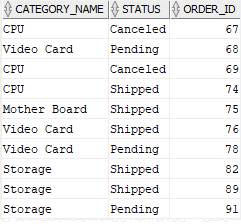
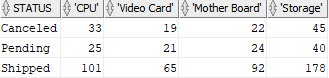
This example uses the PIVOT clause to return the number of orders for each product category by order status:
SELECT * FROM order_stats PIVOT( COUNT(order_id) FOR category_name IN ( 'CPU', 'Video Card', 'Mother Board', 'Storage' ) ) ORDER BY status; Code language: SQL (Structured Query Language) (sql)In this example:
- The
COUNT(order_id)is thepivot_clause. FOR category_nameis thepivot_for_clause.
And here is the pivot_in_clause:
IN ( 'CPU', 'Video Card', 'Mother Board', 'Storage' ) Code language: SQL (Structured Query Language) (sql)The COUNT() function returns the number of orders by category and order status. The query uses the values specified in the pivot_in_clause for the column headings of the result set.
Here is the output:
Aliasing pivot columns #
In the previous example, Oracle used product categories to generate pivot column names. On the other hand, you can alias one or more columns in the pivot_clause and one or more values in the pivot_in_clause.
Generally, Oracle uses the following convention to name the pivot columns based on aliases:
| Pivot Column Aliased? | Pivot In-Value Aliased? | Pivot Column Name |
|---|---|---|
| No | No | pivot_in_clause value |
| Yes | Yes | pivot_in_clause alias || ‘_’ || pivot_clause alias |
| No | Yes | pivot_in_clause alias |
| Yes | No | pivot_in_clause value || ‘_’ || pivot_clause alias |
The following statement uses the query example above with the aliases:
SELECT * FROM order_stats PIVOT( COUNT(order_id) order_count FOR category_name IN ( 'CPU' CPU, 'Video Card' VideoCard, 'Mother Board' MotherBoard, 'Storage' Storage ) ) ORDER BY status; Code language: SQL (Structured Query Language) (sql)Here is the result set:

As you can see, the pivot column names follow the below naming convention:
pivot_in_clause alias || '_' || pivot_clause aliasCode language: SQL (Structured Query Language) (sql)Note that if you use more than one aggregate function in the pivot_clause, you must provide aliases for at least one of the aggregate functions.
Pivoting multiple columns #
In the previous example, you have seen that we used one aggregate function in the pivot_clause. In the following example, we will use two aggregate functions.
First, alter the order_stats view to include the order value column:
CREATE OR REPLACE VIEW order_stats AS SELECT category_name, status, order_id, SUM(quantity * list_price) AS order_value FROM order_items INNER JOIN orders USING (order_id) INNER JOIN products USING (product_id) INNER JOIN product_categories USING (category_id) GROUP BY order_id, status, category_name; Code language: SQL (Structured Query Language) (sql)Second, query data from the new order_stats view:
SELECT * FROM order_stats; Code language: SQL (Structured Query Language) (sql)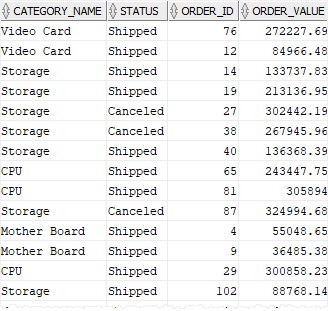
Third, use PIVOT clause to return the number of orders and order values by product category and order status:
SELECT * FROM order_stats PIVOT( COUNT(order_id) orders, SUM(order_value) sales FOR category_name IN ( 'CPU' CPU, 'Video Card' VideoCard, 'Mother Board' MotherBoard, 'Storage' Storage ) ) ORDER BY status; Code language: SQL (Structured Query Language) (sql)Here is the output:

As you can see from the output, the number of pivot columns is doubled, combining category_name with orders and sales.
Finally, use status as the pivot columns and category_name as rows:
SELECT * FROM order_stats PIVOT( COUNT(order_id) orders, SUM(order_value) sales FOR status IN ( 'Canceled' Canceled, 'Pending' Pending, 'Shipped' Shipped ) ) ORDER BY category_name; Code language: SQL (Structured Query Language) (sql)The following picture shows the output:

Oracle PIVOT with subquery #
You cannot use a subquery in the pivot_in_clause. The following statement is invalid and causes an error:
SELECT * FROM order_stats PIVOT( COUNT(order_id) orders, SUM(order_value) sales FOR category_name IN ( SELECT category_name FROM product_categories ) ) ORDER BY status; Code language: SQL (Structured Query Language) (sql)Here is the error message:
ORA-00936: missing expressionCode language: SQL (Structured Query Language) (sql)This restriction is relaxed with the XML option:
SELECT * FROM order_stats PIVOT XML ( COUNT(order_id) orders, SUM(order_value) sales FOR category_name IN ( SELECT category_name FROM product_categories ) ) ORDER BY status; Code language: SQL (Structured Query Language) (sql)This picture is the output:

Here is the sample of one PivotSet:
<PivotSet> <item> <column name="CATEGORY_NAME">CPU</column> <column name="ORDERS">13</column> <column name="SALES">4122040.7</column> </item> <item> <column name="CATEGORY_NAME">Mother Board</column> <column name="ORDERS">12</column> <column name="SALES">679121.39</column> </item> <item> <column name="CATEGORY_NAME">RAM</column> <column name="ORDERS">0</column> <column name="SALES" /> </item> <item> <column name="CATEGORY_NAME">Storage</column> <column name="ORDERS">14</column> <column name="SALES">3023747.6</column> </item> <item> <column name="CATEGORY_NAME">Video Card</column> <column name="ORDERS">9</column> <column name="SALES">1677597.4</column> </item> </PivotSet>Code language: HTML, XML (xml)To view XML in the output grid from the SQL Developer, you follow these steps to set it up:
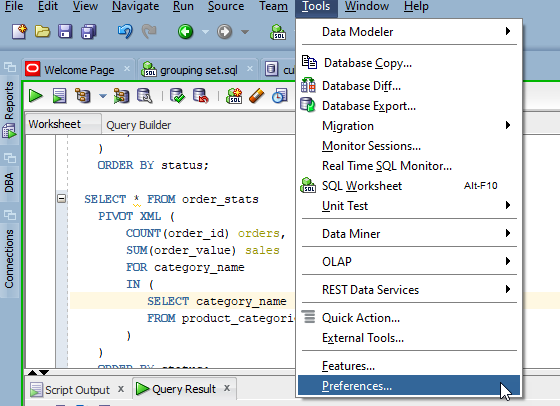
1) From the Tool menu, select Preferences
2) Under Database > Advanced, check the option Display XML Value in Grid
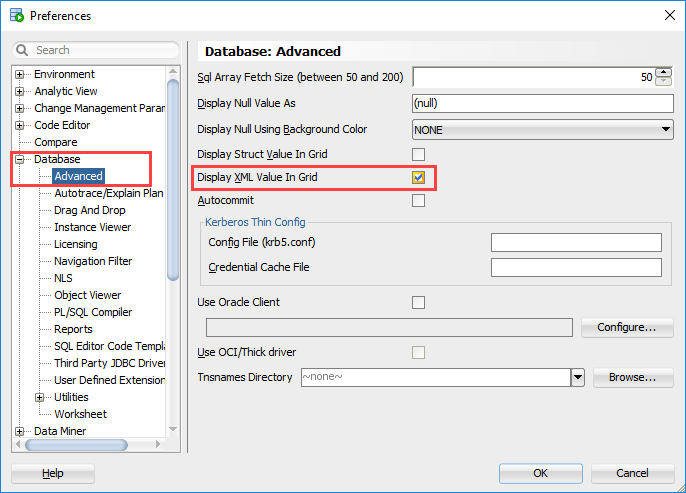
The XML output format is not the same as the non-XML pivot one. For each value specified in the pivot_in_clause, the subquery returns a single XML string column.
The XML string for each row contains aggregated data corresponding to the implicit GROUP BY value of that row e.g., the number of orders ( ORDERS) and total sales ( SALES).
When you use a subquery in the pivot_in_clause, Oracle uses all values returned by the subquery for pivoting.
Note that the subquery must return a list of unique values. Otherwise, Oracle will raise a run-time error. If you are not sure whether the subquery returns a list of distinct values or not, you can use the DISTINCT keyword in the subquery.
Summary #
- Use the Oracle
PIVOTclause to transpose rows to columns to make crosstab reports.

