Summary: in this tutorial, you learn how to use the Oracle NOT EXISTS operator to subtract one set of data from another.
Introduction to the Oracle NOT EXISTS operator #
The NOT EXISTS operator works the opposite of the EXISTS operator. We often use the NOT EXISTS operator with a subquery to subtract one set of data from another.
Here’s the syntax of the NOT EXISTS operator:
NOT EXISTS (subquery);Code language: SQL (Structured Query Language) (sql)The NOT EXISTS operator returns true if the subquery returns no row. Otherwise, it returns false.
Note that the NOT EXISTS operator returns false if the subquery returns any rows with NULL.
Oracle NOT EXISTS examples #
See the following customers and orders tables in the sample database:
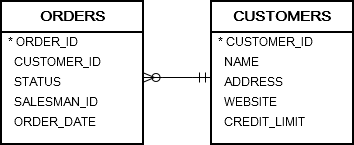
The following statement uses the NOT EXISTS operator to find customers who have no order:
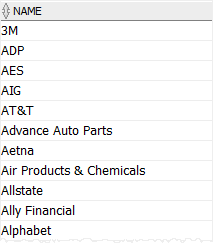
SELECT name FROM customers WHERE NOT EXISTS ( SELECT NULL FROM orders WHERE orders.customer_id = customers.customer_id ) ORDER BY name;Code language: SQL (Structured Query Language) (sql)To archive the customers who have no order, you use the following statement:
CREATE TABLE customers_archive AS SELECT * FROM customers WHERE NOT EXISTS ( SELECT NULL FROM orders WHERE orders.customer_id = customers.customer_id );Code language: SQL (Structured Query Language) (sql)To update the credit limit of customers who have no order in 2017, you use the following UPDATE statement:
UPDATE customers SET credit_limit = 0 WHERE NOT EXISTS ( SELECT NULL FROM orders WHERE orders.customer_id = customers.customer_id AND EXTRACT( YEAR FROM order_date ) = 2017 );Code language: SQL (Structured Query Language) (sql)And to delete all customers who had no orders in 2016 and 2017 from the customers table, you use the following DELETE statement:
DELETE FROM customers WHERE NOT EXISTS ( SELECT NULL FROM orders WHERE orders.customer_id = customers.customer_id AND EXTRACT( YEAR FROM order_date ) IN (2016, 2017) );Code language: SQL (Structured Query Language) (sql)Oracle NOT EXISTS vs. NOT IN #
The following statement uses the IN operator with a subquery:
SELECT * FROM table_name WHERE id IN (subquery);Code language: SQL (Structured Query Language) (sql)Suppose the subquery returns four values 1, 2, 3, and NULL. You can rewrite the whole query above as follows:
SELECT * FROM table_name WHERE id = 1 OR id = 2 OR id = 3 OR id = NULL; Code language: SQL (Structured Query Language) (sql)The following expression always returns a NULL value because a NULL value cannot compare to anything.
id = NULLCode language: SQL (Structured Query Language) (sql)Therefore, the following expression returns a NULL value if any row in the result set of the subquery is NULL.
id NOT IN (subquery)Code language: SQL (Structured Query Language) (sql)In contrast, NULL does not affect the result of the NOT EXIST operator because the NOT EXISTS operator solely checks the existence of rows in the subquery:
SELECT * FROM table_name WHERE NOT EXISTS(subquery);Code language: SQL (Structured Query Language) (sql)In conclusion, the NOT EXISTS and NOT IN behave differently when there are null values involved.
Summary #
- Use the Oracle
NOT EXISTSoperator to subtract one set of data from another.

