Summary: In this tutorial, you’ll learn how to use the Oracle HAVING clause to filter groups returned by the GROUP BY clause.
Introduction to the Oracle HAVING clause #
The HAVING clause is an optional clause of the SELECT statement. The HAVING clause allows you to filter groups created by the GROUP BY clause.
Here’s the basic syntax of the HAVING clause:
SELECT select_list FROM table_name GROUP BY c1, c2, c3 HAVING filter_condition;Code language: SQL (Structured Query Language) (sql)In this syntax:
- First, the
GROUP BYclause groups rows into groups. - Second, the
HAVINGclause keeps only groups that satisfy thefilter_condition.
Note that the HAVING clause filters groups of rows, whereas the WHERE clause filters rows. This is the main difference between the HAVING and WHERE clauses.
When executing a SELECT statement, Oracle evaluates the HAVING clause after the GROUP BY clause and before the SELECT clause in the following sequence:
Suppose we have the following order_items table:
| order_id | item_id | product_id | quantity | unit_price |
|---|---|---|---|---|
| 7 | 1 | 227 | 74 | 305.00 |
| 7 | 2 | 230 | 49 | 136.69 |
| 11 | 1 | 96 | 113 | 141.56 |
| 11 | 2 | 40 | 79 | 299.89 |
| 20 | 1 | 126 | 105 | 640.99 |
| 20 | 2 | 41 | 78 | 299.89 |
To retrieve the order id and total amount of each, we use the GROUP BY clause:
SELECT order_id, SUM(quantity * unit_price) total FROM order_items GROUP BY order_id;Code language: PostgreSQL SQL dialect and PL/pgSQL (pgsql)Here’s the result set:
| order_id | total |
|---|---|
| 7 | 29267.81 |
| 11 | 39687.59 |
| 20 | 90695.37 |
To retrieve only orders with a total greater than 30,000, you use a GROUP BY clause:
SELECT order_id, SUM(quantity * unit_price) total FROM order_items WHERE order_id IN (7, 11, 20) GROUP BY order_id HAVING SUM(quantity * unit_price) > 30000 ORDER BY order_id;Code language: PostgreSQL SQL dialect and PL/pgSQL (pgsql)Here’s the final result:
| order_id | total |
|---|---|
| 11 | 39687.59 |
| 20 | 90695.37 |
Oracle HAVING clause examples #
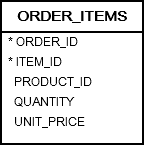
We’ll use the order_items in the sample database for the demonstration.
Basic Oracle HAVING clause example #
The following statement uses the GROUP BY clause to retrieve the orders and their values from the order_items table:
SELECT order_id, SUM(unit_price * quantity) order_value FROM order_items GROUP BY order_id ORDER BY order_value DESC;Code language: SQL (Structured Query Language) (sql)Here is the result:
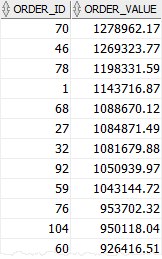
In this example, we use the SUM() aggregate function calculates the total amount of each order.
To find the orders whose values are greater than 1 million, you use a HAVING clause as follows:
SELECT order_id, SUM(unit_price * quantity) order_value FROM order_items GROUP BY order_id HAVING SUM(unit_price * quantity) > 1000000 ORDER BY order_value DESC;Code language: SQL (Structured Query Language) (sql)Output:
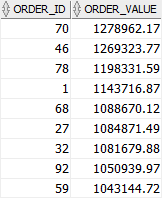
In this example:
- First, the
GROUP BYclause groups orders by their ids and calculates the order values using theSUM() - Then, the
HAVINGclause filters all orders whose values are less than or equal to1,000,000.
Using Oracle HAVING with complex conditions example #
You can use a complex filter condition in the HAVING clause to filter groups.
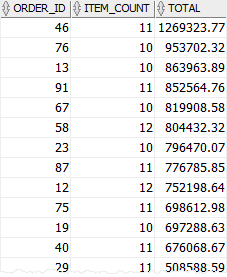
For example, the following statement finds orders whose values are greater than 500,000 and the number of products in each order is between 10 and 12:
SELECT order_id, COUNT(item_id) item_count, SUM(unit_price * quantity) total FROM order_items GROUP BY order_id HAVING SUM(unit_price * quantity) > 500000 AND COUNT(item_id) BETWEEN 10 AND 12 ORDER BY total DESC, item_count DESC;Code language: SQL (Structured Query Language) (sql)Output:
Summary #
- Use the Oracle
HAVINGclause to filter groups of rows returned by theGROUP BYclause.

