Summary: in this tutorial, you’ll learn how to use the Oracle GROUPING SETS expression to generate multiple groupings within a query.
Introduction to the Oracle GROUPING SETS expression #
In Oracle, the GROUP BY clause allows you to group rows into multiple groups based on values in one or more columns. However, the GROUP BY supports only single grouping.
For example, you can use the GROUP BY clause to calculate the sum of sales amounts by customer or category. But you cannot use the GROUP BY clause to group sales amounts by both customers and category within a single query.
To create multiple groupings within a single query, you can use the GROUPING SETS expression.
Here’s the basic syntax of the GROUPING SETS expression:
SELECT column1, column2, aggregate_function (column_3) FROM table_name GROUP BY GROUPING SETS ( (column1, column2), (column1), (column2), () );Code language: SQL (Structured Query Language) (sql)In this syntax:
- First, specify the
GROUPING SETSexpression in theGROUP BYclause. - Second, use a tuple
()to denote each grouping.
The syntax includes four groupings:
(column1, column2)is a grouping that groups the rows bycolumn1andcolumn2.(column1)is a grouping that groups rows bycolumn1.(column2)is a grouping that groups rows bycolumn2.()is a grouping that represents the grand total.
You can have fewer or more groupings. The GROUPING SETS expression works as if you had multiple GROUP BY within a single SELECT statement.
Oracle GROUPING SETS expression example #
Suppose we have the following customer_category_sales view:
| category | customer | sales_amount |
|---|---|---|
| CPU | Plains GP Holdings | 746077.25 |
| CPU | Raytheon | 1217842.73 |
| Mother Board | Plains GP Holdings | 150418.39 |
| Mother Board | Raytheon | 258828.52 |
| Storage | Plains GP Holdings | 336014.38 |
| Storage | Raytheon | 486325.00 |
| Video Card | Plains GP Holdings | 1055198.31 |
| Video Card | Raytheon | 815087.32 |
To group the rows by both categories and customers, you can use GROUPING SETS expression:
SELECT customer, category, SUM(sales_amount) total_sales_amount FROM customer_category_sales GROUP BY GROUPING SETS ((customer, category), (customer), (category), ()) ORDER BY customer, category;Code language: SQL (Structured Query Language) (sql)Output:
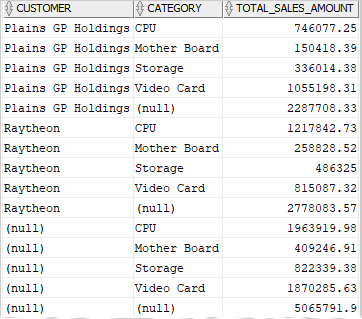
In this example, the rows with NULL are super-aggregate rows because they represent total sales amount over higher levels. The super-aggregate rows are summary row, like a subtotal or grand total row.
The GROUPING SETS expression creates four groupings:
Grouping 1. Total sales amount by customers and categories (customer, category):
| customer | category | total_sales_amount |
|---|---|---|
| Plains GP Holdings | CPU | 746077.25 |
| Plains GP Holdings | Mother Board | 150418.39 |
| Plains GP Holdings | Storage | 336014.38 |
| Plains GP Holdings | Video Card | 1055198.31 |
| Raytheon | CPU | 1217842.73 |
| Raytheon | Mother Board | 258828.52 |
| Raytheon | Storage | 486325.00 |
| Raytheon | Video Card | 815087.32 |
Grouping 2. Total sales amount by customers (customer):
| customer | category | total_sales_amount |
|---|---|---|
| Plains GP Holdings | NULL | 2287708.33 |
| Raytheon | NULL | 2778083.57 |
Grouping 3. Total sales amount by categories (categories):
| customer | category | total_sales_amount |
|---|---|---|
| NULL | Mother Board | 409246.91 |
| NULL | Video Card | 1870285.63 |
| NULL | Storage | 822339.38 |
| NULL | CPU | 1963919.9 |
Grouping 4. Grant total sales amount ():
| customer | category | total_sales_amount |
|---|---|---|
| NULL | NULL | 5065791.90 |
Summary #
- Use the Oracle
GROUPING SETSexpression to generate one or more grouping sets in a query.

