Summary: in this tutorial, you will learn how to use the Oracle GROUP BY clause to group rows into groups.
Introduction to Oracle GROUP BY clause #
The GROUP BY clause is an optional clause of the SELECT statement. The GROUP BY clause allows you to group rows into a set of summary rows by values of columns or expressions and return one row for each group.
Here’s the basic syntax of the GROUP BY clause:
SELECT select_list FROM table_name GROUP BY c1, c2, c3;Code language: SQL (Structured Query Language) (sql)Note that the SELECT statement may include other clauses such as where, joins and fetch.
Suppose you have the following orders table:
| order_id | customer_id | status | salesman_id | order_date |
|---|---|---|---|---|
| 1 | 4 | Pending | 56 | 15-OCT-17 |
| 2 | 4 | Shipped | NULL | 26-APR-15 |
| 3 | 5 | Shipped | NULL | 26-APR-17 |
| 4 | 8 | Shipped | 59 | 09-APR-15 |
| 5 | 5 | Canceled | 56 | 09-APR-17 |
Note that the orders table in the sample database has more rows than this table.
The following statement uses the GROUP BY clause to group the rows in the orders table into groups:
SELECT status FROM orders GROUP BY status;Code language: PostgreSQL SQL dialect and PL/pgSQL (pgsql)Since the GROUP BY clause groups the orders by their statuses, it returns the following intermediate result set that has three groups:
- Pending: 1 row
- Shipped: 3 rows
- Canceled: 1 row
| status (Group) | order_id | customer_id | status | salesman_id | order_date |
|---|---|---|---|---|---|
| Pending | 1 | 4 | Pending | 56 | 15-OCT-17 |
| Shipped | 2 | 4 | Shipped | NULL | 26-APR-15 |
| 3 | 5 | Shipped | NULL | 26-APR-17 | |
| 4 | 8 | Shipped | 59 | 09-APR-15 | |
| Canceled | 5 | 5 | Canceled | 56 | 09-APR-17 |
Then the SELECT clause retrieves the status column and returns the following result set:
| status |
|---|
| Canceled |
| Pending |
| Shipped |
The result indicates that the GROUP BY clause creates fewer rows from the initial result set.
In practice, you’ll use the GROUP BY clause with aggregate functions.
An aggregate function returns a single result for a list of values. For example, you can use the COUNT() aggregate function to return the number of items.
The following shows how to count the number of orders by status:
SELECT status, COUNT(order_id) order_count FROM orders GROUP BY status;Code language: PostgreSQL SQL dialect and PL/pgSQL (pgsql)The query returns the following intermediate result set:
| status (Group) | order_count | order_id | customer_id | status | salesman_id | order_date |
|---|---|---|---|---|---|---|
| Pending | 1 | 1 | 4 | Pending | 56 | 15-OCT-17 |
| Shipped | 3 | 2 | 4 | Shipped | NULL | 26-APR-15 |
| 3 | 5 | Shipped | NULL | 26-APR-17 | ||
| 4 | 8 | Shipped | 59 | 09-APR-15 | ||
| Canceled | 1 | 5 | 5 | Canceled | 56 | 09-APR-17 |
In this result set, the COUNT function returns 1 for the pending orders, 3 for the shipped orders, and 1 for the canceled orders.
Then the SELECT clause returns a result set that includes the status and order_count columns:
| status | order_count |
|---|---|
| Pending | 1 |
| Shipped | 2 |
| Canceled | 1 |
Besides the COUNT function, Oracle provides other standard aggregate functions such as AVG(), MAX(), MIN() and SUM().
When executing a SELECT statement, Oracle evaluates the GROUP BY clause after the WHERE clause and before the HAVING clause in the following sequence:
Oracle GROUP BY clause examples #
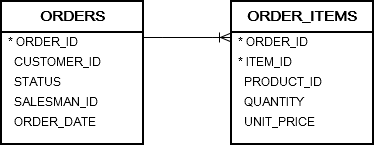
We’ll use the following orders and order_items in the sample database for the demonstration:
Basic Oracle GROUP BY clause example #
The following statement uses the GROUP BY clause to find unique order statuses from the orders table:
SELECT status FROM orders GROUP BY status;Code language: SQL (Structured Query Language) (sql)
This statement has the same effect as the following statement, which uses the DISTINCT operator:
SELECT DISTINCT status FROM orders;Code language: SQL (Structured Query Language) (sql)Oracle GROUP BY with an aggregate function example #
The following statement uses a GROUP BY clause with the COUNT function to return the number of orders by customers:
SELECT customer_id, COUNT(order_id) FROM orders GROUP BY customer_id ORDER BY customer_id;Code language: SQL (Structured Query Language) (sql)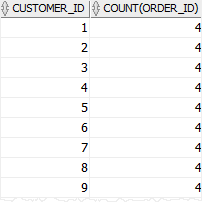
In this example, we group the orders by customers and use the COUNT() function to return the number of orders per group.
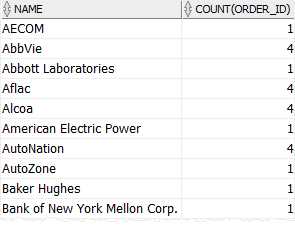
To get more meaningful data, you can join the orders table with the customers table as follows:
SELECT name, COUNT(order_id) FROM orders INNER JOIN customers USING (customer_id) GROUP BY name ORDER BY name;Code language: SQL (Structured Query Language) (sql)Here is the result:
Oracle GROUP BY with an expression example #
The following example groups the orders by year and returns the number of orders per year.
SELECT EXTRACT(year FROM order_date) order_year, COUNT( order_id ) order_count FROM orders GROUP BY EXTRACT(YEAR FROM order_date) ORDER BY order_year;Code language: SQL (Structured Query Language) (sql)Output:
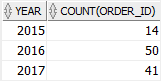
How it works:
- First, group orders by years using the
GROUP BYclause. - Second, extract the year from the order date using the
EXTRACT()function. - Third, count the order id by years using the
COUNTfunction.
Note that Oracle evaluates the GROUP BY clause before the SELECT clause, you cannot use the order_year alias in the GROUP BY clause. Therefore, you need to use the expression EXTRACT(year FROM order_date) twice, one in the GROUP BY clause and one in the SELECT clause.
Oracle GROUP BY with WHERE clause example #
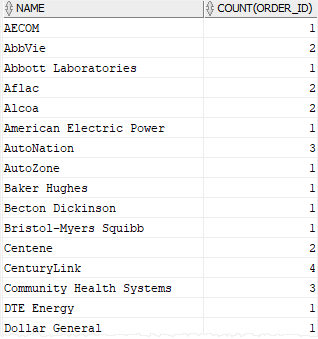
This example uses the GROUP BY clause with a WHERE clause to return the number of shipped orders for every customer:
SELECT name, COUNT(order_id) FROM orders INNER JOIN customers USING (customer_id) WHERE status = 'Shipped' GROUP BY name ORDER BY name;Code language: SQL (Structured Query Language) (sql)Output:
Note that the Oracle always evaluates the condition in the WHERE clause before the GROUP BY clause.
Summary #
- Use Oracle
GROUP BYclause to group rows into groups. - Use the
GROUP BYclause with an aggregate function to calculate a value for each group.

