Summary: in this tutorial, you will learn about the Oracle correlated subquery which is a subquery whose some clauses refer to the column expressions in the outer query.
Introduction to the Oracle correlated subquery #
A correlated subquery is a subquery that references columns from its outer query.
Unlike a regular subquery that can execute separately, Oracle may have to execute a correlated subquery for every row in the outer query.
See the following products table in the sample database:
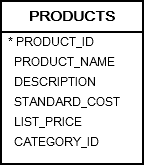
The following query returns the cheapest products from the products table using a subquery in the WHERE clause.
SELECT product_id, product_name, list_price FROM products WHERE list_price = ( SELECT MIN(list_price) FROM products );Code language: SQL (Structured Query Language) (sql)Let’s examine this query in more detail.
First, you can execute the subquery independently.
SELECT MIN(list_price) FROM products;Code language: SQL (Structured Query Language) (sql)Second, Oracle evaluates the subquery only once.
Third, after the subquery returns the minimum price, the outer query makes use of it. In other words, the outer query depends on the result of the subquery. Additionally, the subquery is isolated and does not depends on the values of the outer query.
Unlike a regular subquery, a correlated subquery is a subquery that uses values returned by the outer query. Additionally, a correlated subquery executes once for each row selected from the outer query. Therefore, a query that uses a correlated subquery could be slow.
A correlated subquery is also known as a repeating subquery or a synchronized subquery.
Oracle correlated subquery examples #
Let’s take some examples of the correlated subqueries to better understand how they work.
Oracle correlated subquery in the WHERE clause example #
The following query finds all products whose list price is above average for their category.
SELECT product_id, product_name, list_price FROM products p WHERE list_price > ( SELECT AVG(list_price) FROM products WHERE category_id = p.category_id );Code language: SQL (Structured Query Language) (sql)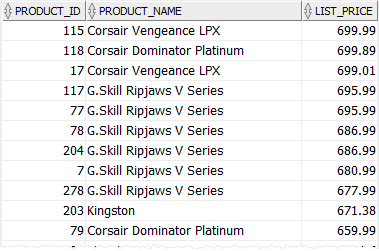
In the above query, the outer query is:
SELECT product_id, product_name, list_price FROM products p WHERE list_price > Code language: SQL (Structured Query Language) (sql)The correlated subquery is:
SELECT AVG(list_price) FROM products WHERE category_id = p.category_idCode language: SQL (Structured Query Language) (sql)For each product from the products table, Oracle has to execute the correlated subquery to calculate the average price by category.
Oracle correlated subquery in the SELECT clause example #
The following query returns all products and the average standard cost based on the product category:
SELECT product_id, product_name, standard_cost, ROUND( ( SELECT AVG(standard_cost) FROM products WHERE category_id = p.category_id ), 2 ) avg_standard_cost FROM products p ORDER BY product_name;Code language: SQL (Structured Query Language) (sql)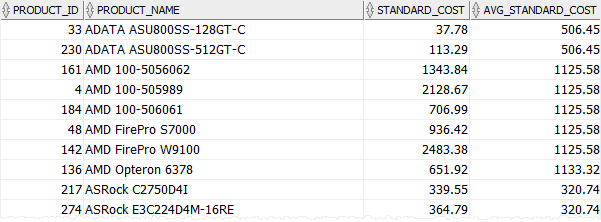
For each product from the products table, Oracle executed the correlated subquery to calculate the average standard of cost for the product category.
Note that the above query used the ROUND()
Summary #
- A correlated subquery is subquery that uses values from its outer query.
- Avoid using correlated subquery as much as possible to optimize the query performance.

