Summary: This tutorial introduces you to an Oracle sample database and shows you how to load it into the Oracle Database Server.
Introduction to the OT Oracle sample database #
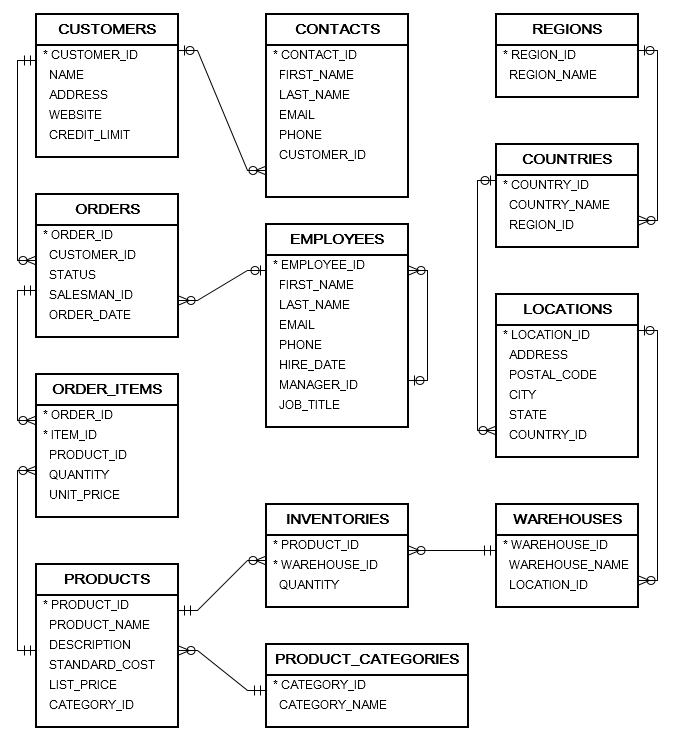
We provide you with an Oracle sample database named OT, which is based on a global fictitious company that sells computer hardware, including storage, motherboards, RAM, video cards, and CPUs.
The company maintains product information, including name, description, standard cost, list price, and product line.
It also tracks the inventory information for all products, including warehouses where products are available.
Since the company operates globally, it maintains warehouses in various locations worldwide.
The company maintains a comprehensive record of all customer information, including name, address, and website. Each customer has at least one dedicated contact person with detailed information, including their name, email address, and phone number.
The company also places a credit limit on each customer to limit the amount that the customer can owe.
Whenever a customer issues a purchase order, a sales order is created in the database with the pending status. When the company ships the order, the order status updates to ‘shipped’. If the customer cancels an order, the order status is updated to canceled.
In addition to sales information, the database includes employee data with detailed information, such as name, email, phone, job title, manager, and hire date.
Oracle sample database diagram #
The following picture shows the database diagram:
| Table Names | Description | Records |
|---|---|---|
CONTACTS | Contact person information of customers | 319 records |
COUNTRIES | Country information | 25 records |
CUSTOMERS | Customer master | 319 records |
EMPLOYEES | Employee master | 107 records |
INVENTORIES | Inventory information of products | 1112 records |
LOCATIONS | Locations of warehouses | 23 records |
ORDERS | Order header information | 105 records |
ORDER_ITEMS | Order line items | 665 records |
PRODUCT_CATEGORIES | Product categories | 5 records |
PRODUCTS | Product information | 288 records |
REGIONS | Regions where the company operates | 4 records |
WAREHOUSES | Warehouse master | 9 records |
Download Oracle Sample Database #
You can download the Oracle Sample Database.
After downloading the file, you need to extract it to a directory. In the zip file, you’ll find the oracle_sample_database.sql file.
Loading the sample database using SQL Developer #
Step 1. Create a User #
First, launch SQL Developer from your computer.
Second, connect to the Oracle Database server using the system account:
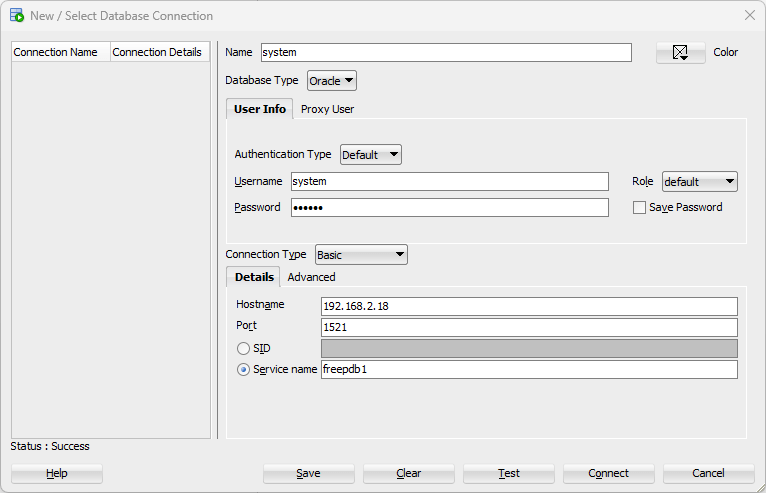
Third, run the following script to create a new user called ot and grant privileges:
-- create new user CREATE USER ot IDENTIFIED BY oracle; -- grant privileges GRANT CONNECT, RESOURCE, DBA TO ot;Code language: SQL (Structured Query Language) (sql)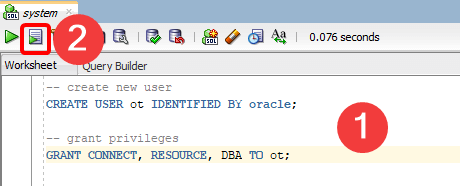
Step 2. Load the sample database #
First, create a new connection and use the new user (ot) and password (oracle) to connect to the Oracle Database Server:
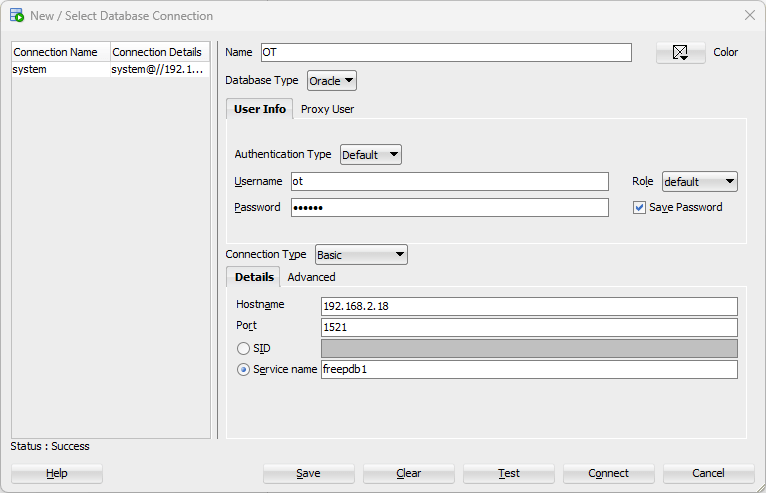
Second, open the oracle_sample_database.sql file and click the Run Script to execute the statements to create tables and populating data:
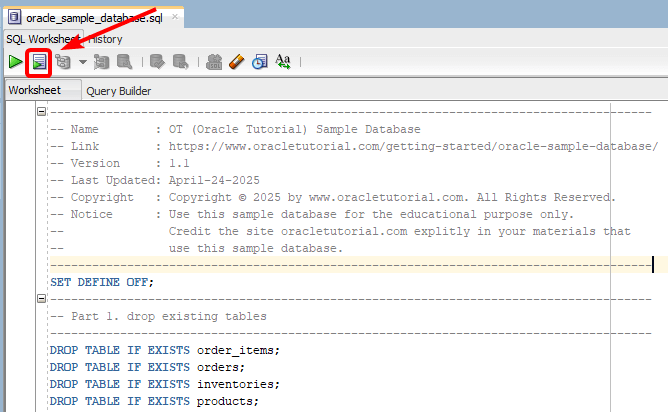
Third, wait for the script to complete.
Oracle Sample Database Schema Script #
The following statements create the database objects in the sample database.
CREATE TABLE regions ( region_id NUMBER GENERATED BY DEFAULT AS IDENTITY START WITH 5 PRIMARY KEY, region_name VARCHAR2( 50 ) NOT NULL ); -- countries table CREATE TABLE countries ( country_id CHAR( 2 ) PRIMARY KEY , country_name VARCHAR2( 40 ) NOT NULL, region_id NUMBER , -- fk CONSTRAINT fk_countries_regions FOREIGN KEY( region_id ) REFERENCES regions( region_id ) ON DELETE CASCADE ); -- location CREATE TABLE locations ( location_id NUMBER GENERATED BY DEFAULT AS IDENTITY START WITH 24 PRIMARY KEY , address VARCHAR2( 255 ) NOT NULL, postal_code VARCHAR2( 20 ) , city VARCHAR2( 50 ) , state VARCHAR2( 50 ) , country_id CHAR( 2 ) , -- fk CONSTRAINT fk_locations_countries FOREIGN KEY( country_id ) REFERENCES countries( country_id ) ON DELETE CASCADE ); -- warehouses CREATE TABLE warehouses ( warehouse_id NUMBER GENERATED BY DEFAULT AS IDENTITY START WITH 10 PRIMARY KEY, warehouse_name VARCHAR( 255 ) , location_id NUMBER( 12, 0 ), -- fk CONSTRAINT fk_warehouses_locations FOREIGN KEY( location_id ) REFERENCES locations( location_id ) ON DELETE CASCADE ); -- employees CREATE TABLE employees ( employee_id NUMBER GENERATED BY DEFAULT AS IDENTITY START WITH 108 PRIMARY KEY, first_name VARCHAR( 255 ) NOT NULL, last_name VARCHAR( 255 ) NOT NULL, email VARCHAR( 255 ) NOT NULL, phone VARCHAR( 50 ) NOT NULL , hire_date DATE NOT NULL , manager_id NUMBER( 12, 0 ) , -- fk job_title VARCHAR( 255 ) NOT NULL, CONSTRAINT fk_employees_manager FOREIGN KEY( manager_id ) REFERENCES employees( employee_id ) ON DELETE CASCADE ); -- product category CREATE TABLE product_categories ( category_id NUMBER GENERATED BY DEFAULT AS IDENTITY START WITH 6 PRIMARY KEY, category_name VARCHAR2( 255 ) NOT NULL ); -- products table CREATE TABLE products ( product_id NUMBER GENERATED BY DEFAULT AS IDENTITY START WITH 289 PRIMARY KEY, product_name VARCHAR2( 255 ) NOT NULL, description VARCHAR2( 2000 ) , standard_cost NUMBER( 9, 2 ) , list_price NUMBER( 9, 2 ) , category_id NUMBER NOT NULL , CONSTRAINT fk_products_categories FOREIGN KEY( category_id ) REFERENCES product_categories( category_id ) ON DELETE CASCADE ); -- customers CREATE TABLE customers ( customer_id NUMBER GENERATED BY DEFAULT AS IDENTITY START WITH 320 PRIMARY KEY, name VARCHAR2( 255 ) NOT NULL, address VARCHAR2( 255 ) , website VARCHAR2( 255 ) , credit_limit NUMBER( 8, 2 ) ); -- contacts CREATE TABLE contacts ( contact_id NUMBER GENERATED BY DEFAULT AS IDENTITY START WITH 320 PRIMARY KEY, first_name VARCHAR2( 255 ) NOT NULL, last_name VARCHAR2( 255 ) NOT NULL, email VARCHAR2( 255 ) NOT NULL, phone VARCHAR2( 20 ) , customer_id NUMBER , CONSTRAINT fk_contacts_customers FOREIGN KEY( customer_id ) REFERENCES customers( customer_id ) ON DELETE CASCADE ); -- orders table CREATE TABLE orders ( order_id NUMBER GENERATED BY DEFAULT AS IDENTITY START WITH 106 PRIMARY KEY, customer_id NUMBER( 6, 0 ) NOT NULL, -- fk status VARCHAR( 20 ) NOT NULL , salesman_id NUMBER( 6, 0 ) , -- fk order_date DATE NOT NULL , CONSTRAINT fk_orders_customers FOREIGN KEY( customer_id ) REFERENCES customers( customer_id ) ON DELETE CASCADE, CONSTRAINT fk_orders_employees FOREIGN KEY( salesman_id ) REFERENCES employees( employee_id ) ON DELETE SET NULL ); -- order items CREATE TABLE order_items ( order_id NUMBER( 12, 0 ) , -- fk item_id NUMBER( 12, 0 ) , product_id NUMBER( 12, 0 ) NOT NULL , -- fk quantity NUMBER( 8, 2 ) NOT NULL , unit_price NUMBER( 8, 2 ) NOT NULL , CONSTRAINT pk_order_items PRIMARY KEY( order_id, item_id ), CONSTRAINT fk_order_items_products FOREIGN KEY( product_id ) REFERENCES products( product_id ) ON DELETE CASCADE, CONSTRAINT fk_order_items_orders FOREIGN KEY( order_id ) REFERENCES orders( order_id ) ON DELETE CASCADE ); -- inventories CREATE TABLE inventories ( product_id NUMBER( 12, 0 ) , -- fk warehouse_id NUMBER( 12, 0 ) , -- fk quantity NUMBER( 8, 0 ) NOT NULL, CONSTRAINT pk_inventories PRIMARY KEY( product_id, warehouse_id ), CONSTRAINT fk_inventories_products FOREIGN KEY( product_id ) REFERENCES products( product_id ) ON DELETE CASCADE, CONSTRAINT fk_inventories_warehouses FOREIGN KEY( warehouse_id ) REFERENCES warehouses( warehouse_id ) ON DELETE CASCADE );Code language: SQL (Structured Query Language) (sql)
