Regular Expressions in Java
Last Updated : 09 Dec, 2025
Regular Expressions, commonly known as Regex, provide a powerful way to define string patterns for searching, validating and manipulating text in Java. They are widely used for tasks such as email validation, password strength checking, parsing logs and text replacement.
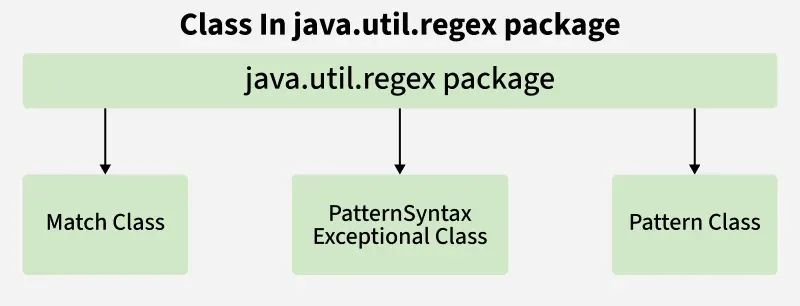 Classes in java.util.regex package
In Java, regular expressions are supported through the java.util.regex package, which mainly consists of the following classes:
- Pattern: Defines the regular expression.
- Matcher: Used to perform operations such as matching, searching and replacing.
- PatternSyntaxException: Indicates a syntax error in the regular expression.
Pattern Class
The Pattern class compiles regex strings into pattern objects.
Methods:
- compile(String regex): Compiles a regex.
- matcher(CharSequence input): Creates a matcher to search a string.
- matches(String regex, CharSequence input): Checks full-string match.
- split(CharSequence input): Splits input based on the pattern.
Java import java.util.regex.Pattern; class PatternExample { public static void main(String[] args){ System.out.println(Pattern.matches("geeks.*", "geeksforgeeks")); // true System.out.println(Pattern.matches("geeks[0-9]+", "geeks12s")); // false } } Matcher Class
The Matcher class performs matching operations for input strings.
Key Methods:
Java import java.util.regex.Matcher; import java.util.regex.Pattern; class MatcherExample { public static void main(String[] args) { Pattern p = Pattern.compile("geeks"); Matcher m = p.matcher("geeksforgeeks.org"); while (m.find()) { System.out.println("Pattern found from " + m.start() + " to " + (m.end() - 1)); } } } Output:
Pattern found from 0 to 4
Pattern found from 8 to 12
Regex Character Classes
- [xyz]: Matches x, y, or z
- [^xyz]: Matches any character except x, y, or z
- [a-zA-Z]: Matches any character in the specified range
- [a-f[m-t]]: Union of ranges a–f and m–t
- [a-z && [^m-p]]: Intersection of a–z excluding m–p
Java import java.util.regex.Pattern; class CharClassExample { public static void main(String[] args) { System.out.println(Pattern.matches("[a-z]", "g")); // true System.out.println(Pattern.matches("[a-zA-Z]", "Gfg")); // false } } | Quantifier | Meaning | Example Matches |
|---|
| X? | Appears 0 or 1 time | "a?" -> "", "a" |
| X+ | Appears 1 or more times | "a+" -> "a", "aa" |
| X* | Appears 0 or more times | "a*" -> "", "a", "aa" |
| X{n} | Appears exactly n times | "a{3}" -> "aaa" |
| X{n,} | Appears at least n times | "a{2,}" -> "aa", "aaa" |
| X{n,m} | Appears between n and m times | "a{2,4}" -> "aa", "aaa", "aaaa" |
Example: Using quantifiers with Pattern.matches()
Java System.out.println(Pattern.matches("\\d{4}", "1234")); // true System.out.println(Pattern.matches("\\d{4}", "123")); // false System.out.println(Pattern.matches("[a-z]+", "hello")); // true System.out.println(Pattern.matches("[a-z]+", "")); // false System.out.println(Pattern.matches("a*", "aaaa")); // true Common Regex Patterns in Java
- . : Any character
- \d : Digit [0-9]
- \D : Non-digit
- \s : Whitespace
- \S : Non-whitespace
- \w : Word character [a-zA-Z0-9_]
- \W : Non-word character
- \b : Word boundary
- \B : Non-word boundary
Java System.out.println(Pattern.matches("\\d+", "1234")); // true System.out.println(Pattern.matches("\\D+", "1234")); // false System.out.println(Pattern.matches("\\D+", "Gfg")); // true System.out.println(Pattern.matches("\\S+", "gfg")); // true Important Notes
- Use Pattern.compile() to create a regex pattern.
- Use matcher() on a Pattern to perform matches.
- Pattern.matches() validates the whole string, while Matcher.find() searches for multiple occurrences.
- Regex can split text, validate input, and extract data efficiently in Java.
Which class in Java is responsible for compiling and defining a regex pattern?
Explanation:
The Pattern class compiles and represents a regular expression.
What does the Matcher.find() method do?
-
Checks if the entire string matches the pattern
-
-
Searches for the next occurrence of the pattern
-
Explanation:
find() locates multiple occurrences of the pattern within the input.
What is the result of Pattern.matches("[a-zA-Z]+", "GfgTest")?
Explanation:
The pattern matches one or more letters, and "GfgTest" fits the rule.
Quiz Completed Successfully
Your Score : 2/3
Accuracy : 0%
Login to View Explanation
1/3 1/3 < Previous Next >
Explore
Java Basics
OOP & Interfaces
Collections
Exception Handling
Java Advanced
Practice Java
My Profile