A package in Java is a mechanism to group related classes, interfaces, and sub-packages into a single unit. Packages help organize large applications, avoid naming conflicts, provide access protection, and make code modular and maintainable.
- Avoiding name conflicts (two classes with the same name can exist in different packages)
- Providing access control using public, protected, and default access
- Reusability: packaged code can be imported and used anywhere
- Encouraging modular programming
Types of Java Packages
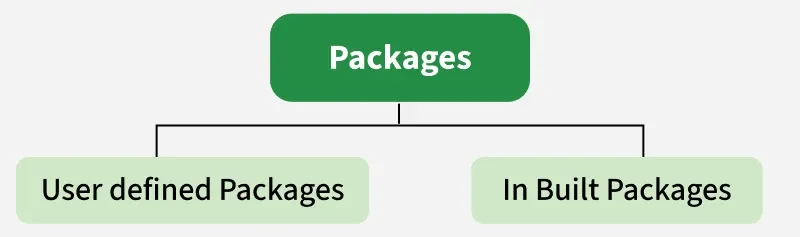 Types of Package
1. Built-in Packages
Built-in Packages comprise a large number of classes that are part of the Java API. Some of the commonly used built-in packages are:
- java.lang: Contains language support classes(e.g, classes that define primitive data types, math operations). This package is automatically imported.
- java.io: Contains classes for supporting input/output operations.
- java.util: Contains utility classes that implement data structures such as Linked Lists and Dictionaries, as well as support for date and time operations.
- java.applet: Contains classes for creating Applets.
- java.awt: Contains classes for implementing the components for graphical user interfaces (like buttons, menus, etc). 6)
Example: Using java.util.Random (Built-in Package)
Java import java.util.Random; // built-in package public class GFG{ public static void main(String[] args) { // using Random class Random rand = new Random(); // generates a number between 0–99 int number = rand.nextInt(100); System.out.println("Random number: " + number); } } 2. User-defined Packages
User-defined Packages are the packages that are defined by the user.
Example:
Java package com.myapp; public class Helper { public static void show() { System.out.println("Hello from Helper!"); } } To use it in another class:
Java import com.myapp.Helper; public class Test { public static void main(String[] args) { Helper.show(); } } Forder Structure
 Forder Structure
Accessing Classes Inside a Package
In Java, we can import classes from a package using either of the following methods:
1 Import a Single Class
import java.util.Vector;
This imports only the Vector class from the java.util package.
2. Import all classes from a package:
import java.util.*;
This imports all classes and interfaces from the java.util package but does not include sub-packages.
Example: Import the Vector class
Java import java.util.Vector; public class Geeks { public Geeks() { // java.util.Vector is imported, We are able to access it directly in our code. Vector v = new Vector(); java.util.ArrayList l = new java.util.ArrayList(); l.add(3); l.add(5); l.add(7); System.out.println(l); } public static void main(String[] args) { new Geeks(); } } Access Modifiers and Packages
Packages directly influence Java access levels:
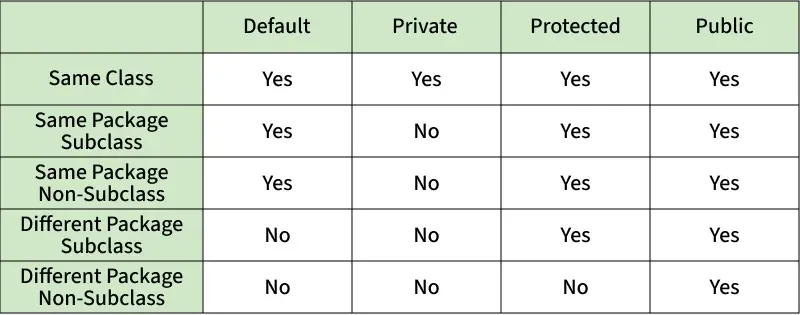 Access Modifiers and Packages
Explore
Java Basics
OOP & Interfaces
Collections
Exception Handling
Java Advanced
Practice Java
My Profile