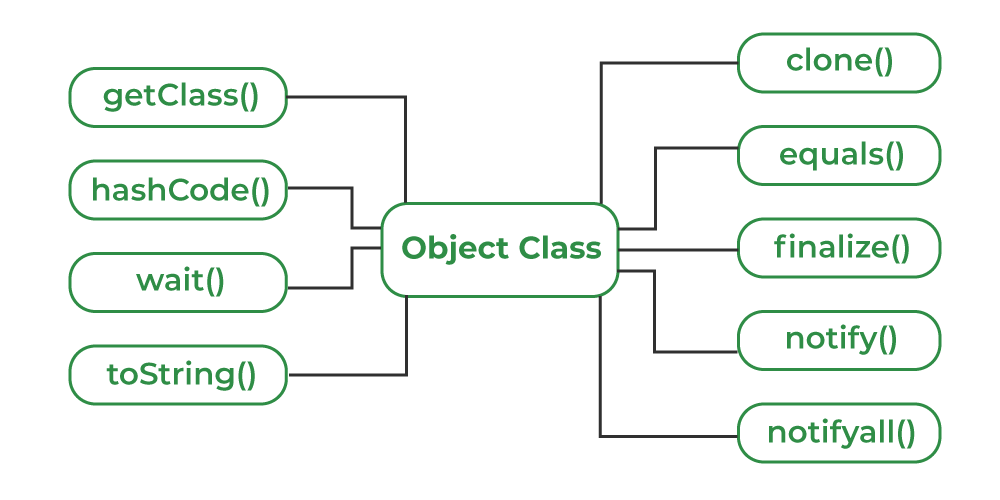
Object class (in java.lang) is the root of the Java class hierarchy. Every class in Java either directly or indirectly extends Object. It provides essential methods like toString(), equals(), hashCode(), clone() and several others that support object comparison, hashing, debugging, cloning and synchronization.
Why Object Class?
- Acts as the root of all Java classes
- Defines essential methods shared by all objects
- Provides default behavior for printing, comparing and cloning objects
- Supports thread communication (wait(), notify(), notifyAll())
Using toString() and hashCode()
Java class Person{ String n; // Constructor public Person(String n) { this.n = n; } // Override toString() for a // custom string representation @Override public String toString() { return "Person{name:'" + n + "'}"; } public static void main(String[] args) { Person p = new Person("Geek"); // Custom string representation System.out.println(p.toString()); // Default hash code value System.out.println(p.hashCode()); } } OutputPerson{name:'Geek'} 321001045 Explanation: In the above example, we override the toString() method to provide a custom string representation of the Person class and use the hashCode() method to display the default hash code value of the object.
Object Class Methods
Object class provides multiple methods which are as follows:
1. toString() Method
toString() provides a String representation of an object and is used to convert an object to a String.
Java class Student{ String name = "Vishnu"; int age = 21; @Override public String toString(){ return "Student{name='" + name + "', age=" + age + "}"; } public static void main(String[] args) { Student s = new Student(); // Calls overridden toString() System.out.println(s.toString()); } } OutputStudent{name='Vishnu', age=21} Explanation: Overridden toString() prints a custom readable string for the object
2. hashCode() Method
hashCode() method returns the hash value of an object (not its memory address). Used heavily in hash-based collections like HashMap, HashSet, etc.
Java class Employee{ int id = 101; @Override public int hashCode(){ return id * 31; // Simple custom hash } public static void main(String[] args) { Employee e = new Employee(); System.out.println(e.hashCode()); } } Explanation: hashCode() returns an integer value used in hashing-based collections like HashMap. If two objects are equal, they must produce the same hash code..
3. equals(Object obj) Method
equals() method compares the given object with the current object. It is recommended to override this method to define custom equality conditions.
Java class Book{ String title; Book(String title) { this.title = title; } @Override public boolean equals(Object obj){ Book b = (Book) obj; return this.title.equals(b.title); } public static void main(String[] args) { Book b1 = new Book("Java"); Book b2 = new Book("Java"); System.out.println(b1.equals(b2)); // true } } Explanation: equals() compares objects based on content rather than reference. Must be overridden when custom comparison logic is needed.
4. getClass() method
getClass() method returns the class object of "this" object and is used to get the actual runtime class of the object.
Java public class Geeks{ public static void main(String[] args) { Object o = new String("GeeksForGeeks"); Class c = o.getClass(); System.out.println("Class of Object o is: " + c.getName()); } } OutputClass of Object o is: java.lang.String
Explanation: The getClass() method is used to print the runtime class of the "o" object.
5. finalize() method
finalize() method is invoked by the Garbage Collector just before an object is destroyed. It runs when the object has no remaining references. You can override finalize() to release system resources and perform cleanup, but its use is discouraged in modern Java.
Java public class Geeks { public static void main(String[] args) { Geeks t = new Geeks(); System.out.println(t.hashCode()); t = null; // calling garbage collector System.gc(); System.out.println("end"); } @Override protected void finalize() { System.out.println("finalize method called"); } } Output1510467688 end finalize method called
Explanation: The finalize() method is called just before the object is garbage collected.
6. clone() method
clone() method creates and returns a new object that is a copy of the current object.
Java class Student implements Cloneable{ int id = 1; String name = "Vishnu"; @Override public Object clone() throws CloneNotSupportedException{ return super.clone(); // shallow copy } public static void main(String[] args) throws Exception{ Student s1 = new Student(); Student s2 = (Student) s1.clone(); System.out.println(s1.name); // Vishnu System.out.println(s2.name); // Vishnu } } Explanation: clone() creates a copy of the current object (shallow copy by default). Class must implement Cloneable or else it throws CloneNotSupportedException.
7. Concurrency Methods: wait(), notify() and notifyAll()
These methods are related to thread Communication in Java. They are used to make threads wait or notify others in concurrent programming.
Java import java.io.*; public class Book implements Cloneable { private String t; // title private String a; // author private int y; // year public Book(String t, String a, int y) { this.t = t; this.a = a; this.y = y; } // Override the toString method @Override public String toString() { return t + " by " + a + " (" + y + ")"; } // Override the equals method @Override public boolean equals(Object o) { if (o == null || !(o instanceof Book)) { return false; } Book other = (Book)o; return this.t.equals(other.getTitle()) && this.a.equals(other.getAuthor()) && this.y == other.getYear(); } // Override the hashCode method @Override public int hashCode() { int res = 17; res = 31 * res + t.hashCode(); res = 31 * res + a.hashCode(); res = 31 * res + y; return res; } // Override the clone method @Override public Book clone() { try { return (Book)super.clone(); } catch (CloneNotSupportedException e) { throw new AssertionError(); } } // Override the finalize method @Override protected void finalize() throws Throwable { System.out.println("Finalizing " + this); } public String getTitle() { return t; } public String getAuthor() { return a; } public int getYear() { return y; } public static void main(String[] args) { // Create a Book object and print its details Book b1 = new Book( "The Hitchhiker's Guide to the Galaxy", "Douglas Adams", 1979); System.out.println(b1); // Create a clone of the Book object and print its // details Book b2 = b1.clone(); System.out.println(b2); // Check if the two objects are equal System.out.println("b1 equals b2: " + b1.equals(b2)); // Get the hash code of the two objects System.out.println("b1 hash code: " + b1.hashCode()); System.out.println("b2 hash code: " + b2.hashCode()); // Set book1 to null to trigger garbage collection // and finalize method b1 = null; System.gc(); } } OutputThe Hitchhiker's Guide to the Galaxy by Douglas Adams (1979) The Hitchhiker's Guide to the Galaxy by Douglas Adams (1979) b1 equals b2: true b1 hash code: 1840214527 b2 hash code: 1840214527
Explanation: The above example demonstrates the use of toString(), equals(), hashCode() and clone() methods in the Book class.
Explore
Java Basics
OOP & Interfaces
Collections
Exception Handling
Java Advanced
Practice Java
My Profile