In Java, access modifiers are essential tools that define how the members of a class, like variables, methods, and even the class itself, can be accessed from other parts of our program.
There are 4 types of access modifiers available in Java:
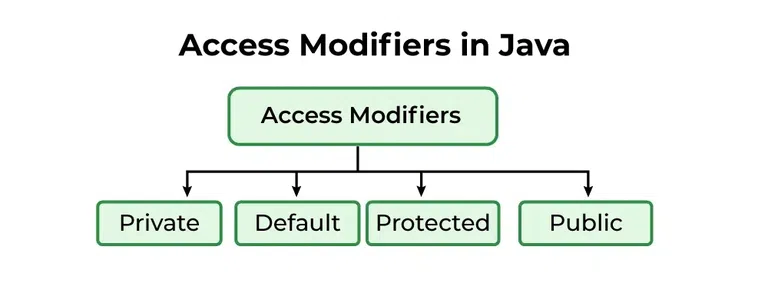 Access Modifiers in Java
Private Access Modifier
The private access modifier is specified using the keyword private. The methods or data members declared as private are accessible only within the class in which they are declared.
Java class Person { // private variable private String name; public void setName(String name) { this.name = name; // accessible within class } public String getName() { return name; } } public class Geeks { public static void main(String[] args) { Person p = new Person(); p.setName("Alice"); // System.out.println(p.name); // Error: 'name' // has private access System.out.println(p.getName()); } } Explanation: Direct access to name is not allowed outside Person, enforcing encapsulation.
Default Access Modifier
When no access modifier is specified for a class, method, or data member, it is said to have the default access modifier by default. This means only classes within the same package can access it.
Java class Car { String model; // default access } public class Main { public static void main(String[] args){ Car c = new Car(); c.model = "Tesla"; // accessible within the same package System.out.println(c.model); } } Explanation: Members with default access cannot be accessed from classes in a different package.
Geeks.java: Default class within the same package
Java // default access modifier package p1; // Class Geek is having // Default access modifier class Geek { void display() { System.out.println("Hello World!"); } } GeeksNew.java: Default class from a different package (for contrast)
C++ // package with default modifier package p2; import p1.*; // importing package p1 // This class is having // default access modifier class GeekNew { public static void main(String args[]) { // Accessing class Geek from package p1 Geek o = new Geek(); o.display(); } } Explanation: In this example, the program will show the compile-time error when we try to access a default modifier class from a different package.
Protected Access Modifier
The protected access modifier is specified using the keyword protected. The methods or data members declared as protected are accessible within the same package or subclasses in different packages.
Java class Vehicle { protected int speed; // protected member } class Bike extends Vehicle { void setSpeed(int s) { speed = s; // accessible in subclass } int getSpeed() { return speed; // accessible in subclass } } public class Main { public static void main(String[] args){ Bike b = new Bike(); b.setSpeed(100); System.out.println("Access via subclass method: " + b.getSpeed()); Vehicle v = new Vehicle(); System.out.println(v.speed); } } OutputAccess via subclass method: 100 0
Explanation: speed is accessible via subclass methods and other classes in the same package, but direct access from a different package (non-subclass) would fail.
Public Access Modifier
The public access modifier is specified using the keyword public. Public members are accessible from everywhere in the program. There is no restriction on the scope of public data members.
Java class MathUtils { public static int add(int a, int b) { return a + b; } } public class Main { public static void main(String[] args) { System.out.println(MathUtils.add(5, 10)); // accessible anywhere } } Explanation: add() is globally accessible due to the public modifier.
Top-level classes or interfaces can not be declared as private because, private means "only visible within the enclosing class".
Comparison Table of Access Modifiers in Java
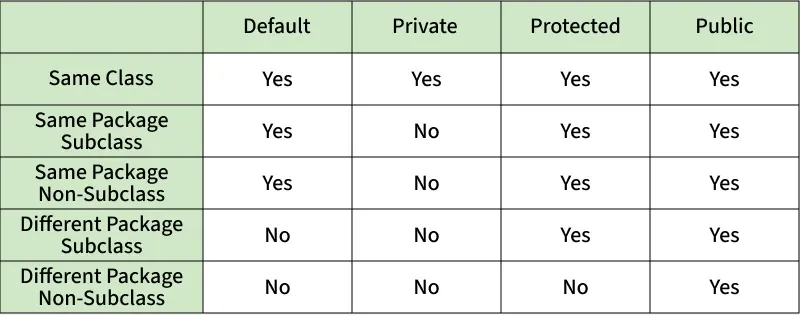 Access-Modifier
When to Use Each Access Modifier in Real-World Projects
- Private: The idea should be use as restrictive access as possible, so private should be used as much as possible.
- Default (Package-Private): Often used in package-scoped utilities or helper classes.
- Protected: Commonly used in inheritance-based designs like framework extensions.
- Public: This is used for API endpoints, service classes, or utility methods shared across different parts of an application.
Explore
Java Basics
OOP & Interfaces
Collections
Exception Handling
Java Advanced
Practice Java
My Profile