Terraform, developed by HashiCorp, is the industry-standard tool for building, changing, and versioning infrastructure safely and efficiently.
Before tools like Terraform, system administrators manually created servers by clicking buttons in the AWS/Azure console. This was slow, error-prone, and impossible to replicate perfectly. Terraform solves this by allowing you to define your infrastructure in code (files), which can be shared, versioned in Git, and reused.
What is Infrastructure as Code (IaC)?
IaC is the practice of managing IT infrastructure using configuration files rather than manual, interactive configuration tools.
- Declarative: You tell Terraform what you want (e.g., "I want 5 servers"), and Terraform figures out how to create them.
- Version Controlled: You can track the history of your infrastructure changes just like application code.
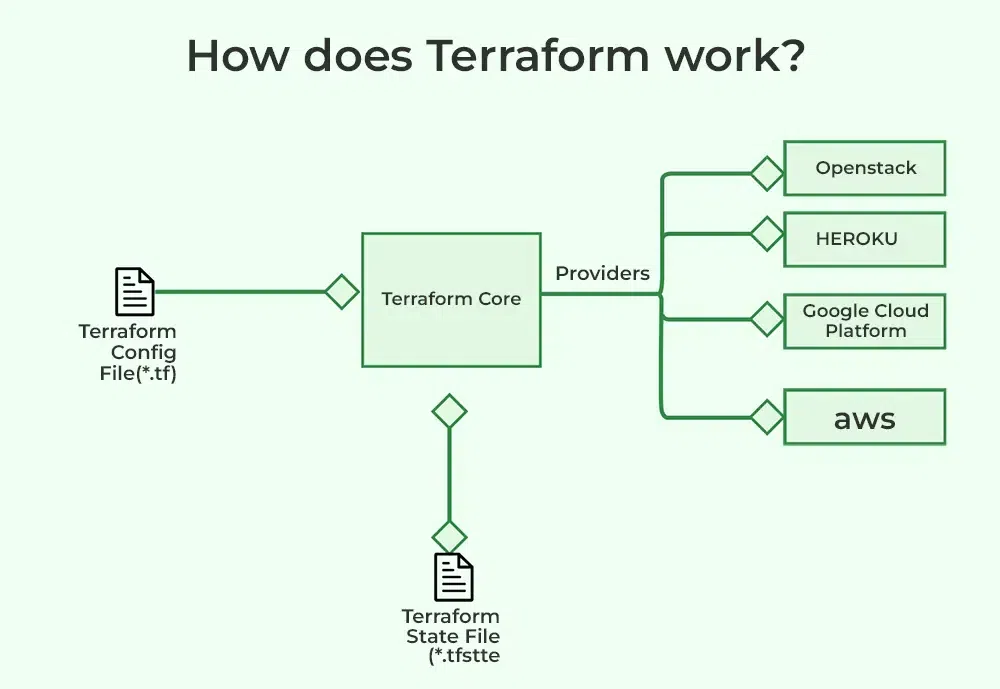
- Cloud Agnostic: Unlike CloudFormation (AWS only) or ARM Templates (Azure only), Terraform works with any cloud provider (AWS, Google Cloud, Azure, Kubernetes, Alibaba, etc.).
- Immutable Infrastructure: Terraform typically replaces servers rather than changing them, reducing "configuration drift" (where servers become inconsistent over time).
- State Management: Terraform keeps track of your real-world resources in a state file, acting as the "source of truth."
- Modular: You can package code into Modules to reuse common patterns (e.g., a standard "Web Server" module used by all teams).
With Terraform, users can define infrastructure resources using a simple, declarative configuration language. These resources can include virtual machines, networking components, storage resources, and more. Once the configuration is defined, Terraform can be used to create, modify, and destroy these resources in a repeatable and predictable way.To know more about terraform work flow.
One of the key benefits of Terraform is its ability to support multiple cloud providers, as well as on-premises and open-source tools. This means that users can define infrastructure resources using a single configuration and use Terraform to manage resources across different environments.
Overall, Terraform is a powerful and flexible tool that enables users to define and manage infrastructure resources in a reusable and automated way. It is widely used in a variety of industries and scenarios, including cloud infrastructure, data centers, and hybrid environments.

To understand how Terraform works, you need to understand its core components.
1. The Core (Engine)
This is the binary you run on your laptop. It reads your configuration files and compares them to the current state of your infrastructure to calculate what needs to be done.
2. Providers
Terraform doesn't know how to talk to AWS or Azure directly. It uses Providers plugins that translate Terraform code into API calls for specific platforms.
- Examples: AWS Provider, Azure Provider, Kubernetes Provider.
This is the brain of Terraform. It maps your code to the real-world resources.
- If you delete a resource from your code, Terraform looks at the state file to find the ID of the real resource and delete it from the cloud.
- Note: In teams, this file is stored remotely (e.g., in an AWS S3 bucket) so everyone works off the same map.
A private module registry is a repository for Terraform modules that is only accessible to a specific group of users, rather than being publicly available. Private module registries are useful for organizations that want to manage and distribute their own infrastructure code internally, rather than using publicly available modules from the Terraform Registry.
To use a private module registry, users need to configure their Terraform CLI to authenticate with the registry and access the modules. This typically involves setting up an access token or other authentication method and specifying the registry URL in the Terraform configuration.
Once configured, users can use the 'module' block in their Terraform configuration to reference the modules in the private registry, just like they would with publicly available modules. Private module registries can be hosted on a variety of platforms, including cloud providers, on-premises servers, and open-source tools.
Overall, private module registries are a useful tool for organizations that want to manage and distribute their own Terraform modules internally, enabling them to better control and reuse their infrastructure code.
- Action: Initializes the working directory.
- What it does: Downloads the necessary Providers (plugins) required for your code (e.g., downloads the AWS plugin).
$ terraform init

- Action: Creates an execution plan.
- What it does: It compares your code to the current state and shows you a "preview" of what will happen. It will say, "I plan to create 3 resources and destroy 1." It does not make changes yet.
- Action: Executes the changes.
- What it does: It reaches out to the Cloud API to create/delete resources to match your plan.
$ terraform apply

- Action: Tears down everything.
- What it does: Deletes all resources tracked in the state file.
$ terraform destroy
Imports an existing resource into the Terraform state, allowing it to be managed by Terraform.
$ terraform import
Opens an interactive console for evaluating expressions in the Terraform configuration.
$ terraform console
This command updates the state of your infrastructure to reflect the actual state of your resources. It is useful when you want to ensure that your Terraform state is in sync with the actual state of your infrastructure.
$ terraform refresh
Below is a main.tf file that provisions a simple EC2 instance on AWS.
# 1. Define the Provider
provider "aws" {
 region = "us-east-1"
}

# 2. Define a Resource (The "What")
# Syntax: resource "type" "name"
resource "aws_instance" "my_web_server" {
 ami = "ami-0c55b159cbfafe1f0" # Ubuntu AMI ID
 instance_type = "t2.micro"

 tags = {
 Name = "DevOps-Server"
 }
}
Explaining the Syntax (HCL)
resource: The keyword to define infrastructure.aws_instance: The type of resource (provided by the AWS plugin).my_web_server: The internal name Terraform uses to track this resource.- Arguments: The block inside
{ } defines the properties (like ami and instance_type).
Terraform is an open-source tool that is packaged into a single executable binary, which you can download and run directly from the command line. This tool helps you automate the creation and management of infrastructure. To see a list of available commands in Terraform, you can run:
terraform --help
This command will display all the available commands, with the most commonly used ones listed first. The primary Terraform commands include:
- init: Prepares your directory to run other Terraform commands.
- validate: Checks if the configuration is valid.
- plan: Shows what changes will be made to your infrastructure.
- apply: Executes the changes to create or modify your infrastructure.
- destroy: Deletes the infrastructure that was previously created.
In addition to these, there are other commands for various tasks like formatting code (fmt), managing state (state), and more.
Terraform uses HashiCorp Configuration Language (HCL) to define infrastructure. HCL is designed to be both easy to read by humans and understandable by machines, making it a great fit for DevOps tools.
Infrastructure elements managed by Terraform are called resources. These can include virtual machines, S3 buckets, VPCs, and databases. Each resource is defined in a block, like this example for creating an AWS VPC:
resource "aws_vpc" "default_vpc" {
 cidr_block = "172.31.0.0/16"
 tags = {
 Name = "example_vpc"
 }
}A software element known as a Terraform provider enables Terraform to communicate with a particular infrastructure platform. The resource kinds and data sources that Terraform can handle for that platform must be implemented by providers.Cloud platforms, data centres, network devices, databases, and other resources inside the target infrastructure or service can all be defined, configured, and managed by Terraform providers.
In Terraform, a module is a container for a set of related resources that are used together to perform a specific task. Modules allow users to organize and reuse their infrastructure code, making it easier to manage complex infrastructure deployments.
Modules are defined using the ' module ' block in Terraform configuration. A module block takes the following arguments:
- source: The source location of the module. This can be a local path or a URL.
- name: The name of the module. This is used to reference the module in other parts of the configuration.
- version: The version of the module to use. This is optional and can be used to specify a specific version of the module.
Inside a module block, users can define the resources that make up the module, as well as any input and output variables that the module exposes. Input variables allow users to pass values into the module when it is called, and output variables allow the module to return values to the calling configuration. Modules can be nested, allowing users to create complex infrastructure architectures using a hierarchical structure. Modules can also be published and shared on the Terraform Registry, enabling users to reuse and extend the infrastructure code of others.
Provisioners are special tools in Terraform that let you execute commands on your infrastructure after it’s been created. For example, you can use provisioners to copy files to a virtual machine or run scripts for further configuration.
However, provisioners should be used with caution because they can complicate your setup and may require higher-level permissions. It’s best to only use them when no other Terraform constructs (like resources or modules) can achieve the same result.
Terraform keeps track of your infrastructure and its current state in a file called terraform.tfstate. This file contains information about your infrastructure resources, which helps Terraform determine what changes to make during future operations.
The state can be stored locally on your machine, but in collaborative settings, it's usually better to store it remotely to ensure everyone on the team is working with the same state information.
Infrastructure as Code (IaC) tools are essential for automating and managing infrastructure. Terraform is a popular choice, but there are several other tools that serve similar purposes. Here’s a straightforward comparison to help you understand the differences.
The following is the comparison table between Terraform and Cloudformation:
| Feature | Terraform | AWS CloudFormation |
|---|
| Scope | Multi-Cloud (AWS, Azure, GCP, etc.). | AWS Only. |
| Language | HCL (Simple, clean, easy to read). | JSON or YAML (Can get very verbose and complex). |
| State | managed by user (Local or Remote). | Managed automatically by AWS. |
The following is the comparison table between Terraform and Ansible:
Feature | Terraform | Ansible |
|---|
Primary Use | Focuses on setting up and managing infrastructure. | Primarily for configuring systems and deploying applications. |
|---|
Language | Uses HCL for infrastructure definitions. | Uses YAML for defining tasks. |
|---|
Idempotency | Automatically ensures resources are created only if necessary. | Requires careful task definition to avoid duplication. |
|---|
Execution | Manages infrastructure changes using plans and state. | Executes tasks immediately without state tracking. |
|---|
Cloud Support | Excellent multi-cloud capabilities. | Useful for multi-cloud configurations but limited to system-level tasks. |
|---|
Advantages
- Speed & Efficiency: Spin up entire environments in minutes.
- Multi-Cloud Strategy: Learn one language (HCL) and use it for AWS, Azure, and Google Cloud.
- Documentation: Terraform has excellent documentation and a massive community.
Disadvantages
- State Management Risks: If the
terraform.tfstate file is deleted or corrupted, Terraform loses track of your infrastructure. - Learning Curve: While HCL is simple, understanding how cloud resources relate to each other (dependencies) takes time.
Explore
DevOps Basics
Version Control
CI & CD
Containerization
Orchestration
Infrastructure as Code (IaC)
Monitoring and Logging
Security in DevOps
My Profile