VoltOps Deploy
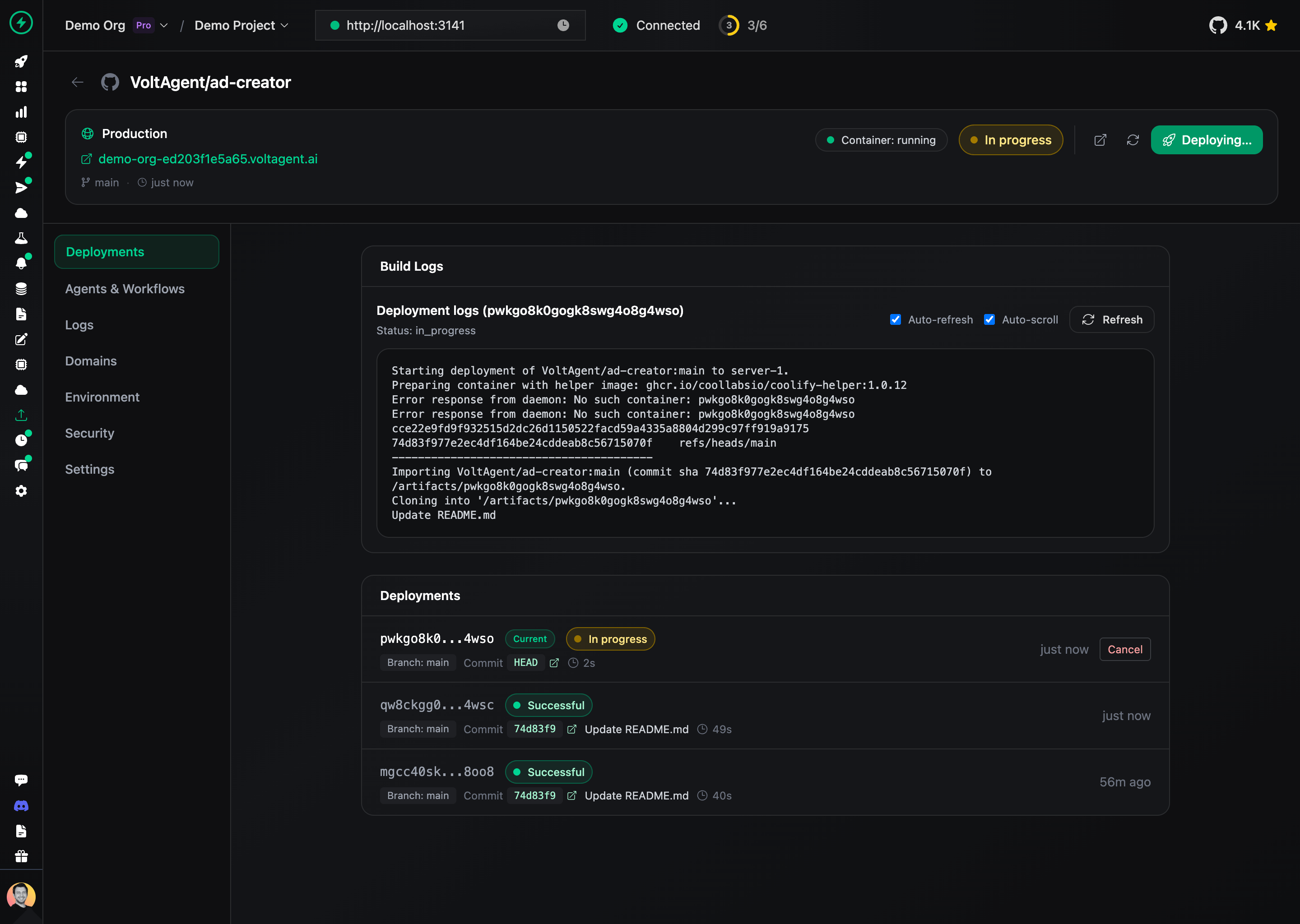
VoltOps Deploy is a managed deployment platform built specifically for VoltAgent applications. Connect your GitHub repository and deploy your AI agents with zero configuration, automatic SSL certificates, and custom domain support.
Features
- GitHub Integration - Connect public or private repositories via the VoltOps GitHub App
- Automatic Deployments - Push-to-deploy with webhook triggers on every commit
- Environment Variables - Build-time and runtime env var management with secrets support
- Custom Domains - CNAME-based custom domain support with automatic SSL provisioning
- Real-time Logs - Monitor build progress and application logs in real-time
- HTTP Basic Auth - Password-protect your deployments (Pro plan)
- Agent Discovery - View registered agents and workflows directly from the deployment dashboard
Getting Started
1. Navigate to Deploy
Go to console.voltagent.dev/deployments and click New deployment.
2. Connect Your Repository
Choose how to connect your repository:
- Public GitHub - Enter the repository URL directly (e.g.,
https://github.com/user/repo) - GitHub App - Install the VoltOps GitHub App for private repository access
3. Configure Build Settings
Select the branch to deploy and configure build options:
- Branch - Choose the branch to deploy (defaults to
main) - Auto-deploy - Enable to automatically deploy on every push
4. Set Environment Variables
Add any environment variables your application needs:
- Runtime variables - Available to your running application
- Build-time variables - Available during the build process
- Secrets - Encrypted values hidden from logs and UI
Paste a .env file content directly into the key field to import multiple variables at once.
5. Deploy
Click Deploy to start the build process. You can monitor the build logs in real-time.
Configuration Options
Branch Settings
Configure which branch to deploy and how deployments are triggered:
| Setting | Description |
|---|---|
| Branch | The Git branch to deploy |
| Auto-deploy | Automatically deploy on push to the selected branch |
Environment Variables
Environment variables support multiple configurations:
| Option | Description |
|---|---|
| Secret | Encrypts the value and hides it from logs |
| Runtime | Makes the variable available to the running application |
| Build-time | Makes the variable available during build |
Custom Domains
Add a custom domain to your deployment:
- Go to the Domains tab in your deployment details
- Click Add Domain and enter your domain
- Create a CNAME record pointing to the provided target
- SSL certificate is provisioned automatically once DNS propagates
HTTP Basic Authentication
Protect your deployment with username and password authentication (Pro plan only):
- Go to the Security tab
- Enable HTTP Basic Auth
- Enter username and password
- Save to trigger a redeployment
Pricing
VoltOps Deploy is available on Core and Pro plans.
| Feature | Free | Core ($50/mo) | Pro (Custom) |
|---|---|---|---|
| Deployments | - | Included | Included |
| Parallel Builds | 0 | 1 | 2 |
| Runtime Minutes | 0 | 43,200/mo (1 agent) | 129,600/mo (3 agents) |
| Build Minutes | 0 | 100/mo | 300/mo |
| HTTP Basic Auth | - | - | Yes |
| Team Members | 1 | 3 | 20 |
Runtime minutes are calculated per active deployment. Core plan includes enough minutes for 1 agent running 24/7 for a month (30 days × 24 hours × 60 min = 43,200 min). Pro plan covers 3 agents running continuously (129,600 min).
Usage-Based Billing
- Build minutes: Included minutes used first; extra usage billed at $0.10 per 10 minutes
- Runtime minutes: Metered per active deployment minute; extra usage billed at ~$0.005/min
- Queued builds: When parallel build limit is reached, builds queue automatically and start when a slot becomes available
FAQ
Which repositories can I deploy?
You can deploy public GitHub repositories using a direct URL, or private repositories by installing the VoltOps GitHub App.
How do automatic deployments work?
When auto-deploy is enabled, VoltOps receives webhook events from GitHub. Each push to the selected branch triggers a new deployment automatically.
How do I add a custom domain?
Navigate to the Domains tab in your deployment details, enter your domain, and create a CNAME record pointing to the provided target. SSL certificates are provisioned automatically.
What happens when I hit the parallel build limit?
Builds queue automatically and start as soon as a build slot becomes available. You can see queued builds in the deployment dashboard.
How do I manage secrets?
Mark environment variables as Secret to encrypt their values. Secret values are hidden in the UI and logs but available to your application at runtime.
Can I password-protect my deployment?
Yes, HTTP Basic Authentication is available on Pro plans. Enable it in the Security tab of your deployment settings.
How do I view application logs?
Use the Logs tab in the deployment detail page for real-time application logs. Build logs are available in the Deployments tab.
What build systems are supported?
VoltOps Deploy supports Dockerfile and Nixpacks for building your application. The build system is auto-detected based on your repository contents.
How do I cancel a running deployment?
Click the Cancel button next to the active deployment in the Deployments list. The build will be stopped and marked as cancelled.
Can I rollback to a previous deployment?
Currently, you can redeploy from a specific commit by updating your branch settings. Full rollback support is coming soon.