

A label for an element.
Inserting a label into content attaches it to the closest preceding element that is not a space. The preceding element must be in the same scope as the label, which means that Hello #[<label>], for instance, wouldn't work.
A labelled element can be referenced, queried for, and styled through its label.
Once constructed, you can get the name of a label using str.
Example
#show <a>: set text(blue) #show label("b"): set text(red) = Heading <a> *Strong* #label("b") 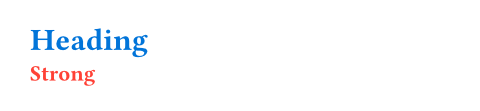
Syntax
This function also has dedicated syntax: You can create a label by enclosing its name in angle brackets. This works both in markup and code. A label's name can contain letters, numbers, _, -, :, and .. A label cannot be empty.
Note that there is a syntactical difference when using the dedicated syntax for this function. In the code below, the <a> terminates the heading and thus attaches to the heading itself, whereas the #label("b") is part of the heading and thus attaches to the heading's text.
// Equivalent to `#heading[Introduction] <a>`. = Introduction <a> // Equivalent to `#heading[Conclusion #label("b")]`. = Conclusion #label("b") Currently, labels can only be attached to elements in markup mode, not in code mode. This might change in the future.
Constructor
Creates a label from a string.
name
The name of the label.
Unlike the dedicated syntax, this constructor accepts any non-empty string, including names with special characters.