
flutter_utils_project 1.2.0  flutter_utils_project: ^1.2.0 copied to clipboard
This library works to provide the tools and parts needed to build your project faster, with less effort, and add code.
flutter_utils_project #


Getting Started #
This project is a starting point for a Flutter plug-in package, Set of methods/extensions for flutter that makes using framework in a much easier and clean way also adds additional functionality, and provide the tools and parts needed to build your project faster.
Platform Support #
| Android | iOS | MacOS | Web | Linux | Windows |
|---|---|---|---|---|---|
| ✔️ | ✔️ | ✔️ | ✔️ | ✔️ | ✔️ |
What's in the box #
SnapHelperWidgetAppThemeDark-light.AutoSizeText.ContextExtensions.ErrorHandler.IntExtensions.TextStyle.StringExtension.Spacing.WidgetExtension.Button(Type) => rounded - small - medium - text - block - outlined - large.Container(Type) => none - bordered - roundBordered - rounded.SharedPreferences.TextFormField(Type) => none - bordered - roundBordered - rounded.Text=> There are mainly 13 types of Text widgets.Patternsfor url - phone - image - audio - text - document - excel - ppt - apk - pdf .CustomLogcountryCodeErrorResponseDecorationHeader=>There are mainly 2 types of Header utils.headerWithoutTokenandheaderWithToken.
first #
Future<void> main() async { //You will need to initialize AppThemeNotifier class for theme changes. WidgetsFlutterBinding.ensureInitialized(); FlutterUtilsProject.init();} Examples #
1 -SnapHelperWidget
SnapHelperWidget makes easy implementation for future or stream builder
SnapHelperWidget<List<YOURMODEL>>( future: getData(context), defaultErrorMessage: 'default Error Message', errorWidget: const Text('error Widget').center(), loadingWidget: const CircularProgressIndicator().center(), ///useConnectionStateForLoader: , ///initialData: ,this is initial Data onSuccess: (List<YOURMODEL> snap) { return ListView.builder( itemCount: snap.length, physics: const BouncingScrollPhysics( parent: AlwaysScrollableScrollPhysics()), itemBuilder: (BuildContext context, int index) { var data = snap[index]; return Text(data.name); }, ); }), 2- FuLog #
Future<void> main() async { //You will need to initialize AppThemeNotifier class for theme changes. WidgetsFlutterBinding.ensureInitialized(); FlutterUtilsProject.init(); ///if you want enable log console, do it. FlutterUtilsProject.enableLog(); ///If you don't want to show the log consol, do it. FlutterUtilsProject.disableLog(); /// default log consol equal enable } 3- Use the AppTheme #
import 'package:provider/provider.dart'; import 'package:flutter/material.dart'; import 'package:flutter_utils_project/flutter_utils_project.dart'; Future<void> main() async { runApp( MultiProvider( providers: [ ChangeNotifierProvider<FuAppThemeNotifier>( create: (_) => FuAppThemeNotifier(),), ], child: const MyApp() ) ); } class MyApp extends StatelessWidget { const MyApp({Key? key}) : super(key: key); @override Widget build(BuildContext context) { return Consumer<FuAppThemeNotifier>( builder: (BuildContext context, FuAppThemeNotifier value, Widget? child) { return MaterialApp( debugShowCheckedModeBanner: false, title: "Flutter Utils Project", theme: FuAppTheme.getThemeFromThemeMode(), home: const HomeScreen()//navigator to your HomeScreen ); }); } } 4- Use AutoSizeText #
group You can synchronize the font size of multiple AutoSizeText. They will fit their boundaries and all AutoSizeText in the same group have the same size. That means they adjust their font size to the group member with the smallest effective font size.
Note: If a AutoSizeText cannot adjust because of constraints like minFontSize, it won't have the same size as the other group members.
An instance of AutoSizeGroup represents one group. Pass this instance to all AutoSizeText you want to add to that group. You don't have to care about disposing the group if it is no longer needed.
Important: Please don't pass a new instance of AutoSizeGroup every build. In other words, save the AutoSizeGroup instance in a StatefulWidget.
var myGroup = AutoSizeGroup(); AutoSizeText( 'Text 1', group: myGroup, ); AutoSizeText( 'Text 2', group: myGroup, ); 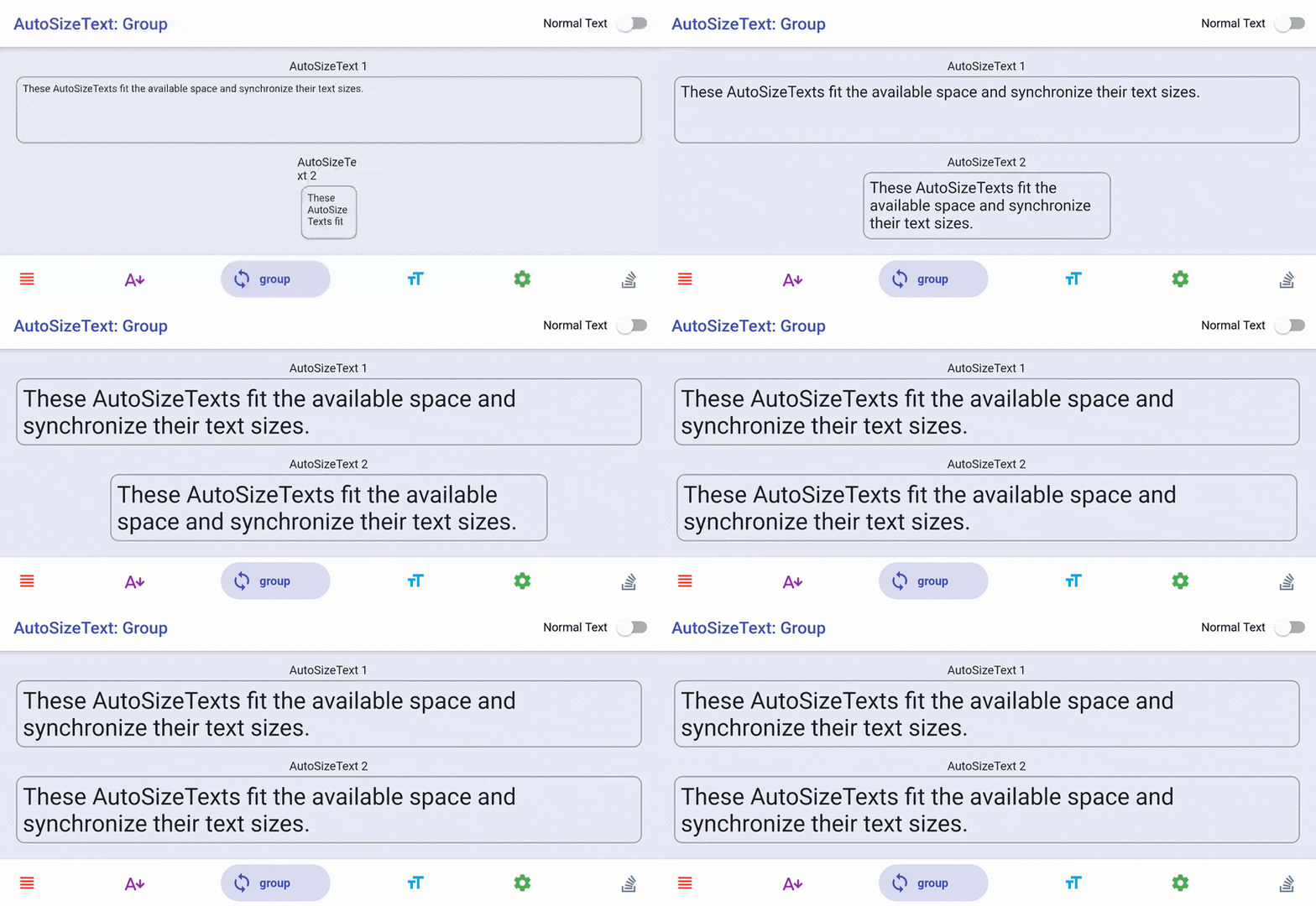
stepGranularity The AutoSizeText will try each font size, starting with TextStyle.fontSize until the text fits within its bounds. stepGranularity specifies how much the font size is decreased each step. Usually, this value should not be below 1 for best performance.
AutoSizeText( 'A really long String', style: TextStyle(fontSize: 40), minFontSize: 10, stepGranularity: 10, maxLines: 4, overflow: TextOverflow.ellipsis, ) AutoSizeText behaves exactly like a Text. The only difference is that it resizes text to fit within its bounds.
AutoSizeText( 'A really long String', style: TextStyle(fontSize: 30), maxLines: 2, ) maxLines
The maxLines parameter works like you are used to with the Text widget. If there is no maxLines parameter specified, the AutoSizeText only fits the text according to the available width and height.
AutoSizeText( 'A really long String', style: TextStyle(fontSize: 30), maxLines: 2, ) 5- Context Extensions #
Are you still typing MediaQuery.of(context).size... or Navigator.of(this).push.. ? Let's change that 🤩
❌ Navigator.of(context).push(MaterialPageRoute( builder: (_) => HomeScreen(), )); ✅ context.push(HomeScreen()); ❌ MediaQuery.of(context).size.width; ✅ context.width; ✅ context.height; bool get isSmallTablet => (mediaQueryShortestSide >= 600); can you get found context Extensions [mediaQueryPadding - mediaQuery - textTheme - mediaQueryViewPadding - orientation - textScaleFactor - mediaQueryShortestSide] and
Responsive ui [isPhone - isSmallTablet - isLargeTablet - isTablet]
and the a lot Extensions
Container( color: context.textTheme.bodyText2!.color,//can yuo get found Context Extensions theme height: context.height / 2,//can yuo get found Context Extensions height (mediaQuerySize height) width: context.width / 1.5, child: const Center( child: Text( 'wellCome', style: TextStyle(color: Colors.white), ), ), ), 6- Error Handler #
can you handler error Exception. Handling for Error Exception Example (No Internet Connection 😑 or Bad response format 👎 or Couldn't find the post 😱 ) And if nothing happens, he'll return the default mistake.
Future<List<YOURMODEL>?> getProfile(BuildContext context) async { try { List<YOURMODEL> profile = [];//your model class http.Response response = await http.get( Uri.parse('YOUR URI'), headers: YourHeader() ); if (response.statusCode == 200) { List list = json.decode(response.body); profile = list.map((model) => YOURMODEL.fromJson(model)).toList(); return profile; } else { var massages = jsonDecode(response.body); String error = massages['Error']; // return showSnackBar(); //can you return anything print(error) } } catch (err) { /* Handling for Error Exception Example (No Internet Connection 😑 or Bad response format 👎 or Couldn't find the post 😱 ) And if nothing happens, he'll return the default mistake. */ ApiErrorHandler.parseError(err, context,); print("$err Error"); } return null; } 7- Int Extensions #
height => Leaves given height of space #
Container(child:Text('Example1')), ❌SizedBox(height:12), or ❌SizedBox(width:12), Container(child:Text('Example2')), Container(child:Text('Example1')), ✅ 12.height, ✅ 12.width, Container(child:Text('Example2')), width => Leaves given width of space #
Row(children:[ Text('width1'), 5.width, Text('width2'), ]) isSuccessful =>HTTP status code #
if(response.statusCode=isSuccessful){ print(' statusCode Successful') } microseconds #
Returns microseconds duration
5.microseconds milliseconds #
Returns milliseconds duration
5.milliseconds seconds #
Returns minutes duration
5.seconds minutes #
Returns hours duration
5.minutes hours #
Returns hours duration
5.hours days #
Returns days duration
5.days 8- TextStyle #
[FuTextStyle] - gives 13 different type of styles to the text on the basis of size
FuText.h1( 'TextStyle h1', color: Colors.white, ), FuText.b1( 'TextStyle b1', color: Colors.white, ), FuText.button( 'TextStyle button', color: Colors.white, ), 9-Strings Extensions, Methods #
/// Returns True/False String example = ""; /// Check URL validation example.validateURL(); /// Check email validation example.validateEmail(); /// Check phone validation example.validatePhone(); /// Return true if given String is Digit example.isDigit(); /// Check weather String is alpha or not example.isAlpha(); /// Check weather String is Json or not example.isJson(); /// Copy String to Clipboard example.copyToClipboard(); /// for ex. add comma in price example.formatNumberWithComma(); /// Get Color from HEX String example.toColor(); /// It reverses the String example.reverse; /// It return list of single character from String example.toList(); /// Returns true if given String is null or isEmpty example.isEmptyOrNull; /// Check null string, return given value if null example.validate(); /// Capitalize First letter of a given String example.capitalizeFirstLetter(); /// Returns if its type image example.isImage; /// Returns if its type Audio example.isAudio; /// Returns if its type Video example.isVideo; /// Returns if its type Txt example.isTxt; /// Returns if its type Doc example.isDoc; /// Returns if its type Excel example.isExcel; /// Returns if its type PPT example.isPPT; /// Returns if its type Apk example.isApk; /// Returns if its type Pdf example.isPdf; /// Returns if its type Html example.isHtml; /// Pass the Pattern /// Splits from a [pattern] and returns remaining String after that example.splitAfter(Patterns.apk); /// Splits from a [pattern] and returns String before that example.splitBefore(Patterns.audio); /// It matches the String and returns between [startPattern] and [endPattern] example.splitBetween("d", "g"); /// Return int value of given string example.toInt(); /// Get YouTube Video ID example.toYouTubeId(); /// Returns YouTube thumbnail for given video id example.getYouTubeThumbnail(); /// Removes white space from given String example.removeAllWhiteSpace(); /// Returns only numbers from a string example.getNumericOnly(example); /// Return average read time duration of given String in seconds example.calculateReadTime(); /// Return number of words in a given String example.countWords(); /// Generate slug of a given String example.toSlug(); /// returns searchable array for Firebase Database example.setSearchParam(); /// replace From number English To Arabic Text(''. replaceFarsiNumber('1234567'); 10- Spacing #
[FuSpacing] - provides spacing of various types.
const Text('First Text'), FuSpacing.height(30), const Text('Next Text'), FuSpacing.width(30), Container(padding:FuSpacing.all(12) ,), Container(padding:FuSpacing.bottom(12) ,), Container(padding:FuSpacing.fromLTRB(12, 1, 12, 8) ,), Container(padding:FuSpacing.horizontal(2) ,), Container(padding:FuSpacing.vertical(2) ,), Container(padding:FuSpacing.left(2) ,), ///padding from all direction except Right ❌ Container(padding: EdgeInsets.only(left: 12,top:12 ,bottom: 12),child: EnyWidget(),), ✅ Container(padding:FuSpacing.noRight(12),child: EnyWidget(),), ///padding from all direction except Bottom ❌ Container(padding: EdgeInsets.only(left: 12,top:12 ,right: 12),child: EnyWidget(),), ✅ Container(padding:FuSpacing.noBottom(12),child: EnyWidget(),), ///padding from all direction except Left ❌ Container(padding: EdgeInsets.only(bottom: 12,top:12 ,right: 12),child: EnyWidget(),), ✅ Container(padding:FuSpacing.noLeft(12),child: EnyWidget(),), ///padding from all direction except Top ❌ Container(padding: EdgeInsets.only(bottom: 12,left:12 ,right: 12),child: EnyWidget(),), ✅ Container(padding:FuSpacing.noTop(12),child: EnyWidget(),), Container(padding:FuSpacing.only(bottom: 12) ,), Container(padding:FuSpacing.symmetric(horizontal: 1) ,), Container(padding:FuSpacing.only(bottom: 12) ,), getYouTubeThumbnail
Text('Text1234567'. getYouTubeThumbnail(), style: TextStyle(color: context.theme.primaryColor,fontSize: 20), ), 11- Widget Extensions #
//Padding piece from the height Text('withHeight').withHeight(20), //Padding piece from the width and height Text('widthAndHeight').widthAndHeight(height: 12, width: 11), //hide Widget if value equal false else equal true visible widget Text('visible').visible(false), //you can withTooltip for any widget Text('withTooltip').withTooltip(msg: 'Text'), //you can onTap for any widget ❌ InkWell( onTap: (){/* do anything */}, child: Text('onTap'),) ✅ Text('onTap').onTap((){/* do anything */}), //Padding piece from all directions ❌ Padding(padding: EdgeInsets.all(12),child: Text('paddingAll'),), ✅ Text('paddingAll').paddingAll(12), //Padding piece from the bottom Text('paddingBottom').paddingBottom(12), //Padding piece from the left Text('paddingLeft').paddingLeft(12), //Padding piece from the right Text('paddingRight').paddingRight(12), //Padding Widget form custom directions Text('paddingOnly').paddingOnly(bottom: 30,top: 50,left: 0,right: 12), //you can expand for any widget ❌ Row(children: [Expanded(child: TextField())],), ✅ Row(children: [TextField()],).expand(), //you can center for any widget Text('center').center(), //you can fit for widget Text('fit').fit(), //you can flexible for widget Text('flexible').flexible(), //Padding Widget form custom directions Text('paddingSymmetric').paddingSymmetric(), //this is same SizedBox() WidgetExtension.empty(), Circle Button
CircleButton( icon: const Icon(Icons.search), iconSize: 30.0, color:Colors.black, onPressed: () => print('Search'), ), 12- FuLog #
FuLog('Anything'); 13- country Code #
get all name and code all country
Column(children: List<Widget>.generate(FxTextUtils. countryCode.length, (index) { FxTextUtils. countryCode.toList(); var data= FxTextUtils. countryCode[index]; return Row( children: [ Text(data['name']), 12.width, Text(data['code'],style: TextStyle(color: context.theme.primaryColor),), ], ); },)), 14- How to use the SharedPreferences #
set String
❌ SharedPreferences preference = await SharedPreferences.getInstance(); ❌ var result = preference.setString('key', 'value'); ✅ await FuSharedPreferences.setString('key', 'value'); get String
❌ SharedPreferences preference = await SharedPreferences.getInstance(); ❌ var result = preference.getString('key'); ✅ await FuSharedPreferences.getString('key'); delete
await FuSharedPreferences.deleteString('key'); clear
await FuSharedPreferences.clear(); You can also do a lot of operations with SharedPreferences[sitInt-getInt-sitBool-getBool]
15- FuWidgetErrorResponse #
FuErrorResponse.snackBarError( error: "Bad response format 👎", context: context, color: Colors.red, ); 16- FuDashedDivider #
this is same Divider but has Dashed Example this shape [- - - - - - - - - - - - ]
FuDashedDivider( color:FuAppTheme.getThemeFromThemeMode().colorScheme.onBackground, ), 17- Decoration #
boxDecorationDefault
Container(child: Text('boxDecorationDefault'),decoration: boxDecorationDefault(),), boxDecorationWithShadow
Container(child: const Text('boxDecorationWithShadow'),decoration: boxDecorationWithShadow(shadowColor: context.theme.primaryColor),), radius
❌Container(decoration: const BoxDecoration(borderRadius:BorderRadius.all( Radius.circular ❌(12)) ),child:const Text('radius')), ✅ Container(borderRadius: radius(),child:Text('radius')) radiusOnly
FuContainer.none(borderRadius: radiusOnly(),child:Text('radiusOnly')) ShapeBorder dialogShape
18- Costume Transition #
this is custom animation Navigator
Navigator.push(context,CostumeTransition(HomePage)); Input Validation
validator:(String ?value){ FuInputValidation.validationTextField( controller: _textController, error: 'Enter Your Error', lengthMin: 'The field must be at least tow characters long.', lengthMax: 'The field should not be more than eight letters long.', main: 2, max: 8); } , Header #
do [post or put or get or delete or patch] WithoutToken
final response = await http.get(Uri.parse('Your URI'), headers: FuHeader.headerWithoutToken()), do [post or put or get or delete or patch] WithToken
final response = await http.get(Uri.parse('Your URI'), headers: FuHeader.headerWithToken('Your Token')), Contribution #
Of course the project is open source, and you can contribute to it repository link
- If you found a bug, open an issue.
- If you have a feature request, open an issue.
Contributors #

Metadata
Publisher
unverified uploader
Weekly Downloads
Metadata
This library works to provide the tools and parts needed to build your project faster, with less effort, and add code.
Repository (GitHub)
View/report issues
Documentation
License
 MIT (license)
Dependencies
flutter, get, shared_preferences

