Energy Load Forecast with Visualization in Interactive Tool#
In this notebook, we will show how to use NeuralProphet to forecast energy load and visualize the results in an interactive tool. The forecast is based on the RE-Europe data set, which models the continental European electricity system, including demand and renewable energy inflows for the period 2012-2014. The total data set comprises 1494 buses, which we will reduce to 5 buses for the purpose of this example.
[1]: import pandas as pd import numpy as np from neuralprophet import NeuralProphet, set_log_level import plotly.graph_objects as go import plotly.express as px from plotly.subplots import make_subplots import ipywidgets as widgets from ipywidgets import interact_manual # Set plotting backend to plotly for interactive plots and plotly-static for static plots plotting_backend = "plotly-static" The dataset includes for every bus and every hour of the year the following information: * load (MW) * actual solar production (MW) * forecasted solar production (MW)
The forecasts are at hour 00 of every day for the next 24 hours.
[2]: # load data df = pd.read_csv( "https://raw.githubusercontent.com/ourownstory/neuralprophet-data/main/datasets/multivariate/ER_Europe_subset_10nodes.csv" ) df["ID"] = df["ID"].astype(str) IDs = df["ID"].unique() df["ds"] = pd.to_datetime(df["ds"]) # use one year for faster training df = df[df["ds"] > "2014-01-01"] df.head() [2]: | ds | ID | y | solar | solar_fcs | |
|---|---|---|---|---|---|
| 17545 | 2014-01-01 01:00:00 | 1 | 72.3142 | 0.0 | 0.0 |
| 17546 | 2014-01-01 02:00:00 | 1 | 67.5617 | 0.0 | 0.0 |
| 17547 | 2014-01-01 03:00:00 | 1 | 63.0677 | 0.0 | 0.0 |
| 17548 | 2014-01-01 04:00:00 | 1 | 59.9401 | 0.0 | 0.0 |
| 17549 | 2014-01-01 05:00:00 | 1 | 58.9296 | 0.0 | 0.0 |
[16]: # plot first month of data fig = px.line(df[df["ds"] < "2014-02-01"], x="ds", y="y", color="ID") fig.update_layout( xaxis_title="Date", yaxis_title="Energy consumption", legend_title="ID", height=600, width=1000, ) if plotting_backend == "plotly-static": fig.show("svg") 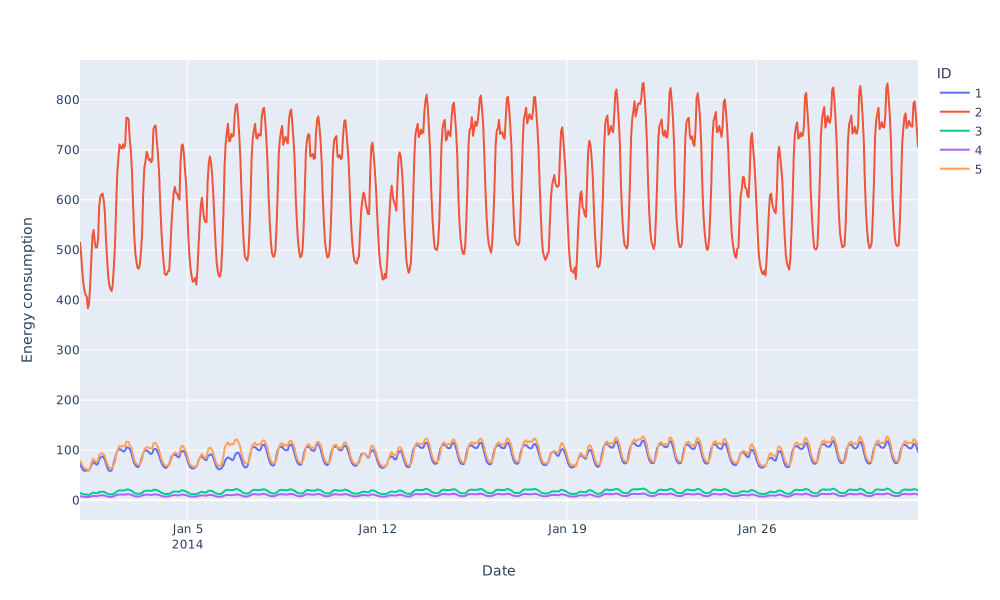
1. Data Preparation#
To better capture different seasons of the year and days of the week, we add conditional seasonaility. For every season of the year (summer, winter, fall and spring) and weekdays/weekend a separate seasonality is modelled.
[4]: # Conditional Seasonality: 4 Seasons for yearly and weekly seasonality df["summer"] = 0 df.loc[df["ds"].dt.month.isin([6, 7, 8]), "summer"] = 1 df["winter"] = 0 df.loc[df["ds"].dt.month.isin([12, 1, 2]), "winter"] = 1 df["fall"] = 0 df.loc[df["ds"].dt.month.isin([9, 10, 11]), "fall"] = 1 df["spring"] = 0 df.loc[df["ds"].dt.month.isin([3, 4, 5]), "spring"] = 1 # Conditional Seasonality: 4 Seasons, Weekday/Weekend distinction for each season, for daily seasonality df["summer_weekday"] = 0 df.loc[(df["ds"].dt.month.isin([6, 7, 8])) & (df["ds"].dt.dayofweek.isin([0, 1, 2, 3, 4])), "summer_weekday"] = 1 df["summer_weekend"] = 0 df.loc[(df["ds"].dt.month.isin([6, 7, 8])) & (df["ds"].dt.dayofweek.isin([5, 6])), "summer_weekend"] = 1 df["winter_weekday"] = 0 df.loc[(df["ds"].dt.month.isin([12, 1, 2])) & (df["ds"].dt.dayofweek.isin([0, 1, 2, 3, 4])), "winter_weekday"] = 1 df["winter_weekend"] = 0 df.loc[(df["ds"].dt.month.isin([12, 1, 2])) & (df["ds"].dt.dayofweek.isin([5, 6])), "winter_weekend"] = 1 df["spring_weekday"] = 0 df.loc[(df["ds"].dt.month.isin([3, 4, 5])) & (df["ds"].dt.dayofweek.isin([0, 1, 2, 3, 4])), "spring_weekday"] = 1 df["spring_weekend"] = 0 df.loc[(df["ds"].dt.month.isin([3, 4, 5])) & (df["ds"].dt.dayofweek.isin([5, 6])), "spring_weekend"] = 1 df["fall_weekday"] = 0 df.loc[(df["ds"].dt.month.isin([9, 10, 11])) & (df["ds"].dt.dayofweek.isin([0, 1, 2, 3, 4])), "fall_weekday"] = 1 df["fall_weekend"] = 0 df.loc[(df["ds"].dt.month.isin([9, 10, 11])) & (df["ds"].dt.dayofweek.isin([5, 6])), "fall_weekend"] = 1 df.head() [4]: | ds | ID | y | solar | solar_fcs | summer | winter | fall | spring | summer_weekday | summer_weekend | winter_weekday | winter_weekend | spring_weekday | spring_weekend | fall_weekday | fall_weekend | |
|---|---|---|---|---|---|---|---|---|---|---|---|---|---|---|---|---|---|
| 17545 | 2014-01-01 01:00:00 | 1 | 72.3142 | 0.0 | 0.0 | 0 | 1 | 0 | 0 | 0 | 0 | 1 | 0 | 0 | 0 | 0 | 0 |
| 17546 | 2014-01-01 02:00:00 | 1 | 67.5617 | 0.0 | 0.0 | 0 | 1 | 0 | 0 | 0 | 0 | 1 | 0 | 0 | 0 | 0 | 0 |
| 17547 | 2014-01-01 03:00:00 | 1 | 63.0677 | 0.0 | 0.0 | 0 | 1 | 0 | 0 | 0 | 0 | 1 | 0 | 0 | 0 | 0 | 0 |
| 17548 | 2014-01-01 04:00:00 | 1 | 59.9401 | 0.0 | 0.0 | 0 | 1 | 0 | 0 | 0 | 0 | 1 | 0 | 0 | 0 | 0 | 0 |
| 17549 | 2014-01-01 05:00:00 | 1 | 58.9296 | 0.0 | 0.0 | 0 | 1 | 0 | 0 | 0 | 0 | 1 | 0 | 0 | 0 | 0 | 0 |
2. Model definition#
The best parameters for the model can be obtained with hyperparameter tuning. By setting the quantiles, a prediction interval is modelled instead of a point forecast.
[5]: # Model and prediction quantiles = [0.015, 0.985] params = { "n_lags": 7 * 24, "n_forecasts": 24, "n_changepoints": 20, "learning_rate": 0.01, "ar_layers": [32, 16, 16, 32], "yearly_seasonality": 10, "weekly_seasonality": False, "daily_seasonality": False, "epochs": 40, "batch_size": 1024, "quantiles": quantiles, } m = NeuralProphet(**params) m.set_plotting_backend(plotting_backend) set_log_level("ERROR") 2.1 Lagged and future regressors#
With additional information, our model can get better. We use the last 10 days of the actual solar production as lagged regressor and the solar forecast as the future regressor.
[6]: m.add_lagged_regressor(names="solar", n_lags=10 * 24) m.add_future_regressor(name="solar_fcs") [6]: <neuralprophet.forecaster.NeuralProphet at 0x12cc57b20> 2.2 Conditional seasonalities#
[7]: m.add_seasonality(name="summer_weekly", period=7, fourier_order=14, condition_name="summer") m.add_seasonality(name="winter_weekly", period=7, fourier_order=14, condition_name="winter") m.add_seasonality(name="spring_weekly", period=7, fourier_order=14, condition_name="spring") m.add_seasonality(name="fall_weekly", period=7, fourier_order=14, condition_name="fall") m.add_seasonality(name="summer_weekday", period=1, fourier_order=6, condition_name="summer_weekday") m.add_seasonality(name="winter_weekday", period=1, fourier_order=6, condition_name="winter_weekday") m.add_seasonality(name="spring_weekday", period=1, fourier_order=6, condition_name="spring_weekday") m.add_seasonality(name="fall_weekday", period=1, fourier_order=6, condition_name="fall_weekday") m.add_seasonality(name="summer_weekend", period=1, fourier_order=6, condition_name="summer_weekend") m.add_seasonality(name="winter_weekend", period=1, fourier_order=6, condition_name="winter_weekend") m.add_seasonality(name="spring_weekend", period=1, fourier_order=6, condition_name="spring_weekend") m.add_seasonality(name="fall_weekend", period=1, fourier_order=6, condition_name="fall_weekend") [7]: <neuralprophet.forecaster.NeuralProphet at 0x12cc57b20> 3. Model training#
To test our model later, data is split into training and test data. The test data is the last 5% of the data. The model is trained on the training data.
[8]: # Split Train and Test Data df_train, df_test = m.split_df(df, valid_p=0.05, local_split=True) print(f"Train shape: {df_train.shape}") print(f"Test shape: {df_test.shape}") Train shape: (41545, 17) Test shape: (3090, 17) [9]: # Fit model metrics_fit = m.fit(df_train, freq="H", metrics=True) [ ]: # Predict forecast = m.predict(df) [11]: # extract season columns and convert to numeric season_cols = [col for col in forecast.columns if "season" in col or "trend" in col] forecast[season_cols] = forecast[season_cols].apply(pd.to_numeric) 4. Visualization#
4.1 Model plots#
NeuralProphet includes plot functions to explore the forecasted data. For an overview over the plot functions see the Visualizing tutorial.
[12]: m.highlight_nth_step_ahead_of_each_forecast(1).plot(forecast.iloc[-10 * 24 :]) 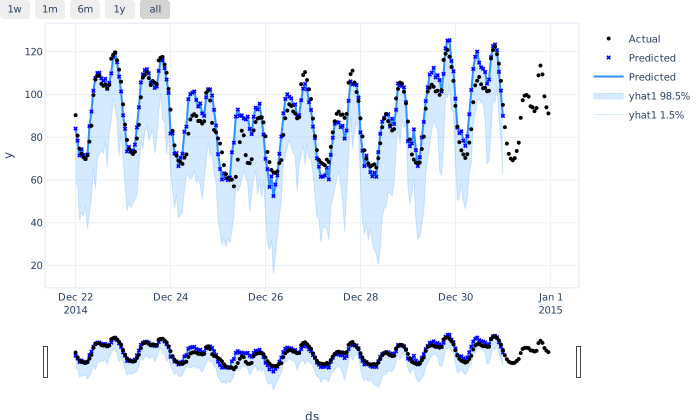
[13]: m.plot_parameters(components=["trend", "trend_rate_change", "lagged_regressors"]) 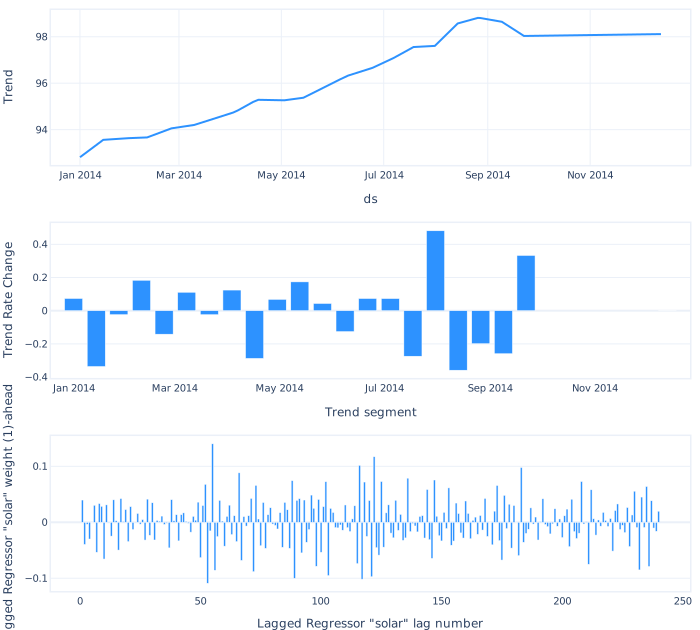
4.2 Interactive tool#
Let’s explore the data more interactively. By choosing a date, the forecast for the next 24 hours is shown, which represents industry standards.
[14]: def get_day_ahead_format(date, ID, column_name): values = pd.DataFrame(columns=["ds", column_name]) forecast_ID = forecast[forecast["ID"] == ID] for i in range(0, 24): if "%" in column_name: step_name = f"yhat{i+1} {column_name}" # eg yhat10 1.5% else: step_name = f"{column_name}{i+1}" ds = date + pd.Timedelta(hours=i + 1) # throw an error if the date is not in the forecast if ds not in forecast_ID["ds"].values: raise ValueError( f'The date {ds} is not in the forecast. Please choose a date between {forecast_ID["ds"].min()} and {forecast_ID["ds"].max()}' ) step_value = forecast_ID[forecast_ID["ds"] == ds][step_name].values[0] values = pd.concat([values, pd.DataFrame({"ds": ds, column_name: step_value}, index=[0])], ignore_index=True) return values [15]: @interact_manual # with this line of code the forecast becomes interactive by letting you choose the ID and date def show_forecast_uncertainty(ID=IDs, date=widgets.DatePicker()): start = pd.to_datetime(date) end = start + pd.DateOffset(days=1) # get forecast np_yhats = get_day_ahead_format(start, ID, "yhat") np_yhats_lower = get_day_ahead_format(start, ID, "1.5%") np_yhats_upper = get_day_ahead_format(start, ID, "98.5%") np_ar = get_day_ahead_format(start, ID, "ar") # get actual, temp and temp forecast forecast_window = forecast[forecast["ID"] == ID] forecast_window = forecast_window[(forecast_window["ds"] >= start) & (forecast_window["ds"] < end)] df_window = df[df["ID"] == ID] df_window = df_window[(df_window["ds"] >= start) & (df_window["ds"] < end)] # get components seasonalities_to_plot = [] for season in season_cols: if np.abs(forecast_window[season].sum()) > 0: seasonalities_to_plot.append(season) fig = make_subplots( rows=3, cols=1, shared_xaxes=True, subplot_titles=("Actuals and Forecast", "Solar production", "Forecast Components"), ) # plot actuals fig.add_trace( go.Scatter( x=forecast_window["ds"], y=forecast_window["y"], name="Actuals", mode="markers", marker=dict(symbol="x") ), row=1, col=1, ) # plot forecast and uncertainty fig.add_trace( go.Scatter( x=np_yhats_lower["ds"], y=np_yhats_lower["1.5%"], fill=None, mode="lines", line_color="#A6B168", name="1.5% quantile", ), row=1, col=1, ) fig.add_trace( go.Scatter( x=np_yhats_upper["ds"], y=np_yhats_upper["98.5%"], fill="tonexty", mode="lines", line_color="#A6B168", name="98.5% quantile", ), row=1, col=1, ) fig.add_trace(go.Scatter(x=np_yhats["ds"], y=np_yhats["yhat"], name="Forecast", line_color="#7A863B"), row=1, col=1) # plot solar fig.add_trace( go.Scatter(x=df_window["ds"], y=df_window["solar"], mode="lines", name="Solar actual production"), row=2, col=1 ) fig.add_trace( go.Scatter(x=df_window["ds"], y=df_window["solar_fcs"], mode="lines", name="Solar forecast production"), row=2, col=1, ) # plot different seasons of seasons_to_plot for season in seasonalities_to_plot: fig.add_trace(go.Scatter(x=forecast_window["ds"], y=forecast_window[season], name=season), row=3, col=1) fig.add_trace(go.Scatter(x=np_ar["ds"], y=np_ar["ar"], name="Autoregression"), row=3, col=1) fig.update_layout( title=f"Forecast for ID {ID} on {date}", yaxis=dict(title="Load (MW)"), width=1200, height=800, ) if plotting_backend == "plotly-static": fig.show("svg") else: fig.show() [ ]: