HugeGraph Toolchain Local Testing Guide
This guide helps developers run HugeGraph toolchain tests locally.
1. Core Concepts
1.1 Core Dependency: HugeGraph Server
Integration and functional tests of the toolchain depend on HugeGraph Server, including Client, Loader, Hubble, Spark Connector, Tools, and other components.
1.2 Test Types
- Unit Tests: Test individual functions/methods, no external dependencies required
- API Tests (ApiTestSuite): Test API interfaces, requires running HugeGraph Server
- Functional Tests (FuncTestSuite): End-to-end tests, require complete system environment
2. Environment Setup
2.1 System Requirements
- Operating System: Linux / macOS (Windows use WSL2)
- JDK: >= 11, configure
JAVA_HOME - Maven: >= 3.5
- Python: >= 3.11 (only required for Hubble tests)
2.2 Clone Code
git clone https://github.com/${GITHUB_USER_NAME}/hugegraph-toolchain.git cd hugegraph-toolchain 3. Deploy Test Environment
Deployment Options
- Script Deployment (Recommended): Precisely control Server version by specifying Commit ID, avoid interface incompatibility
- Docker Deployment: Quick start, but may have version lag causing test failures
For detailed installation instructions, refer to Community Documentation
3.1 Script Deployment (Recommended)
Parameter Description
$COMMIT_ID: Specify Server source code Git Commit ID$DB_DATABASE/$DB_PASS: MySQL database name and password for Loader JDBC tests
Deployment Steps
1. Install HugeGraph Server
# Set version export COMMIT_ID="master" # Or specific commit hash, e.g. "8b90977" # Execute installation (script located in /assembly/travis/ directory) hugegraph-client/assembly/travis/install-hugegraph-from-source.sh $COMMIT_ID - Default ports: http 8080, https 8443
- Ensure ports are not occupied
2. Install Optional Dependencies
# Hadoop (only required for Loader HDFS tests) hugegraph-loader/assembly/travis/install-hadoop.sh # MySQL (only required for Loader JDBC tests) hugegraph-loader/assembly/travis/install-mysql.sh $DB_DATABASE $DB_PASS 3. Health Check
curl http://localhost:8080/graphs # Returns {"graphs":["hugegraph"]} indicates success 3.2 Docker Deployment
Note: Docker images may have version lag, use script deployment if encountering compatibility issues
Quick Start
docker network create hugegraph-net docker run -itd --name=server -p 8080:8080 --network hugegraph-net hugegraph/hugegraph:latest docker-compose Configuration (Optional)
Complete configuration example including Server, MySQL, Hadoop services (requires Docker Compose V2):
version: '3.8' services: hugegraph-server: image: hugegraph/hugegraph:latest # Can be replaced with a specific version, or build your own image container_name: hugegraph-server ports: - "8080:8080" # HugeGraph Server HTTP port environment: # Configure HugeGraph Server parameters as needed, e.g., backend storage - HUGEGRAPH_SERVER_OPTIONS="-Dstore.backend=rocksdb" volumes: # If you need to persist data or mount configuration files, add volumes here # - ./hugegraph-data:/opt/hugegraph/data healthcheck: test: ["CMD-SHELL", "curl -f http://localhost:8080/graphs || exit 1"] interval: 10s timeout: 3s retries: 5 networks: - hugegraph-net # If you need JDBC tests for hugegraph-loader, you can add the following service # mysql: # image: mysql:5.7 # container_name: mysql-db # environment: # MYSQL_ROOT_PASSWORD: ${DB_PASS:-your_mysql_root_password} # Read from environment variable, or use default # MYSQL_DATABASE: ${DB_DATABASE:-hugegraph_test_db} # Read from environment variable, or use default # ports: # - "3306:3306" # volumes: # - ./mysql-data:/var/lib/mysql # Data persistence # healthcheck: # test: ["CMD", "mysqladmin", "ping", "-h", "localhost", "-p${DB_PASS:-your_mysql_root_password}"] # interval: 5s # timeout: 3s # retries: 5 # networks: # - hugegraph-net # If you need Hadoop/HDFS tests for hugegraph-loader, you can add the following services # namenode: # image: johannestang/hadoop-namenode:2.0.0-hadoop2.8.5-java8 # container_name: namenode # ports: # - "0.0.0.0:9870:9870" # - "0.0.0.0:8020:8020" # environment: # - CLUSTER_NAME=test-cluster # - HDFS_NAMENODE_USER=root # - HADOOP_CONF_DIR=/hadoop/etc/hadoop # volumes: # - ./config/core-site.xml:/hadoop/etc/hadoop/core-site.xml # - ./config/hdfs-site.xml:/hadoop/etc/hadoop/hdfs-site.xml # - namenode_data:/hadoop/dfs/name # command: bash -c "if [ ! -d /hadoop/dfs/name/current ]; then hdfs namenode -format; fi && /entrypoint.sh" # healthcheck: # test: ["CMD", "hdfs", "dfsadmin", "-report"] # interval: 5s # timeout: 3s # retries: 5 # networks: # - hugegraph-net # datanode: # image: johannestang/hadoop-datanode:2.0.0-hadoop2.8.5-java8 # container_name: datanode # depends_on: # - namenode # environment: # - CLUSTER_NAME=test-cluster # - HDFS_DATANODE_USER=root # - HADOOP_CONF_DIR=/hadoop/etc/hadoop # volumes: # - ./config/core-site.xml:/hadoop/etc/hadoop/core-site.xml # - ./config/hdfs-site.xml:/hadoop/etc/hadoop/hdfs-site.xml # - datanode_data:/hadoop/dfs/data # healthcheck: # test: ["CMD", "hdfs", "dfsadmin", "-report"] # interval: 5s # timeout: 3s # retries: 5 # networks: # - hugegraph-net networks: hugegraph-net: driver: bridge volumes: namenode_data: datanode_data: Hadoop Configuration Mounts
Create a ./config folder in the same directory as docker-compose.yml to mount Hadoop configuration files. You can skip this step if HDFS testing is not required.
📁 ./config/core-site.xml content:
<configuration> <property> <name>fs.defaultFS</name> <value>hdfs://namenode:8020</value> </property> </configuration> 📁 ./config/hdfs-site.xml content:
<configuration> <property> <name>dfs.namenode.name.dir</name> <value>/hadoop/hdfs/name</value> </property> <property> <name>dfs.datanode.data.dir</name> <value>/hadoop/hdfs/data</value> </property> <property> <name>dfs.permissions.superusergroup</name> <value>hadoop</value> </property> <property> <name>dfs.support.append</name> <value>true</value> </property> </configuration> Docker Operations
# Start services docker compose up -d # Check status docker compose ps lsof -i:8080 # Server lsof -i:8020 # Hadoop lsof -i:3306 # MySQL # Stop services docker compose down 4. Run Tests
Test process for each tool:
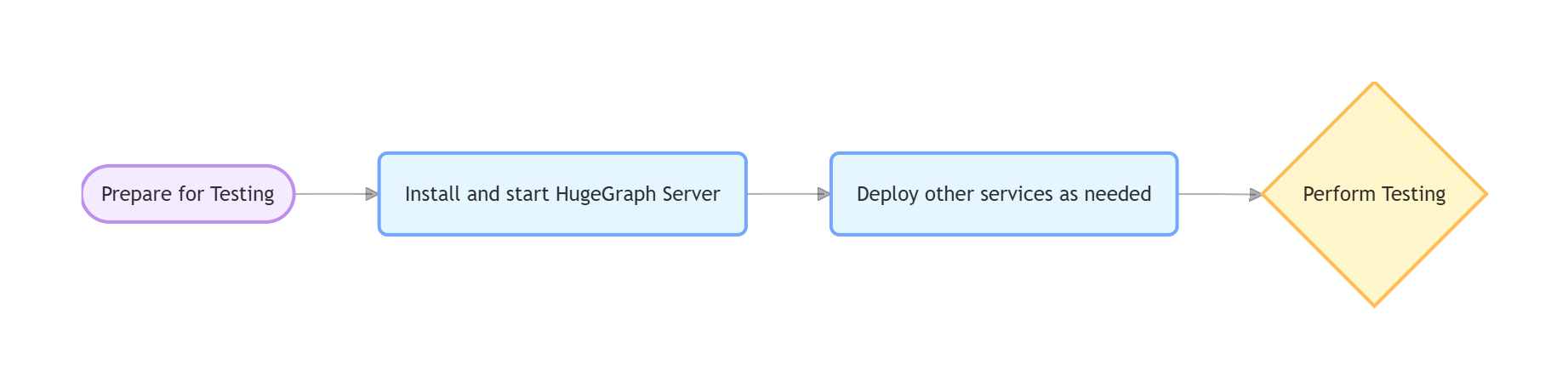
4.1 hugegraph-client
Compile
mvn -e compile -pl hugegraph-client -Dmaven.javadoc.skip=true -ntp Dependent Services
Start HugeGraph Server (refer to Section 3)
Server Authentication Configuration
Note: Docker images <= 1.5.0 don’t support authentication tests, need 1.6.0+
ApiTest requires authentication configuration. Skip this if using script installation. Manual configuration needed for Docker:
# 1. Modify authentication mode cp conf/rest-server.properties conf/rest-server.properties.backup sed -i '/^auth.authenticator=/c\auth.authenticator=org.apache.hugegraph.auth.StandardAuthenticator' conf/rest-server.properties grep auth.authenticator conf/rest-server.properties # 2. Set password # Note: Test code uses "pa" as default password, must match for tests to work bin/stop-hugegraph.sh export PASSWORD="pa" # Set to test default password echo -e "${PASSWORD}" | bin/init-store.sh bin/start-hugegraph.sh Run Tests
# Check environment curl http://localhost:8080/graphs # Should return {"graphs":["hugegraph"]} curl -u admin:pa http://localhost:8080/graphs # Authentication test (pa is test default password) # Run tests cd hugegraph-client mvn test -Dtest=UnitTestSuite -ntp # Unit tests mvn test -Dtest=ApiTestSuite -ntp # API tests (requires Server) mvn test -Dtest=FuncTestSuite -ntp # Functional tests (requires Server) Check Server log if tests fail:
logs/hugegraph-server.log
4.2 hugegraph-loader
Compile
mvn install -pl hugegraph-client,hugegraph-loader -am -Dmaven.javadoc.skip=true -DskipTests -ntp Dependent Services
- Required: HugeGraph Server
- Optional: Hadoop (HDFS tests), MySQL (JDBC tests)
Run Tests
cd hugegraph-loader mvn test -P unit -ntp # Unit tests mvn test -P file -ntp # File tests (requires Server) mvn test -P hdfs -ntp # HDFS tests (requires Server + Hadoop) mvn test -P jdbc -ntp # JDBC tests (requires Server + MySQL) mvn test -P kafka -ntp # Kafka tests (requires Server) 4.3 hugegraph-hubble
Compile
mvn install -pl hugegraph-client,hugegraph-loader -am -Dmaven.javadoc.skip=true -DskipTests -ntp cd hugegraph-hubble mvn -e compile -Dmaven.javadoc.skip=true -ntp Dependent Services
1. Start Server (refer to Section 3)
2. Python Environment
python -m venv venv source venv/bin/activate # Windows: venv\Scripts\activate python -m pip install -r hubble-dist/assembly/travis/requirements.txt 3. Build and Verify
mvn package -Dmaven.test.skip=true # Optional: Start and verify cd apache-hugegraph-hubble-incubating-*/bin ./start-hubble.sh -d && sleep 10 curl http://localhost:8088/api/health ./stop-hubble.sh Run Tests
# Unit tests mvn test -P unit-test -pl hugegraph-hubble/hubble-be -ntp # API tests (requires Server + Hubble running) curl http://localhost:8080/graphs # Check Server curl http://localhost:8088/api/health # Check Hubble cd hugegraph-hubble/hubble-dist ./assembly/travis/run-api-test.sh 4.4 hugegraph-spark-connector
Compile
mvn install -pl hugegraph-client,hugegraph-spark-connector -am -Dmaven.javadoc.skip=true -DskipTests -ntp Run Tests
cd hugegraph-spark-connector mvn test -ntp # Requires Server running 4.5 hugegraph-tools
Compile
mvn install -pl hugegraph-client,hugegraph-tools -am -Dmaven.javadoc.skip=true -DskipTests -ntp Run Tests
cd hugegraph-tools mvn test -Dtest=FuncTestSuite -ntp # Requires Server running 5. Common Issues
Service Connection Issues
Symptoms: Cannot connect to Server/MySQL/Hadoop
Troubleshooting:
- Confirm services are running (Server must be on port 8080)
- Check port usage:
lsof -i:8080 - Docker check:
docker compose psanddocker compose logs
Configuration Issues
Symptoms: File not found, parameter errors
Troubleshooting:
- Check environment variables:
echo $COMMIT_ID - Script permissions:
chmod +x hugegraph-*/assembly/travis/*.sh
HDFS Test Failures
Troubleshooting:
- Confirm NameNode/DataNode running normally
- Check Hadoop logs
- Verify HDFS connection:
hdfs dfsadmin -report
JDBC Test Failures
Troubleshooting:
- Confirm MySQL running normally
- Verify database connection:
mysql -u root -p$DB_PASS - Check MySQL logs
6. References
- HugeGraph GitHub Repository: https://github.com/apache/hugegraph
- HugeGraph Toolchain GitHub Repository: https://github.com/apache/hugegraph-toolchain
- HugeGraph Server Official Documentation: https://hugegraph.apache.org/docs/quickstart/hugegraph/hugegraph-server/
- CI Script Path:
.github/workflows/*-ci.yml(CI configuration files in the HugeGraph toolchain project, which can be used as a reference) - Dependent Service Installation Scripts:
hugegraph-*/assembly/travis/(Installation scripts for CI and local testing in the HugeGraph toolchain project, can be used directly or as a reference)