HTML Cheat Sheet

JS Cheat Sheet JS Cheat Sheet

Hide comments

Basics

Basic syntax, introduction.

On page script

<script type="text/javascript"> ... </script> 

Include external JS file

<script src="filename.js"></script> 

Delay - 1 second timeout

setTimeout(function () { }, 1000); 

Functions

function addNumbers(a, b) { return a + b; ; } 
x = addNumbers(1, 2); 

Edit DOM element

document.getElementById("elementID").innerHTML = "Hello World!"; 

Output

console.log(a); // write to the browser console document.write(a); // write to the HTML alert(a); // output in an alert box confirm("Really?"); // yes/no dialog, returns true/false depending on user click prompt("Your age?","0"); // input dialog. Second argument is the initial value 

Comments

/* Multi line comment */ // One line 

Loops

Cycle through a block of code a number of times.

For Loop

for (var i = 0; i < 10; i++) { document.write(i + ": " + i*3 + "<br />"); } 
var sum = 0; for (var i = 0; i < a.length; i++) { sum + = a[i]; } // parsing an array 
html = ""; for (var i of custOrder) { html += "<li>" + i + "</li>"; } 

While Loop

var i = 1; // initialize while (i < 100) { // enters the cycle if statement is true i *= 2; // increment to avoid infinite loop document.write(i + ", "); // output } 

Do While Loop

var i = 1; // initialize do { // enters cycle at least once i *= 2; // increment to avoid infinite loop document.write(i + ", "); // output } while (i < 100) // repeats cycle if statement is true at the end 

Break

for (var i = 0; i < 10; i++) { if (i == 5) { break; } // stops and exits the cycle document.write(i + ", "); // last output number is 4 } 

Continue

for (var i = 0; i < 10; i++) { if (i == 5) { continue; } // skips the rest of the cycle document.write(i + ", "); // skips 5 } 

Ads📣

We show ads to support this free website.

If - Else

If-Else and Switch statements.
if ((age >= 14) && (age < 19)) { // logical condition status = "Eligible."; // executed if condition is true } else { // else block is optional status = "Not eligible."; // executed if condition is false } 

Switch Statement

switch (new Date().getDay()) { // input is current day case 6: // if (day == 6)	text = "Saturday"; break; case 0: // if (day == 0)	text = "Sunday"; break; default: // else...	text = "Whatever"; } 

Variablesx

JavaScript variables and operators
var a; // variable var b = "init"; // string var c = "Hi" + " " + "Joe"; // = "Hi Joe" var d = 1 + 2 + "3"; // = "33" var e = [2,3,5,8]; // array var f = false; // boolean var g = /()/; // RegEx var h = function(){}; // function object const PI = 3.14; // constant var a = 1, b = 2, c = a + b; // one line let z = 'zzz'; // block scope local variable 

Strict mode

"use strict"; // Use strict mode to write secure code x = 1; // Throws an error because variable is not declared 

Values

false, true // boolean 18, 3.14, 0b10011, 0xF6, NaN // number "flower", 'John' // string undefined, null , Infinity // special 

Operators

a = b + c - d; // addition, substraction a = b * (c / d); // multiplication, division x = 100 % 48; // modulo. 100 / 48 remainder = 4 a++; b--; // postfix increment and decrement 

Bitwise operators

& AND   5 & 1 (0101 & 0001)1 (1)
| OR   5 | 1 (0101 | 0001)5 (101)
~ NOT   ~ 5 (~0101)10 (1010)
^ XOR   5 ^ 1 (0101 ^ 0001)4 (100)
<< left shift   5 << 1 (0101 << 1)10 (1010)
>> right shift   5 >> 1 (0101 >> 1)2 (10)
>>> zero fill right shift   5 >>> 1 (0101 >>> 1)2 (10)

Arithmetic

a * (b + c) // grouping person.age // member person[age] // member !(a == b) // logical not a != b // not equal typeof a // type (number, object, function...) x << 2 x >> 3 // minary shifting a = b // assignment a == b // equals a != b // unequal a === b // strict equal a !== b // strict unequal a < b a > b // less and greater than a <= b a >= b // less or equal, greater or eq a += b // a = a + b (works with - * %...) a && b // logical and a || b // logical or 

Ads📣

We show ads to support this free website.

Data Types

JavaScript variables and objects
var age = 18; // number  var name = "Jane"; // string var name = {first:"Jane", last:"Doe"}; // object var truth = false; // boolean var sheets = ["HTML","CSS","JS"]; // array var a; typeof a; // undefined var a = null; // value null 

Objects

var student = { // object name firstName:"Jane", // list of properties and values lastName:"Doe", age:18, height:170, fullName : function() { // object function return this.firstName + " " + this.lastName; } }; 
student.age = 19; // setting value student[age]++; // incrementing name = student.fullName(); // call object function 

Strings

Selectors specify which elements are targeted with a style
var abc = "abcdefghijklmnopqrstuvwxyz"; var esc = 'I don\'t \n know'; // \n new line var len = abc.length; // string length abc.indexOf("lmno"); // find substring, -1 if doesn't contain  abc.lastIndexOf("lmno"); // last occurance abc.slice(3, 6); // cuts out "def", negative values count from behind abc.replace("abc","123"); // find and replace, takes regular expressions abc.toUpperCase(); // convert to upper case abc.toLowerCase(); // convert to lower case abc.concat(" ", str2); // abc + " " + str2 abc.charAt(2); // character at index: "c" abc[2]; // unsafe, abc[2] = "C" doesn't work abc.charCodeAt(2); // character code at index: "c" -> 99 abc.split(","); // splitting a string on commas gives an array abc.split(""); // splitting on characters 128.toString(16); // number to hex(16), octal (8) or binary (2) 

Events🕖

Event handlers in JavaScript.
<button onclick="myFunction();"> Click here </button> 

Mouse

onclick, oncontextmenu, ondblclick, onmousedown, onmouseenter, onmouseleave, onmousemove, onmouseover, onmouseout, onmouseup

Keyboard

onkeydown, onkeypress, onkeyup

Frame

onabort, onbeforeunload, onerror, onhashchange, onload, onpageshow, onpagehide, onresize, onscroll, onunload

Form

onblur, onchange, onfocus, onfocusin, onfocusout, oninput, oninvalid, onreset, onsearch, onselect, onsubmit

Drag

ondrag, ondragend, ondragenter, ondragleave, ondragover, ondragstart, ondrop

Clipboard

oncopy, oncut, onpaste

Media

onabort, oncanplay, oncanplaythrough, ondurationchange, onended, onerror, onloadeddata, onloadedmetadata, onloadstart, onpause, onplay, onplaying, onprogress, onratechange, onseeked, onseeking, onstalled, onsuspend, ontimeupdate, onvolumechange, onwaiting

Animation

animationend, animationiteration, animationstart

Miscellaneous

transitionend, onmessage, onmousewheel, ononline, onoffline, onpopstate, onshow, onstorage, ontoggle, onwheel, ontouchcancel, ontouchend, ontouchmove, ontouchstart

Numbers and Math

Working with numbers in JavaScript.
var pi = 3.141; pi.toFixed(0); // returns 3 pi.toFixed(2); // returns 3.14 - for working with money pi.toPrecision(2) // returns 3.1 pi.valueOf(); // returns number Number(true); // converts to number Number(new Date()) // number of milliseconds since 1970 parseInt("3 months"); // returns the first number: 3 parseFloat("3.5 days"); // returns 3.5 Number.MAX_VALUE // largest possible JS number Number.MIN_VALUE // smallest possible JS number Number.NEGATIVE_INFINITY// -Infinity Number.POSITIVE_INFINITY// Infinity 

Math.

var pi = Math.PI; // 3.141592653589793 Math.round(4.4); // = 4 - rounded Math.round(4.5); // = 5 Math.pow(2,8); // = 256 - 2 to the power of 8 Math.sqrt(49); // = 7 - square root  Math.abs(-3.14); // = 3.14 - absolute, positive value Math.ceil(3.14); // = 4 - rounded up Math.floor(3.99); // = 3 - rounded down Math.sin(0); // = 0 - sine Math.cos(Math.PI); // OTHERS: tan,atan,asin,acos, Math.min(0, 3, -2, 2); // = -2 - the lowest value Math.max(0, 3, -2, 2); // = 3 - the highest value Math.log(1); // = 0 natural logarithm  Math.exp(1); // = 2.7182pow(E,x) Math.random(); // random number between 0 and 1 Math.floor(Math.random() * 5) + 1; // random integer, from 1 to 5 

Constants like Math.PI:

E, PI, SQRT2, SQRT1_2, LN2, LN10, LOG2E, Log10E

Dates📆

Working with dates.
var d = new Date(); 
Number(d) 
Date("2017-06-23"); // date declaration Date("2017"); // is set to Jan 01 Date("2017-06-23T12:00:00-09:45"); // date - time YYYY-MM-DDTHH:MM:SSZ Date("June 23 2017"); // long date format Date("Jun 23 2017 07:45:00 GMT+0100 (Tokyo Time)"); // time zone 

Get Times

var d = new Date(); a = d.getDay(); // getting the weekday getDate(); // day as a number (1-31) getDay(); // weekday as a number (0-6) getFullYear(); // four digit year (yyyy) getHours(); // hour (0-23) getMilliseconds(); // milliseconds (0-999) getMinutes(); // minutes (0-59) getMonth(); // month (0-11) getSeconds(); // seconds (0-59) getTime(); // milliseconds since 1970 

Setting part of a date

var d = new Date(); d.setDate(d.getDate() + 7); // adds a week to a date setDate(); // day as a number (1-31) setFullYear(); // year (optionally month and day) setHours(); // hour (0-23) setMilliseconds(); // milliseconds (0-999) setMinutes(); // minutes (0-59) setMonth(); // month (0-11) setSeconds(); // seconds (0-59) setTime(); // milliseconds since 1970) 

Arrays

JavaScript arrays: multiple values in a single variable
var dogs = ["Bulldog", "Beagle", "Labrador"]; var dogs = new Array("Bulldog", "Beagle", "Labrador"); // declaration alert(dogs[1]); // access value at index, first item being [0] dogs[0] = "Bull Terier"; // change the first item for (var i = 0; i < dogs.length; i++) { // parsing with array.length console.log(dogs[i]); } 

Methods

dogs.toString(); // convert to string: results "Bulldog,Beagle,Labrador" dogs.join(" * "); // join: "Bulldog * Beagle * Labrador" dogs.pop(); // remove last element dogs.push("Chihuahua"); // add new element to the end dogs[dogs.length] = "Chihuahua"; // the same as push dogs.shift(); // remove first element dogs.unshift("Chihuahua"); // add new element to the beginning delete dogs[0]; // change element to undefined (not recommended) dogs.splice(2, 0, "Pug", "Boxer"); // add elements (where, how many to remove, element list) var animals = dogs.concat(cats,birds); // join two arrays (dogs followed by cats and birds) dogs.slice(1,4); // elements from [1] to [4-1] dogs.sort(); // sort string alphabetically dogs.reverse(); // sort string in descending order x.sort(function(a, b){return a - b}); // numeric sort x.sort(function(a, b){return b - a}); // numeric descending sort highest = x[0]; // first item in sorted array is the lowest (or highest) value x.sort(function(a, b){return 0.5 - Math.random()}); // random order sort 

concat, copyWithin, every, fill, filter, find, findIndex, forEach, indexOf, isArray, join, lastIndexOf, map, pop, push, reduce, reduceRight, reverse, shift, slice, some, sort, splice, toString, unshift, valueOf

Global Functions()

Common JS functions.
eval(); // executes a string as if it was script code String(23); // return string from number (23).toString(); // return string from number Number("23"); // return number from string decodeURI(enc); // decode URI. Result: "my page.asp" encodeURI(uri); // encode URI. Result: "my%page.asp" decodeURIComponent(enc); // decode a URI component encodeURIComponent(uri); // encode a URI component isFinite(); // is variable a finite, legal number isNaN(); // is variable an illegal number parseFloat(); // returns floating point number of string parseInt(); // parses a string and returns an integer 

Regular Expressions\n

JavaScript regular expression cheetsheet.
var a = str.search(/CheatSheet/i); 

Modifiers

i perform case-insensitive matching
g perform a global match
m perform multiline matching

Patterns

\ Escape character
\d find a digit
\s find a whitespace character
\b find match at beginning or end of a word
n+ contains at least one n
n* contains zero or more occurrences of n
n? contains zero or one occurrences of n
^ Start of string
$ End of string
\uxxxx find the Unicode character
. Any single character
(a|b) a or b
(...) Group section
[abc] In range (a, b or c)
[0-9] any of the digits between the brackets
[^abc] Not in range
\s White space
a? Zero or one of a
a* Zero or more of a
a*? Zero or more, ungreedy
a+ One or more of a
a+? One or more, ungreedy
a{2} Exactly 2 of a
a{2,} 2 or more of a
a{,5} Up to 5 of a
a{2,5} 2 to 5 of a
a{2,5}? 2 to 5 of a, ungreedy
[:punct:] Any punctu­ation symbol
[:space:] Any space character
[:blank:] Space or tab

Ads📣

We show ads to support this free website.

Errors

Handling JS errors: try, catch, throw, finally
try { // block of code to try undefinedFunction(); } catch(err) { // block to handle errors console.log(err.message); } 

Throw error

throw "My error message"; // throw a text 

Input validation

var x = document.getElementById("mynum").value; // get input value try { if(x == "") throw "empty"; // error cases if(isNaN(x)) throw "not a number"; x = Number(x); if(x > 10) throw "too high"; } catch(err) { // if there's an error document.write("Input is " + err); // output error console.error(err); // write the error in console } finally { document.write("</br />Done"); // executed regardless of the try / catch result } 

Error name values

RangeError A number is "out of range"
ReferenceError An illegal reference has occurred
SyntaxError A syntax error has occurred
TypeError A type error has occurred
URIError An encodeURI() error has occurred

JSONj

JavaScript Object Notation
var str = '{"names":[' + // crate JSON object '{"first":"Hakuna","lastN":"Matata" },' + '{"first":"Jane","lastN":"Doe" },' + '{"first":"Air","last":"Jordan" }]}'; obj = JSON.parse(str); // parse document.write(obj.names[1].first); // access 

Send

var myObj = { "name":"Jane", "age":18, "city":"Chicago" }; // create object var myJSON = JSON.stringify(myObj); // stringify window.location = "demo.php?x=" + myJSON; // send to php 

Storing and retrieving

myObj = { "name":"Jane", "age":18, "city":"Chicago" }; myJSON = JSON.stringify(myObj); // storing data localStorage.setItem("testJSON", myJSON); 
text = localStorage.getItem("testJSON"); // retrieving data  obj = JSON.parse(text); document.write(obj.name); 

PromisesÞ

An object, used for asynchronous computations. A Promise represents a value which may be available now, or in the future, or never.
function sum (a, b) { return Promise(function (resolve, reject) { setTimeout(function () { // send the response after 1 second if (typeof a !== "number" || typeof b !== "number") { // testing input types return reject(new TypeError("Inputs must be numbers")); } resolve(a + b); }, 1000); }); } var myPromise = sum(10, 5); myPromsise.then(function (result) { document.write(" 10 + 5: ", result); return sum(null, "foo"); // Invalid data and return another promise }).then(function () { // Won't be called because of the error }).catch(function (err) { // The catch handler is called instead, after another second console.error(err); // => Please provide two numbers to sum. }); 

States

pending, fulfilled, rejected

Properties

Promise.length, Promise.prototype

Methods

Promise.all(iterable), Promise.race(iterable), Promise.reject(reason), Promise.resolve(value)

Useful Links

A list of free useful resources.
HTML
CSS
Apply CSS
Preview

Online Interactive JavaScript (JS) Cheat Sheet

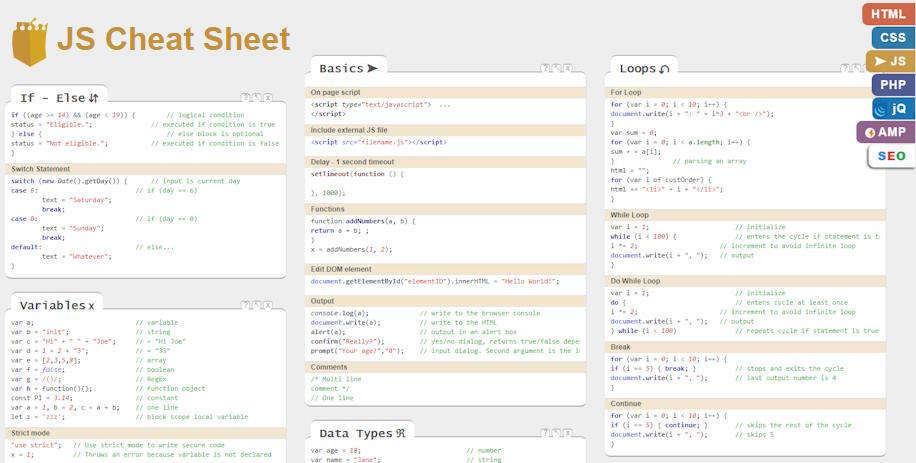
JavaScript Cheat Seet contains useful code examples on a single page. This is not just a PDF page because it's interactive! Find code for JS loops, variables, objects, data types, strings, events and many other categories. Copy-paste the code you need or just quickly check the JS syntax for your projects.
js javascript cheat sheet

Choose to display or hide the comments, clicking the command in the top right corner.

  • Basics – Introduction to JavaScript syntax. Learn how to include the scripts on a HTML page, how to declare a function, target a DOM element by it ID, how to output the data and how to write comments.
  • Loops – Most programming languages allow to work with loops, which help in executing one or more statements up to a desired number of times. Find the "for" and "while" loop syntax in this section.
  • If - Else statements – Conditional statements are used to perform different actions based on different conditions.
  • Variables – Use variables (numbers, strings, arrays etc.) and learn the operators.
  • Data types – You can declare many types of variables and declare your own objects in JavaScript.
  • Strings – Learn how to work with JS strings and find the most common functions to work with this data type.
  • Events – Use JavaScript event listeners to trigger functions.
  • Numbers and math – Work with JS numbers, predefined constants and perform math functions.
  • Dates – Get or modify current time and date.
  • Arrays – Learn how to organize your vairables in vectors and how to use them.
  • Global functions – Predefined functions that are built in every browser that supports JS.
  • Regular expressions – Use RegEx to define a search pattern.
  • Errors – JS error handling.
  • JSON – JavaScript Object Notation is syntax used for storing and exchanging data.
  • Promises – The Promise object is used for asynchronous computation. See our example on how to declare one.

Bookmark this JavaScript cheat sheet with Ctrl + D!