Whether you’re looking to land your first web development job, earn a promotion, or seek a fresh challenge, these React interview questions cover the essential topics for all skill levels, including practical coding challenges.
With web developers earning competitive salaries, now is the ideal moment to explore the job market. Even if you are new to the library, studying this list will reinforce your learning while taking courses or tackling React projects.
React Interview Questions for Beginners
If you’re brand new to ReactJS, these beginner questions are a great way to test your understanding. It's also a good option to follow along with tutorials to help you learn React. Once you complete any of them, you should have a solid reference for the following questions.
1. What Is React?
React is a JavaScript library (developed by Facebook) for building user interfaces (UI). It uses a declarative programming approach and allows developers to describe how a UI should look and behave via small and reusable components.
Pro Tip: Be ready for follow-up questions regarding the difference between React and React Native.
2. What Are the Benefits of Using React?
- Virtual DOM: Provides a fast and efficient way to update the UI.
- Reusability: Components reduce development time and improve maintainability.
- Ecosystem: A massive online community with thousands of third-party libraries.
- Performance: Features like lazy loading, code splitting, and server-side rendering.
3. What Is JSX?
JSX (JavaScript XML) is a syntax extension for JavaScript that allows you to write HTML-like code directly within JS. It makes code easier to understand and debug.
4. Why Do We Use the Render() Method?
It is called whenever there is a change in the state or props of a component. It takes the component tree and returns a React element (a lightweight description of what to render on screen).
5. How Does React Handle DOM Manipulation?
React uses a Virtual DOM. When a component's state changes, React updates the virtual representation first. It then compares this virtual version with the actual DOM (a process called "diffing") and only updates the specific elements that changed. This is significantly faster than traditional full-page manipulation.
6. What Is the Virtual DOM?
It is a lightweight JavaScript object that is an in-memory representation of the real DOM. React uses it to optimize performance by minimizing direct interaction with the browser's API.
7. What Is State?
State is a built-in object used to store data or information about the component. A component's state can change over time; whenever it changes, the component re-renders.
8. What Is a Prop?
Short for "Properties," props are read-only inputs passed from a parent component to a child component. They allow you to customize child components with dynamic data.
9. What Is the Difference Between State and Props?
| State | Props |
|---|---|
| Internal to the component (Managed within) | External to the component (Passed down) |
Mutable (via setState or hooks) | Read-only (Immutable) |
| Stores data that changes over time | Used to pass data/configuration |
10. What Is the Difference Between React and Angular?
| React | Angular |
|---|---|
| A Library (Focuses on UI) | A Framework (Complete solution) |
| Virtual DOM | Real DOM |
| One-way data binding | Two-way data binding |
| Uses JavaScript/JSX | Uses TypeScript |
Intermediate React Interview Questions
The next most common React interview questions focus on those who have already shown some experience with the language. That means experience in the workplace or having built React projects.
11. Explain How to Modularize Code in React.
Modularizing involves breaking the app into small, reusable components. For example, instead of writing the header code inside the main App file, you create a separate Header component.
import React from 'react'; function Header() { return ( <header> <h1>Welcome to my website!</h1> </header> ); } export default Header;12. How Do You Handle Forms in React?
The standard way is using Controlled Components. You create a state variable to hold the input value and update it using the onChange event handler.
13. What Are the Limitations of React?
- View-Only: It is a library, not a framework, so you need other tools for routing and state management.
- JSX Complexity: Some developers find the learning curve of JSX steep initially.
- High Pace of Development: The ecosystem changes so fast that documentation can become outdated quickly.
14. What Are React Hooks?
Introduced in React 16.8, Hooks allow you to use State and other React features without writing a Class Component.
15. Difference Between useEffect and useState?
- useState: Used to store data (state) inside a functional component.
- useEffect: Used to handle side effects (like API calls, subscriptions, or DOM updates) after the component renders.
16. How Do You Handle Errors?
React uses Error Boundaries. These are class components that catch JavaScript errors anywhere in their child component tree, log those errors, and display a fallback UI.
17. What Are Synthetic Events?
React creates a cross-browser wrapper around the browser's native event. This ensures that events behave consistently across different browsers (Chrome, Safari, Firefox).
18. What Is Create React App (CRA)?
It is a CLI tool that sets up a modern web app by running one command. It installs dependencies like Webpack, Babel, and Jest automatically, so developers don't have to configure build tools manually.
19. Why Do We Use Keys in Lists?
Keys help React identify which items have changed, been added, or been removed. They should be stable and unique (like an ID) to ensure efficient updates.
20. How Can You Update the State?
- Class Components:
this.setState({ value: 5 }) - Functional Components:
setValue(5)(using the setter from the useState hook).
Advanced React Interview Questions
21. Rules for Using Hooks
- Only call Hooks at the top level (not inside loops, conditions, or nested functions).
- Only call Hooks from React function components (not regular JavaScript functions).
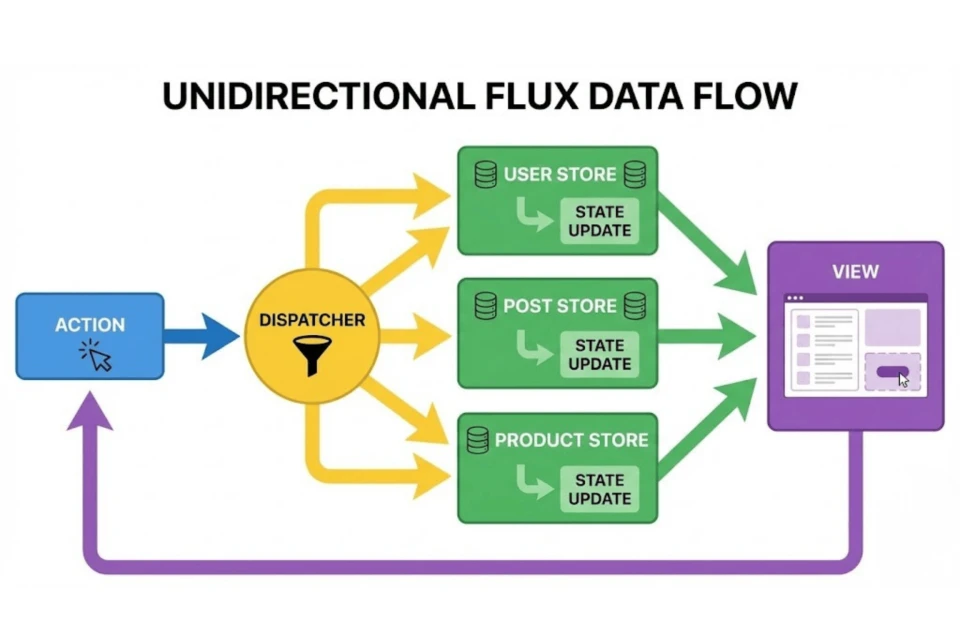
22. What Is Flux Architecture?
Flux is a pattern for managing data flow. Unlike MVC (Model-View-Controller), Flux enforces a unidirectional data flow. The key parts are:
- Actions: Describe what happened.
- Dispatcher: Receives actions and broadcasts them.
- Store: Holds the state and logic.
- View: Listens to changes in the store.
23. React vs. React Native
React is for web development (renders HTML). React Native is for mobile development (renders native iOS/Android UI components). However, the syntax and logic (Hooks, State, Props) are nearly identical.
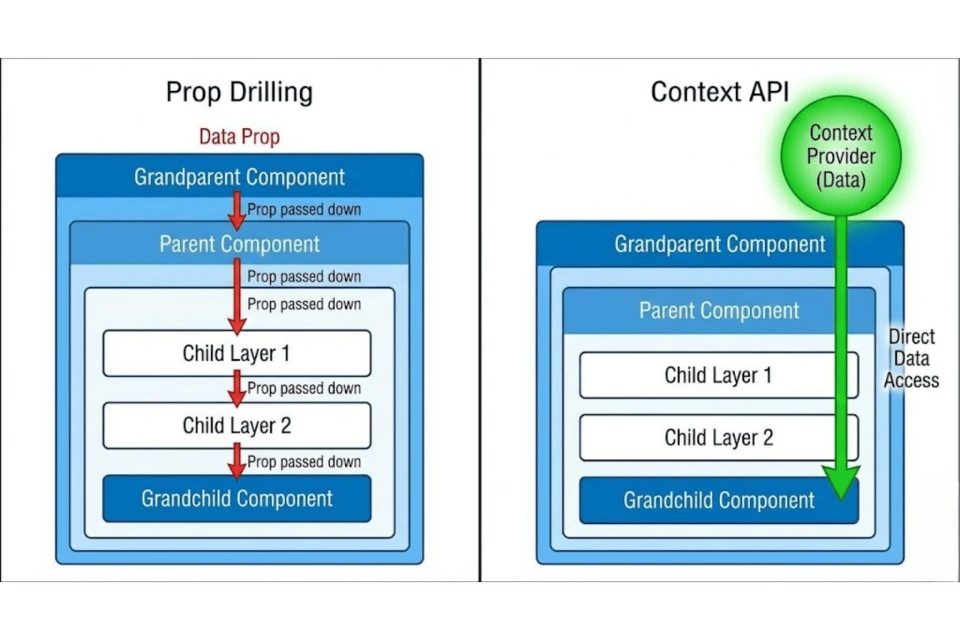
24. Role of Context API
Context provides a way to pass data through the component tree without having to pass props down manually at every level (solving "Prop Drilling").
25. How Do You Implement Animations?
You can use CSS transitions, but for complex animations, libraries like Framer Motion, React Spring, or React Transition Group are preferred.
26. Popular Libraries Used With React
- Redux / Zustand: State Management
- React Router: Navigation
- Axios: API Requests
- Styled Components / Tailwind: Styling
- Next.js: Server-Side Rendering Framework
27. How To Optimize Large Lists?
Use Virtualization (or "Windowing"). Libraries like react-window only render the items currently visible on the screen, rather than rendering all 1,000+ items at once.
28. Best Practices for Large Scale Apps
- Use TypeScript for type safety.
- Implement Lazy Loading for routes.
- Separate business logic from UI components (Custom Hooks).
- Write Unit and Integration tests.
29. Integration with Other Libraries
React is flexible. You can wrap third-party DOM libraries (like D3.js or jQuery plugins) inside a useEffect hook to ensure they initialize only after React has rendered the DOM.
30. Shallow vs. Full DOM Rendering (Testing)
| Feature | Shallow Rendering | Full DOM Rendering |
|---|---|---|
| Scope | Renders only the component (no children) | Renders component and all children |
| Speed | Fast (Unit tests) | Slower (Integration tests) |
| Use Case | Testing isolated logic | Testing full user interactions |
31. What Are Fragments?
Fragments (<>...</>) allow you to group a list of children without adding extra nodes (like unnecessary <div> tags) to the DOM.
32. Why Are Fragments Better Than Divs?
- Cleaner DOM: Less nesting means easier debugging.
- Performance: Slightly less memory usage.
- Layouts: Avoids breaking CSS Flexbox/Grid layouts that depend on parent-child relationships.
33. How To Optimize Performance?
- React.memo: Prevents re-rendering if props haven't changed.
- useMemo: Caches expensive calculations.
- useCallback: Caches functions to prevent them from being recreated on every render.
- Code Splitting: Using
React.lazyto load components only when needed.
34. What Is React Fiber?
Fiber is the core rendering engine introduced in React 16. It enables incremental rendering, allowing React to pause work, prioritize updates, and reuse work, resulting in smoother animations and UI interactions.
35. What Is Prop Drilling?
Prop Drilling occurs when you pass data from a Parent to a Great-Grandchild component, forcing every intermediate component to pass the props along even if they don't use the data themselves. It is usually solved by Context API or Redux.
React Interview Coding Questions
36. Simple Button Click
import React from 'react'; export default function ButtonComponent() { const handleClick = () => { console.log('Button Clicked!'); }; return ( <button onClick={handleClick}>Click Me</button> ); }37. Fetching Data from API
import React, { useEffect, useState } from 'react'; export default function App() { const [data, setData] = useState(null); useEffect(() => { fetch('https://api.example.com/user') .then(response => response.json()) .then(json => setData(json)); }, []); if (!data) return <div>Loading...</div>; return <div>{data.name}</div>; }38. Counter with Redux
// Action const increment = () => ({ type: 'INCREMENT' }); // Reducer const counter = (state = 0, action) => { switch (action.type) { case 'INCREMENT': return state + 1; default: return state; } }; // Component function App() { const dispatch = useDispatch(); return ( <button onClick={() => dispatch(increment())}> Count Up </button> ); }39. Filter a List
const filteredList = list.filter(item => item.toLowerCase().includes(searchTerm.toLowerCase()) );40. Pagination Logic
Pagination involves slicing your data array based on the current page number:
const indexOfLastItem = currentPage * itemsPerPage; const indexOfFirstItem = indexOfLastItem - itemsPerPage; const currentItems = items.slice(indexOfFirstItem, indexOfLastItem);React Components Questions
41. What Are Components?
Components are the building blocks of React. They are independent, reusable snippets of code. Conceptually, they are like JavaScript functions: they accept inputs (Props) and return React elements describing what should appear on the screen.
42. Class vs Function Component
| Feature | Class Component | Function Component |
|---|---|---|
| Syntax | Uses ES6 Classes | Uses JS Functions |
| State | this.state | useState Hook |
| Lifecycle | componentDidMount | useEffect Hook |
43. What Are Higher Order Components (HOCs)?
An HOC is a function that takes a component and returns a new component. It is a pattern used for reusing component logic (e.g., creating an withAuth HOC that checks if a user is logged in before rendering the page).
44. Controlled vs Uncontrolled Components
| Controlled | Uncontrolled |
|---|---|
| Form data is handled by React State | Form data is handled by the DOM |
| Values accessed via State | Values accessed via Refs |
| Instant validation possible | Validation on submit |
45. Pure Component vs Regular Component
| Pure Component | Regular Component |
|---|---|
Implements shouldComponentUpdate automatically | Does not check for updates |
| Only re-renders if props/state truly change | Re-renders whenever parent renders |
46. Presentational vs Container Components
| Presentational | Container |
|---|---|
| Focuses on how things look (UI) | Focuses on how things work (Logic) |
| Receives data via props | Fetches data and manages state |
47. Stateful vs Stateless Components
| Stateful | Stateless |
|---|---|
| Tracks changing data | Just receives data (props) |
| Complex logic | Simple visualization |
48. How Do You Pass Data Between Components?
- Parent to Child: Props
- Child to Parent: Callbacks (Functions passed as props)
- Sibling to Sibling: Lift state up to common parent or use Redux/Context
49. How Do You Handle Events?
React events are named using camelCase, rather than lowercase. With JSX you pass a function as the event handler, rather than a string.
<button onClick={activateLasers}>
50. Purpose of Render Method?
It returns the HTML structure (JSX) that you want to display on the screen.
Redux Questions
51. What Is Redux?
Redux is a predictable state container for JavaScript apps. It solves the problem of "where does this data live?" in complex applications by storing everything in one central place.
52. The Three Principles of Redux
- Single Source of Truth: One store for the whole app.
- State is Read-Only: You cannot modify state directly; you must dispatch an action.
- Pure Functions: Changes are made by reducers, which are pure functions.
53. What Is a Reducer?
A pure function that takes the previous state and an action, and returns the next state.
54. What Are Actions?
Actions are plain JavaScript objects that have a type field. They tell the store what happened (e.g., { type: 'ADD_TODO', text: 'Buy Milk' }).
55. Why Are Reducers "Pure"?
They must always return the same output for the same input, and they cannot produce side effects (like API calls). This makes Redux predictable and easy to debug.
56. Why Use Constants for Action Types?
Using const ADD_TODO = 'ADD_TODO' helps prevent spelling errors and allows IDEs to provide autocomplete.
57. Redux Data Flow Diagram
The flow is strictly unidirectional: Action -> Dispatch -> Store -> Reducer -> New State -> View Update.
58. What Is Redux Thunk?
Redux handles synchronous data by default. Redux Thunk is a middleware that allows you to write action creators that return a function instead of an action. This is required for asynchronous logic, like fetching data from an API.
React Router Questions
59. What Is React Router?
It is the standard routing library for React. It allows you to create Single Page Applications (SPAs) with multiple views without refreshing the browser.
60. How Do You Define Routes?
<Routes> <Route path="/" element={<Home />} /> <Route path="/about" element={<About />} /> </Routes>61. What Are Nested Routes?
Nested routes allow parent components to render child routes inside them (e.g., a "Dashboard" that displays different graphs inside a main layout).
62. "Router May Have Only One Child" Warning
In older versions of React Router, the Router component could only wrap a single child div. This is largely resolved in newer versions (v6), but generally, you should wrap your App in a single <BrowserRouter>.
63. How To Handle 404 Pages?
Use the wildcard path * at the end of your routes list:
<Route path="*" element={<NotFound />} />
64. How To Redirect?
In React Router v6, use the <Navigate /> component:
<Navigate to="/dashboard" replace={true} />
React Styling Questions
65. Ways to Style React
- Inline Styles:
style={{ color: 'red' }} - CSS Classes:
className="my-class" - CSS Modules:
styles.myClass - Styled Components: CSS-in-JS library.
66. What Are CSS Modules?
A way to write CSS where class names are scoped locally to the component. This prevents class name conflicts (e.g., two components both using .button won't clash).
67. What Are Styled Components?
A library that allows you to write actual CSS code inside your JavaScript files using tagged template literals.
68. Styled Components Example
const Button = styled.button` background: blue; color: white; `;69. How To Optimize CSS Performance?
Avoid Inline styles (they create new objects on every render). Use CSS Modules or CSS-in-JS libraries which extract static styles into separate .css files during the build process.
70. Passing Styles to Children
Pass the style as a prop:
<ChildComponent style={{ color: 'blue' }} />
