Automatically Remove AI Features From Windows 11

It seems like a fair assessment to state that the many ‘AI’ features that Microsoft added to Windows 11 are at least somewhat controversial. Unsurprisingly, this has led many to wonder about disabling or outright removing these features, with [zoicware]’s ‘Remove Windows AI’ project on GitHub trying to automate this process as much as reasonably possible.

All you need to use it is your Windows 11-afflicted system running at least 25H2 and the PowerShell script. The script is naturally run with Administrator privileges as it has to do some manipulating of the Windows Registry and prevent Windows Update from undoing many of the changes. There is also a GUI for those who prefer to just flick a few switches in a UI instead of running console commands.

Among the things that can be disabled automatically are the disabling of Copilot, Recall, AI Actions, and other integrations in applications like Edge, Paint, etc. The reinstallation of removed packages is inhibited by a custom package. For the ‘features’ that cannot be disabled automatically, there is a list of where to toggle those to ‘off’.

Naturally, since Windows 11 is a moving target, it can be rough to keep a script like this up to date, but it seems to be a good start at least for anyone who finds themselves stuck on Windows 11 with no love for Microsoft’s ‘AI’ adventures. For the other features, there are also Winaero Tweaker and Open-Shell, with the latter in particular bringing back the much more usable Windows 2000-style start menu, free of ads and other nonsense.


Jenny’s Daily Drivers: Haiku R1/beta5

Back in the mid 1990s, the release of Microsoft’s Windows 95 operating system cemented the Redmond software company’s dominance over most of the desktop operating system space. Apple were still in their period in the doldrums waiting for Steve Jobs to return with his NeXT, while other would-be challengers such as IBM’s OS/2 or Commodore’s Amiga were sinking into obscurity.

Into this unpromising marketplace came Be inc, with their BeBox computer and its very nice BeOS operating system. To try it out as we did at a trade show some time in the late ’90s was to step into a very polished multitasking multimedia OS, but sadly one which failed to gather sufficient traction to survive. The story ended in the early 2000s as Be were swallowed by Palm, and a dedicated band of BeOS enthusiasts set about implementing a free successor OS. This has become Haiku, and while it’s not BeOS it retains API compatibility with and certainly feels a lot like its inspiration. It’s been on my list for a Daily Drivers article for a while now, so it’s time to download the ISO and give it a go. I’m using the AMD64 version.

Continue reading “Jenny’s Daily Drivers: Haiku R1/beta5”

Moving From Windows To FreeBSD As The Linux Chaos Alternative

Back in the innocent days of Windows 98 SE, I nearly switched to Linux on account of how satisfied I was with my Windows experience. This started with the Year of the Linux Desktop in 1999 that started with me purchasing a boxed copy of SuSE Linux and ended with me switching to Windows 2000. After this I continued tinkering with non-Windows OSes including QNX, BeOS, various BSDs, as well as Linux distributions that promised a ‘Windows-like’ desktop experience, such as Lindows.

Now that Windows 2000’s proud legacy has seen itself reduced to a rusting wreck resting on cinderblocks on Microsoft’s dying front lawn, the quiet discomfort that many Windows users have felt since Windows 7 was forcefully End-Of-Life-d has only increased. With it comes the uncomfortable notion that Windows as a viable desktop OS may be nearing its demise. Yet where to from here?

Although the recommendations from the peanut gallery seem to coalesce around Linux or Apple’s MacOS (formerly OS X), there are a few dissenting voices extolling the virtues of FreeBSD over both. There are definitely compelling reasons to pick FreeBSD over Linux, in addition to it being effectively MacOS’s cousin. Best of all is not having to deal with the Chaos Vortex that spawns whenever you dare to utter the question of ‘which Linux distro?’. Within the world of FreeBSD there is just FreeBSD, which makes for a remarkably coherent experience.

Continue reading “Moving From Windows To FreeBSD As The Linux Chaos Alternative”

Jenny’s Daily Drivers: ReactOS 0.4.15

When picking operating systems for a closer look here in the Daily Drivers series, the aim has not been to merely pick the next well-known Linux distro off the pile, but to try out the interesting, esoteric or minority OS. The need remains to use it as a daily driver though, so each one we try has to have at least some chance of being a useful everyday environment in which a Hackaday piece could be written. With some of them such as the then-current BSD or Slackware versions we tried for interest’s sake a while back that’s not a surprising achievement, but for the minority operating systems it’s quite a thing. Today’s choice, ReactOS 0.4.15, is among the closest we’ve come so far to that ideal.

For The N’th Time In The Last 20 Years, I download A ReactOS ISO

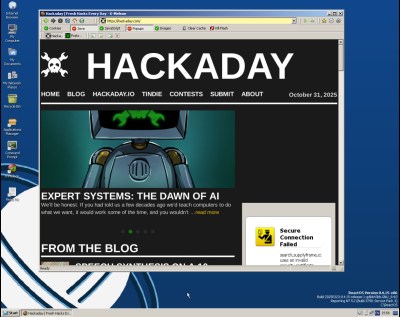
A Windows-style ReactOS desktop with a web browser showing Hackaday
It’s fair to say there are still a few quirks, but it works.

ReactOS is an open-source clone of a Windows operating system from the early 2000s, having a lot on common with Windows XP. It started in the late 1990s and has slowly progressed ever since, making periodic releases that, bit-by-bit, have grown into a usable whole. I last looked at it for Hackaday with version 0.4.13 in 2020, so have five years made any difference? Time to download that ISO and give it a go.

Installing ReactOS has that bright blue and yellow screen feeling of a Windows install from around the millennium, but I found it to be surprisingly quick and pain free despite a few messages about unidentified hardware. The display driver it chose was a VESA one but since it supported all my monitor’s resolutions and colour depths that’s not the hardship it might once have been. Continue reading “Jenny’s Daily Drivers: ReactOS 0.4.15”

Building A DIY Ryzen-Based PC!

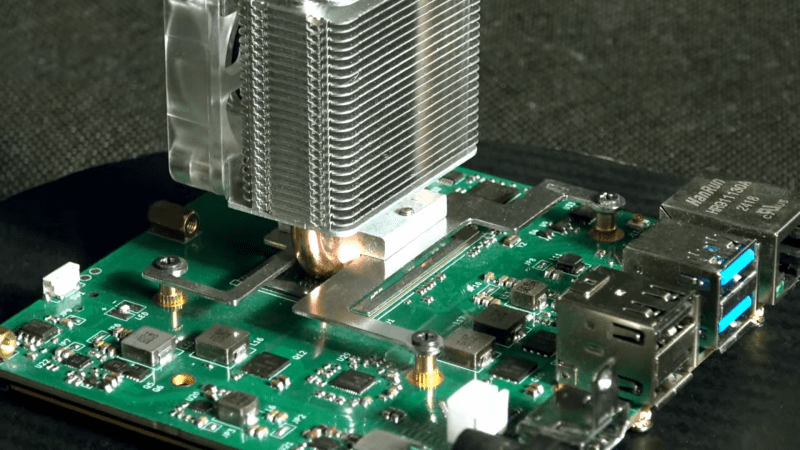
This project gives a whole new meaning to DIY PC. We don’t know how capable you were as a teenager, but could you have designed your own Ryzen-based mini PC?

Whilst making repairs to laptop internals, [Dominik Baroński] was busy taking notes. Modern super-integrated laptop PCs have reached the point where all the functions of a complete PC are embedded in a single chip. But it’s a big, complicated chip with very specific feeding and care needs. Once you’ve figured out what it needs, it ‘merely’ remains to supply it power, hook up some DDR4 RAM, PCIe storage, and some USB ports, and you’re away. It sounds easy when you say it like that, but do not underestimate how difficult it is to create such a board—or even to populate it by hand—yet that’s precisely what [Dominik] has achieved.

Continue reading “Building A DIY Ryzen-Based PC!”

Tommy Flowers: How An Engineer Won The War

Back in 2016, we took you to a collection of slightly dilapidated prefabricated huts in the English Home Counties, and showed you a computer. The place was the National Museum of Computing, next to the famous Bletchley Park codebreaking museum, and the machine was their reconstruction of Colossus, the world’s first fully electronic digital computer. Its designer was a telephone engineer named Tommy Flowers, and the Guardian has a piece detailing his efforts in its creation.

The front of the museum's Colossus MkII.
TNMOC’s Colossus MkII.

It’s a piece written for a non-technical audience so you’ll have to forgive it glossing over some of the more interesting details, but nevertheless it sets out to right a long-held myth that the machine was instead the work of the mathematician Alan Turing. Flowers led the research department at the British Post Office, who ran the country’s telephone system, and was instrumental both in proposing the use of electronic switches in computing, and in producing a working machine. The connection is obvious when you see Colossus, as its racks are the same as those used in British telephone exchanges of the era.

All in all, the article makes for an interesting read for anyone with an interest in technology. You can take a look at Colossus as we saw it in 2016 here, and if your interest extends to the only glimpse the British public had of the technology behind it in the 1950s, we’ve also taken a look at another Tommy Flowers creation, ERNIE, the UK Premium Bond computer.

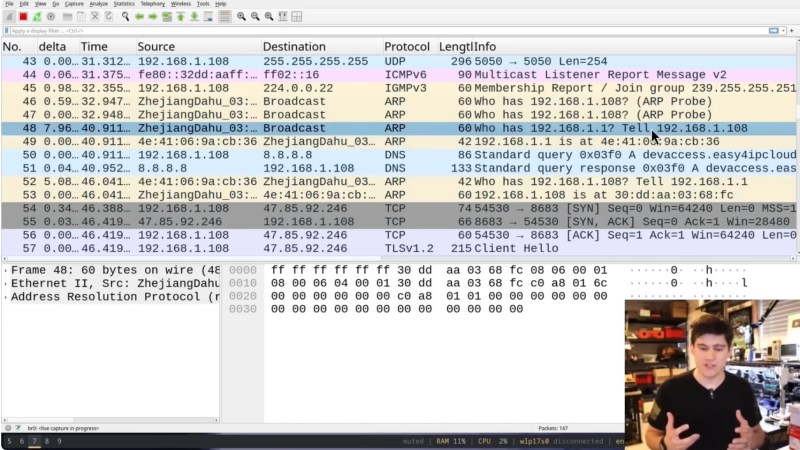
A screen shot of Wireshark in action.

Hacking A Banned Chinese Security Camera

Over on YouTube [Matt Brown] hacks a Chinese security camera recently banned by the US government. If you didn’t hear about this you can find out more over here: Major US online retailers remove listings for millions of prohibited Chinese electronics.

After powering the camera with a power-over-Ethernet (PoE) adapter [Matt] sets about monitoring network activity with Wireshark. The first data comes from DNS for the host devaccess.easy4ipcloud.com, which whois reports is operated by Alibaba Cloud LLC in California. This is a Chinese owned company with servers in the United States.

[Matt] covers some basics of TLS and how it works. He then goes on to explain how a Man in the Middle (MITM) attack works at a high level. To setup a MITM attack against the camera [Matt] sets up some port redirections using iptables for ports 443, 15301, 8683, 9898, and 12337 which his Wireshark analysis indicates were being used. His MITM attack works, which means the device is not properly verifying its certificate signing chain.

[Matt] goes on to reverse engineer the custom UDP protocol used for transmitting video data. He uses a vibe-coded Python program along with ffmpeg for that and manages to reconstruct a few frames of video taken from the UDP packet capture.

We think it would be safe to say that [Matt] did indeed find a few security problems with the camera as-is, but we don’t think that’s the point of the ban. The real problem is that there is auto-update facilities for the device firmware which means that in future malicious software could be uploaded by the manufacturer in the form of a firmware update. So even if this device was secure against MITM attacks and didn’t send unencrypted video data over UDP you would still have the problem of the firmware update if there is no trust.

Continue reading “Hacking A Banned Chinese Security Camera”