



Monaco Editor component for React. demo @uiwjs.github.io/react-monacoeditor/
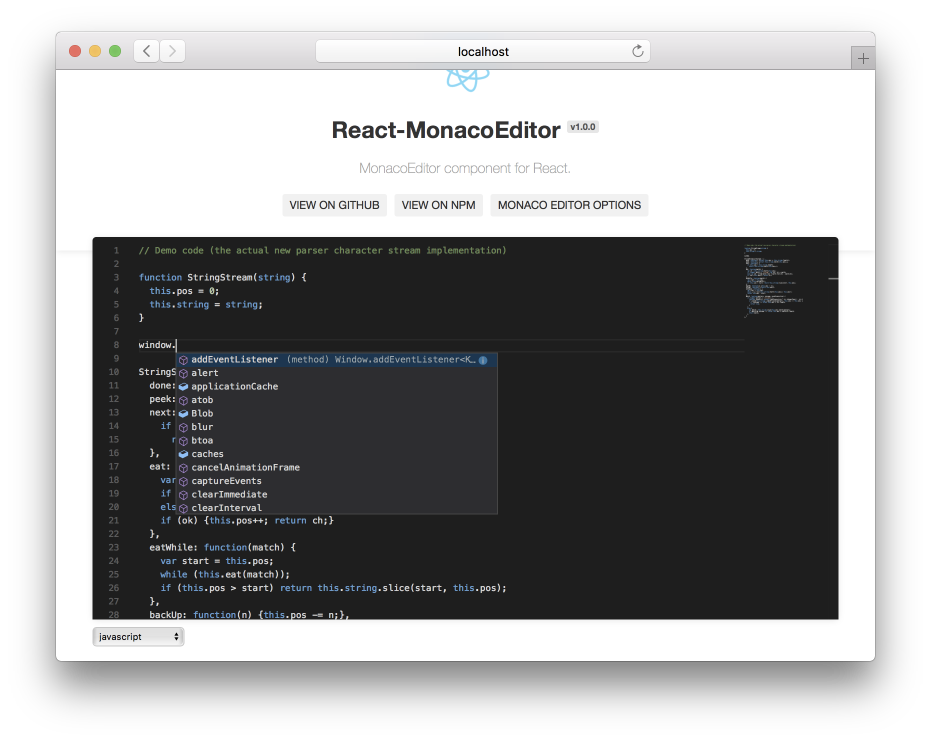
npm install @uiw/react-monacoeditor --save
import React from 'react'; import MonacoEditor from '@uiw/react-monacoeditor'; export default function Demo() { return ( <MonacoEditor language="html" value="<h1>I ♥ react-monacoeditor</h1>" height="300px" options={{ theme: 'vs-dark', }} /> ); }import React from 'react'; import { render } from 'react-dom'; import MonacoEditor from '@uiw/react-monacoeditor'; const code = `import React, { PureComponent } from 'react'; import MonacoEditor from '@uiw/react-monacoeditor'; export default class App extends PureComponent { render() { return ( <MonacoEditor language="html" value="<h1>I ♥ react-codemirror2</h1>" options={{ selectOnLineNumbers: true, roundedSelection: false, cursorStyle: 'line', automaticLayout: false, theme: 'vs-dark', }} /> ); } } `; class App extends React.Component { constructor(props) { super(props); this.state = { code: '// type your code...', } } editorDidMount(editor, monaco) { console.log('editorDidMount', editor, monaco); editor.focus(); } onChange(newValue, e) { console.log('onChange', newValue, e); } render() { const options = { selectOnLineNumbers: true, roundedSelection: false, readOnly: false, cursorStyle: 'line', automaticLayout: false, theme: 'vs-dark', scrollbar: { // Subtle shadows to the left & top. Defaults to true. useShadows: false, // Render vertical arrows. Defaults to false. verticalHasArrows: true, // Render horizontal arrows. Defaults to false. horizontalHasArrows: true, // Render vertical scrollbar. // Accepted values: 'auto', 'visible', 'hidden'. // Defaults to 'auto' vertical: 'visible', // Render horizontal scrollbar. // Accepted values: 'auto', 'visible', 'hidden'. // Defaults to 'auto' horizontal: 'visible', verticalScrollbarSize: 17, horizontalScrollbarSize: 17, arrowSize: 30, }, }; return ( <MonacoEditor height="500px" language="javascript" editorDidMount={this.editorDidMount.bind(this)} onChange={this.onChange.bind(this)} value={code} options={options} /> ); } } render( <App />, document.getElementById('root') );Add the Monaco Editor Webpack Loader Plugin monaco-editor-webpack-plugin to your webpack.config.js:
const MonacoWebpackPlugin = require('monaco-editor-webpack-plugin'); module.exports = { plugins: [ new MonacoWebpackPlugin() ] };If you specify value property, the component behaves in controlled mode. Otherwise, it behaves in uncontrolled mode.
widthwidth of editor. Defaults to100%.heightheight of editor. Defaults to100%.valuevalue of the auto created model in the editor.defaultValuethe initial value of the auto created model in the editor.languagethe initial language of the auto created model in the editor.themethe theme of the editorvs,vs-dark,hc-blackoptionsrefer to Monaco interface IEditorConstructionOptions.editorDidMount(editor, monaco)an event emitted when the editor has been mounted (similar tocomponentDidMountof React).onChange(newValue, event)an event emitted when the content of the current model has changed.autoComplete?: (model: monaco.editor.ITextModel, position: monaco.Position) => languages.CompletionItem[];User provided extension function provider for auto-complete. #47
Refer to Monaco interface IEditor.
- @uiw/react-textarea-code-editor: A simple code editor with syntax highlighting.
- @uiw/react-codemirror: CodeMirror component for React. @codemirror
- @uiw/react-markdown-editor: A markdown editor with preview, implemented with React.js and TypeScript.
- @uiw/react-md-editor: A simple markdown editor with preview, implemented with React.js and TypeScript.
- @uiw/react-markdown-preview: React component preview markdown text in web browser.
- Nginx Editor Nginx language for Monaco Editor.
As always, thanks to our amazing contributors!

Made with github-action-contributors.
Licensed under the MIT License.

