
 



Reason - Get Started - Installation
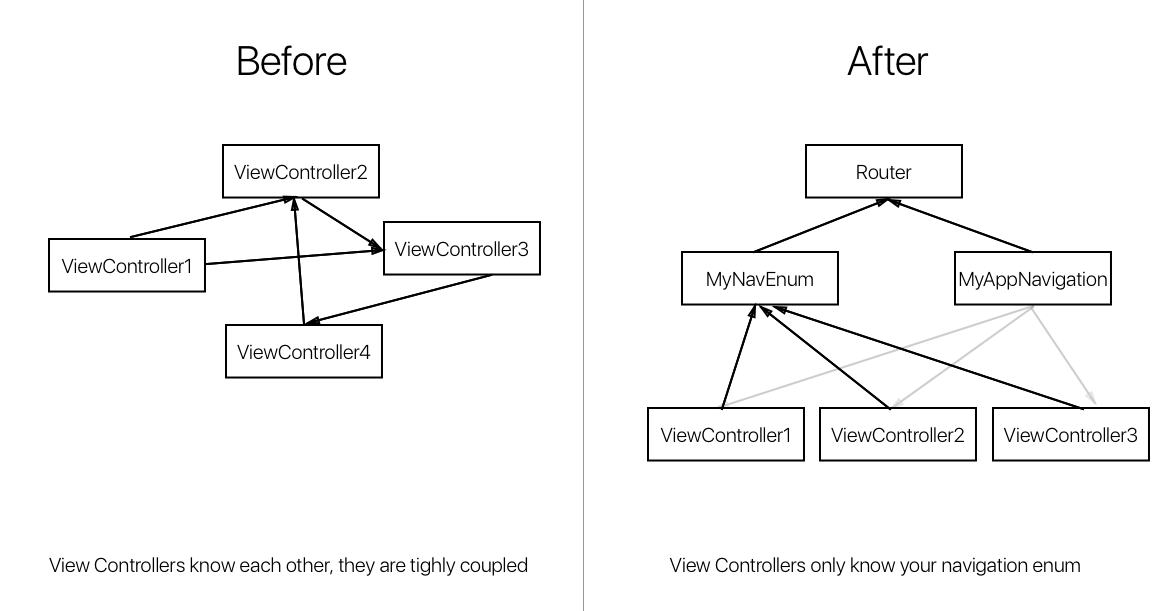
Because classic App Navigation introduces tight coupling between ViewControllers. Complex Apps navigation can look like a gigantic spider web.
Besides the fact that Navigation responsibility is split among ViewControllers, modifying a ViewController can cascade recompiles and produce slow compile times.
By using a Navigation enum to navigate we decouple ViewControllers between them. Aka they don't know each other anymore. So modifying VCA won't trigger VCB to recompile anymore \o/
// navigationController?.pushViewController(AboutViewController(), animated: true) navigate(.about)Navigation code is now encapsulated in a AppNavigation object.
- Decouples ViewControllers
- Makes navigation Testable
- Faster compile times
enum MyNavigation: Navigation { case about case profile(Person) }Swift enum can take params! Awesome for us because that's how we will pass data between ViewControllers :)
struct MyAppNavigation: AppNavigation { func viewcontrollerForNavigation(navigation: Navigation) -> UIViewController { if let navigation = navigation as? MyNavigation { switch navigation { case .about: return AboutViewController() case .profile(let p): return ProfileViewController(person: p) } } return UIViewController() } func navigate(_ navigation: Navigation, from: UIViewController, to: UIViewController) { from.navigationController?.pushViewController(to, animated: true) } }A cool thing is that the swift compiler will produce an error if a navigation case is not handled ! Which would'nt be the case with string URLs by the way ;)
In AppDelegate.swift, before everything :
Router.default.setupAppNavigation(appNavigation: MyAppNavigation())You can now call nagivations from you view controllers :
navigate(MyNavigation.about)Bridge Navigation with your own enum type, here MyNavigation so that we don't have to type our own.
extension UIViewController { func navigate(_ navigation: MyNavigation) { navigate(navigation as Navigation) } }You can now write :
navigate(.about)Another cool thing about decoupling navigation is that you can now extract traking code from view Controllers as well. You can be notified by the router whenever a navigation happened.
Router.default.didNavigate { navigation in // Plug Analytics for instance GoogleAnalitcs.trackPage(navigation) }There is a nasty bug in Swift 3 compiler where the compiler rebuilds files even though they haven't changed. This is documented here : https://forums.developer.apple.com/thread/62737?tstart=0
Due to this bug, the compilation can go like this :
Change ViewController1 -> Build
-> Compiles ViewController1, referenced in MyAppNavigation so
MyAppNavigation gets recompiled. MyAppNavigation is referenced in AppDelegate which gets recompiled which references ... App -> ViewController2 -> ViewController3 -> ViewControllerX you get the point. Before you know it the entire App gets rebuilt :/
A good this is that most of the app coupling usually comes from navigation. which Router decouples.
We can stop this nonsense until this gets fixed in a future release of Xcode. Router can help us manage this issue by injecting our AppNavigation implementation at runtime.
In your AppDelegate.swift
// Inject your AppNavigation at runtime to avoid recompilation of AppDelegate :) Router.default.setupAppNavigation(appNavigation: appNavigationFromString("YourAppName.MyAppNavigation"))And make sure your AppNavigation implementation is now a class that is RuntimeInjectable
class MyAppNavigation: RuntimeInjectable, AppNavigation {github "freshOS/Router" Simply Copy and Paste Router.swift files in your Xcode Project :)
Grab this repository and build the Framework target on the example project. Then Link against this framework.