Getting Started#
Ray is an open source unified framework for scaling AI and Python applications. It provides a simple, universal API for building distributed applications that can scale from a laptop to a cluster.
What’s Ray?#
Ray simplifies distributed computing by providing:
Scalable compute primitives: Tasks and actors for painless parallel programming
Specialized AI libraries: Tools for common ML workloads like data processing, model training, hyperparameter tuning, and model serving
Unified resource management: Seamless scaling from laptop to cloud with automatic resource handling
Choose Your Path#
Select the guide that matches your needs:
Scale ML workloads: Ray Libraries Quickstart
Scale general Python applications: Ray Core Quickstart
Deploy to the cloud: Ray Clusters Quickstart
Debug and monitor applications: Debugging and Monitoring Quickstart

Ray AI Libraries Quickstart#
Use individual libraries for ML workloads. Each library specializes in a specific part of the ML workflow, from data processing to model serving. Click on the dropdowns for your workload below.
 Data: Scalable Datasets for ML
Ray Data provides distributed data processing optimized for machine learning and AI workloads. It efficiently streams data through data pipelines.
Here’s an example of how to scale offline inference and training ingest with Ray Data.
Note
To run this example, install Ray Data:
pip install -U "ray[data]" from typing import Dict import numpy as np import ray # Create datasets from on-disk files, Python objects, and cloud storage like S3. ds = ray.data.read_csv("s3://anonymous@ray-example-data/iris.csv") # Apply functions to transform data. Ray Data executes transformations in parallel. def compute_area(batch: Dict[str, np.ndarray]) -> Dict[str, np.ndarray]: length = batch["petal length (cm)"] width = batch["petal width (cm)"] batch["petal area (cm^2)"] = length * width return batch transformed_ds = ds.map_batches(compute_area) # Iterate over batches of data. for batch in transformed_ds.iter_batches(batch_size=4): print(batch) # Save dataset contents to on-disk files or cloud storage. transformed_ds.write_parquet("local:///tmp/iris/") Train: Distributed Model Training
Ray Train makes distributed model training simple. It abstracts away the complexity of setting up distributed training across popular frameworks like PyTorch and TensorFlow.
This example shows how you can use Ray Train with PyTorch.
To run this example install Ray Train and PyTorch packages:
Note
pip install -U "ray[train]" torch torchvision Set up your dataset and model.
import torch import torch.nn as nn from torch.utils.data import DataLoader from torchvision import datasets from torchvision.transforms import ToTensor def get_dataset(): return datasets.FashionMNIST( root="/tmp/data", train=True, download=True, transform=ToTensor(), ) class NeuralNetwork(nn.Module): def __init__(self): super().__init__() self.flatten = nn.Flatten() self.linear_relu_stack = nn.Sequential( nn.Linear(28 * 28, 512), nn.ReLU(), nn.Linear(512, 512), nn.ReLU(), nn.Linear(512, 10), ) def forward(self, inputs): inputs = self.flatten(inputs) logits = self.linear_relu_stack(inputs) return logits Now define your single-worker PyTorch training function.
def train_func(): num_epochs = 3 batch_size = 64 dataset = get_dataset() dataloader = DataLoader(dataset, batch_size=batch_size) model = NeuralNetwork() criterion = nn.CrossEntropyLoss() optimizer = torch.optim.SGD(model.parameters(), lr=0.01) for epoch in range(num_epochs): for inputs, labels in dataloader: optimizer.zero_grad() pred = model(inputs) loss = criterion(pred, labels) loss.backward() optimizer.step() print(f"epoch: {epoch}, loss: {loss.item()}") This training function can be executed with:
train_func() Convert this to a distributed multi-worker training function.
Use the ray.train.torch.prepare_model and ray.train.torch.prepare_data_loader utility functions to set up your model and data for distributed training. This automatically wraps the model with DistributedDataParallel and places it on the right device, and adds DistributedSampler to the DataLoaders.
import ray.train.torch def train_func_distributed(): num_epochs = 3 batch_size = 64 dataset = get_dataset() dataloader = DataLoader(dataset, batch_size=batch_size, shuffle=True) dataloader = ray.train.torch.prepare_data_loader(dataloader) model = NeuralNetwork() model = ray.train.torch.prepare_model(model) criterion = nn.CrossEntropyLoss() optimizer = torch.optim.SGD(model.parameters(), lr=0.01) for epoch in range(num_epochs): if ray.train.get_context().get_world_size() > 1: dataloader.sampler.set_epoch(epoch) for inputs, labels in dataloader: optimizer.zero_grad() pred = model(inputs) loss = criterion(pred, labels) loss.backward() optimizer.step() print(f"epoch: {epoch}, loss: {loss.item()}") Instantiate a TorchTrainer with 4 workers, and use it to run the new training function.
from ray.train.torch import TorchTrainer from ray.train import ScalingConfig # For GPU Training, set `use_gpu` to True. use_gpu = False trainer = TorchTrainer( train_func_distributed, scaling_config=ScalingConfig(num_workers=4, use_gpu=use_gpu) ) results = trainer.fit() To accelerate the training job using GPU, make sure you have GPU configured, then set use_gpu to True. If you don’t have a GPU environment, Anyscale provides a development workspace integrated with an autoscaling GPU cluster for this purpose.

This example shows how you can use Ray Train to set up Multi-worker training with Keras.
To run this example install Ray Train and Tensorflow packages:
Note
pip install -U "ray[train]" tensorflow Set up your dataset and model.
import sys import numpy as np if sys.version_info >= (3, 12): # Tensorflow is not installed for Python 3.12 because of keras compatibility. sys.exit(0) else: import tensorflow as tf def mnist_dataset(batch_size): (x_train, y_train), _ = tf.keras.datasets.mnist.load_data() # The `x` arrays are in uint8 and have values in the [0, 255] range. # You need to convert them to float32 with values in the [0, 1] range. x_train = x_train / np.float32(255) y_train = y_train.astype(np.int64) train_dataset = tf.data.Dataset.from_tensor_slices( (x_train, y_train)).shuffle(60000).repeat().batch(batch_size) return train_dataset def build_and_compile_cnn_model(): model = tf.keras.Sequential([ tf.keras.layers.InputLayer(input_shape=(28, 28)), tf.keras.layers.Reshape(target_shape=(28, 28, 1)), tf.keras.layers.Conv2D(32, 3, activation='relu'), tf.keras.layers.Flatten(), tf.keras.layers.Dense(128, activation='relu'), tf.keras.layers.Dense(10) ]) model.compile( loss=tf.keras.losses.SparseCategoricalCrossentropy(from_logits=True), optimizer=tf.keras.optimizers.SGD(learning_rate=0.001), metrics=['accuracy']) return model Now define your single-worker TensorFlow training function.
def train_func(): batch_size = 64 single_worker_dataset = mnist_dataset(batch_size) single_worker_model = build_and_compile_cnn_model() single_worker_model.fit(single_worker_dataset, epochs=3, steps_per_epoch=70) This training function can be executed with:
train_func() Now convert this to a distributed multi-worker training function.
Set the global batch size - each worker processes the same size batch as in the single-worker code.
Choose your TensorFlow distributed training strategy. This examples uses the
MultiWorkerMirroredStrategy.
import json import os def train_func_distributed(): per_worker_batch_size = 64 # This environment variable will be set by Ray Train. tf_config = json.loads(os.environ['TF_CONFIG']) num_workers = len(tf_config['cluster']['worker']) strategy = tf.distribute.MultiWorkerMirroredStrategy() global_batch_size = per_worker_batch_size * num_workers multi_worker_dataset = mnist_dataset(global_batch_size) with strategy.scope(): # Model building/compiling need to be within `strategy.scope()`. multi_worker_model = build_and_compile_cnn_model() multi_worker_model.fit(multi_worker_dataset, epochs=3, steps_per_epoch=70) Instantiate a TensorflowTrainer with 4 workers, and use it to run the new training function.
from ray.train.tensorflow import TensorflowTrainer from ray.train import ScalingConfig # For GPU Training, set `use_gpu` to True. use_gpu = False trainer = TensorflowTrainer(train_func_distributed, scaling_config=ScalingConfig(num_workers=4, use_gpu=use_gpu)) trainer.fit() To accelerate the training job using GPU, make sure you have GPU configured, then set use_gpu to True. If you don’t have a GPU environment, Anyscale provides a development workspace integrated with an autoscaling GPU cluster for this purpose.
Tune: Hyperparameter Tuning at Scale
Ray Tune is a library for hyperparameter tuning at any scale. It automatically finds the best hyperparameters for your models with efficient distributed search algorithms. With Tune, you can launch a multi-node distributed hyperparameter sweep in less than 10 lines of code, supporting any deep learning framework including PyTorch, TensorFlow, and Keras.
Note
To run this example, install Ray Tune:
pip install -U "ray[tune]" This example runs a small grid search with an iterative training function.
from ray import tune def objective(config): # ① score = config["a"] ** 2 + config["b"] return {"score": score} search_space = { # ② "a": tune.grid_search([0.001, 0.01, 0.1, 1.0]), "b": tune.choice([1, 2, 3]), } tuner = tune.Tuner(objective, param_space=search_space) # ③ results = tuner.fit() print(results.get_best_result(metric="score", mode="min").config) If TensorBoard is installed (pip install tensorboard), you can automatically visualize all trial results:
tensorboard --logdir ~/ray_results Serve: Scalable Model Serving
Ray Serve provides scalable and programmable serving for ML models and business logic. Deploy models from any framework with production-ready performance.
Note
To run this example, install Ray Serve and scikit-learn:
pip install -U "ray[serve]" scikit-learn This example runs serves a scikit-learn gradient boosting classifier.
import requests from starlette.requests import Request from typing import Dict from sklearn.datasets import load_iris from sklearn.ensemble import GradientBoostingClassifier from ray import serve # Train model. iris_dataset = load_iris() model = GradientBoostingClassifier() model.fit(iris_dataset["data"], iris_dataset["target"]) @serve.deployment class BoostingModel: def __init__(self, model): self.model = model self.label_list = iris_dataset["target_names"].tolist() async def __call__(self, request: Request) -> Dict: payload = (await request.json())["vector"] print(f"Received http request with data {payload}") prediction = self.model.predict([payload])[0] human_name = self.label_list[prediction] return {"result": human_name} # Deploy model. serve.run(BoostingModel.bind(model), route_prefix="/iris") # Query it! sample_request_input = {"vector": [1.2, 1.0, 1.1, 0.9]} response = requests.get( "http://localhost:8000/iris", json=sample_request_input) print(response.text) The response shows {"result": "versicolor"}.
RLlib: Industry-Grade Reinforcement Learning
RLlib is a reinforcement learning (RL) library that offers high performance implementations of popular RL algorithms and supports various training environments. RLlib offers high scalability and unified APIs for a variety of industry- and research applications.
Note
To run this example, install rllib and either tensorflow or pytorch:
pip install -U "ray[rllib]" tensorflow # or torch You may also need CMake installed on your system.
import gymnasium as gym import numpy as np import torch from typing import Dict, Tuple, Any, Optional from ray.rllib.algorithms.ppo import PPOConfig # Define your problem using python and Farama-Foundation's gymnasium API: class SimpleCorridor(gym.Env): """Corridor environment where an agent must learn to move right to reach the exit. --------------------- | S | 1 | 2 | 3 | G | S=start; G=goal; corridor_length=5 --------------------- Actions: 0: Move left 1: Move right Observations: A single float representing the agent's current position (index) starting at 0.0 and ending at corridor_length Rewards: -0.1 for each step +1.0 when reaching the goal Episode termination: When the agent reaches the goal (position >= corridor_length) """ def __init__(self, config): self.end_pos = config["corridor_length"] self.cur_pos = 0.0 self.action_space = gym.spaces.Discrete(2) # 0=left, 1=right self.observation_space = gym.spaces.Box(0.0, self.end_pos, (1,), np.float32) def reset( self, *, seed: Optional[int] = None, options: Optional[Dict] = None ) -> Tuple[np.ndarray, Dict]: """Reset the environment for a new episode. Args: seed: Random seed for reproducibility options: Additional options (not used in this environment) Returns: Initial observation of the new episode and an info dict. """ super().reset(seed=seed) # Initialize RNG if seed is provided self.cur_pos = 0.0 # Return initial observation. return np.array([self.cur_pos], np.float32), {} def step(self, action: int) -> Tuple[np.ndarray, float, bool, bool, Dict]: """Take a single step in the environment based on the provided action. Args: action: 0 for left, 1 for right Returns: A tuple of (observation, reward, terminated, truncated, info): observation: Agent's new position reward: Reward from taking the action (-0.1 or +1.0) terminated: Whether episode is done (reached goal) truncated: Whether episode was truncated (always False here) info: Additional information (empty dict) """ # Walk left if action is 0 and we're not at the leftmost position if action == 0 and self.cur_pos > 0: self.cur_pos -= 1 # Walk right if action is 1 elif action == 1: self.cur_pos += 1 # Set `terminated` flag when end of corridor (goal) reached. terminated = self.cur_pos >= self.end_pos truncated = False # +1 when goal reached, otherwise -0.1. reward = 1.0 if terminated else -0.1 return np.array([self.cur_pos], np.float32), reward, terminated, truncated, {} # Create an RLlib Algorithm instance from a PPOConfig object. print("Setting up the PPO configuration...") config = ( PPOConfig().environment( # Env class to use (our custom gymnasium environment). SimpleCorridor, # Config dict passed to our custom env's constructor. # Use corridor with 20 fields (including start and goal). env_config={"corridor_length": 20}, ) # Parallelize environment rollouts for faster training. .env_runners(num_env_runners=3) # Use a smaller network for this simple task .training(model={"fcnet_hiddens": [64, 64]}) ) # Construct the actual PPO algorithm object from the config. algo = config.build_algo() rl_module = algo.get_module() # Train for n iterations and report results (mean episode rewards). # Optimal reward calculation: # - Need at least 19 steps to reach the goal (from position 0 to 19) # - Each step (except last) gets -0.1 reward: 18 * (-0.1) = -1.8 # - Final step gets +1.0 reward # - Total optimal reward: -1.8 + 1.0 = -0.8 print("\nStarting training loop...") for i in range(5): results = algo.train() # Log the metrics from training results print(f"Iteration {i+1}") print(f" Training metrics: {results['env_runners']}") # Save the trained algorithm (optional) checkpoint_dir = algo.save() print(f"\nSaved model checkpoint to: {checkpoint_dir}") print("\nRunning inference with the trained policy...") # Create a test environment with a shorter corridor to verify the agent's behavior env = SimpleCorridor({"corridor_length": 10}) # Get the initial observation (should be: [0.0] for the starting position). obs, info = env.reset() terminated = truncated = False total_reward = 0.0 step_count = 0 # Play one episode and track the agent's trajectory print("\nAgent trajectory:") positions = [float(obs[0])] # Track positions for visualization while not terminated and not truncated and step_count < 1000: # Compute an action given the current observation action_logits = rl_module.forward_inference( {"obs": torch.from_numpy(obs).unsqueeze(0)} )["action_dist_inputs"].numpy()[ 0 ] # [0]: Batch dimension=1 # Get the action with highest probability action = np.argmax(action_logits) # Log the agent's decision action_name = "LEFT" if action == 0 else "RIGHT" print(f" Step {step_count}: Position {obs[0]:.1f}, Action: {action_name}") # Apply the computed action in the environment obs, reward, terminated, truncated, info = env.step(action) positions.append(float(obs[0])) # Sum up rewards total_reward += reward step_count += 1 # Report final results print(f"\nEpisode complete:") print(f" Steps taken: {step_count}") print(f" Total reward: {total_reward:.2f}") print(f" Final position: {obs[0]:.1f}") # Verify the agent has learned the optimal policy if total_reward > -0.5 and obs[0] >= 9.0: print(" Success! The agent has learned the optimal policy (always move right).") else: print(" Failure! The agent didn't reach the goal within 1000 timesteps.") Ray Core Quickstart#

Ray Core provides simple primitives for building and running distributed applications. It enables you to turn regular Python or Java functions and classes into distributed stateless tasks and stateful actors with just a few lines of code.
The examples below show you how to:
Convert Python functions to Ray tasks for parallel execution
Convert Python classes to Ray actors for distributed stateful computation
Core: Parallelizing Functions with Ray Tasks
Note
To run this example install Ray Core:
pip install -U "ray" Import Ray and and initialize it with ray.init(). Then decorate the function with @ray.remote to declare that you want to run this function remotely. Lastly, call the function with .remote() instead of calling it normally. This remote call yields a future, a Ray object reference, that you can then fetch with ray.get.
import ray ray.init() @ray.remote def f(x): return x * x futures = [f.remote(i) for i in range(4)] print(ray.get(futures)) # [0, 1, 4, 9] Note
To run this example, add the ray-api and ray-runtime dependencies in your project.
Use Ray.init to initialize Ray runtime. Then use Ray.task(...).remote() to convert any Java static method into a Ray task. The task runs asynchronously in a remote worker process. The remote method returns an ObjectRef, and you can fetch the actual result with get.
import io.ray.api.ObjectRef; import io.ray.api.Ray; import java.util.ArrayList; import java.util.List; public class RayDemo { public static int square(int x) { return x * x; } public static void main(String[] args) { // Initialize Ray runtime. Ray.init(); List<ObjectRef<Integer>> objectRefList = new ArrayList<>(); // Invoke the `square` method 4 times remotely as Ray tasks. // The tasks run in parallel in the background. for (int i = 0; i < 4; i++) { objectRefList.add(Ray.task(RayDemo::square, i).remote()); } // Get the actual results of the tasks. System.out.println(Ray.get(objectRefList)); // [0, 1, 4, 9] } } In the above code block we defined some Ray Tasks. While these are great for stateless operations, sometimes you must maintain the state of your application. You can do that with Ray Actors.
Core: Parallelizing Classes with Ray Actors
Ray provides actors to allow you to parallelize an instance of a class in Python or Java. When you instantiate a class that is a Ray actor, Ray starts a remote instance of that class in the cluster. This actor can then execute remote method calls and maintain its own internal state.
Note
To run this example install Ray Core:
pip install -U "ray" import ray ray.init() # Only call this once. @ray.remote class Counter(object): def __init__(self): self.n = 0 def increment(self): self.n += 1 def read(self): return self.n counters = [Counter.remote() for i in range(4)] [c.increment.remote() for c in counters] futures = [c.read.remote() for c in counters] print(ray.get(futures)) # [1, 1, 1, 1] Note
To run this example, add the ray-api and ray-runtime dependencies in your project.
import io.ray.api.ActorHandle; import io.ray.api.ObjectRef; import io.ray.api.Ray; import java.util.ArrayList; import java.util.List; import java.util.stream.Collectors; public class RayDemo { public static class Counter { private int value = 0; public void increment() { this.value += 1; } public int read() { return this.value; } } public static void main(String[] args) { // Initialize Ray runtime. Ray.init(); List<ActorHandle<Counter>> counters = new ArrayList<>(); // Create 4 actors from the `Counter` class. // These run in remote worker processes. for (int i = 0; i < 4; i++) { counters.add(Ray.actor(Counter::new).remote()); } // Invoke the `increment` method on each actor. // This sends an actor task to each remote actor. for (ActorHandle<Counter> counter : counters) { counter.task(Counter::increment).remote(); } // Invoke the `read` method on each actor, and print the results. List<ObjectRef<Integer>> objectRefList = counters.stream() .map(counter -> counter.task(Counter::read).remote()) .collect(Collectors.toList()); System.out.println(Ray.get(objectRefList)); // [1, 1, 1, 1] } } Ray Cluster Quickstart#
Deploy your applications on Ray clusters on AWS, GCP, Azure, and more, often with minimal code changes to your existing code.
Clusters: Launching a Ray Cluster on AWS
Ray programs can run on a single machine, or seamlessly scale to large clusters.
Note
To run this example install the following:
pip install -U "ray[default]" boto3 If you haven’t already, configure your credentials as described in the documentation for boto3.
Take this simple example that waits for individual nodes to join the cluster.
You can also download this example from the GitHub repository. Store it locally in a file called example.py.
To execute this script in the cloud, download this configuration file, or copy it here:
Assuming you have stored this configuration in a file called cluster.yaml, you can now launch an AWS cluster as follows:
ray submit cluster.yaml example.py --start Learn more about launching Ray Clusters on AWS, GCP, Azure, and more
Clusters: Launching a Ray Cluster on Kubernetes
Ray programs can run on a single node Kubernetes cluster, or seamlessly scale to larger clusters.
Clusters: Launching a Ray Cluster on Anyscale
Anyscale is the company behind Ray. The Anyscale platform provides an enterprise-grade Ray deployment on top of your AWS, GCP, Azure, or on-prem Kubernetes clusters.
Debugging and Monitoring Quickstart#
Use built-in observability tools to monitor and debug Ray applications and clusters. These tools help you understand your application’s performance and identify bottlenecks.
Ray Dashboard: Web GUI to monitor and debug Ray
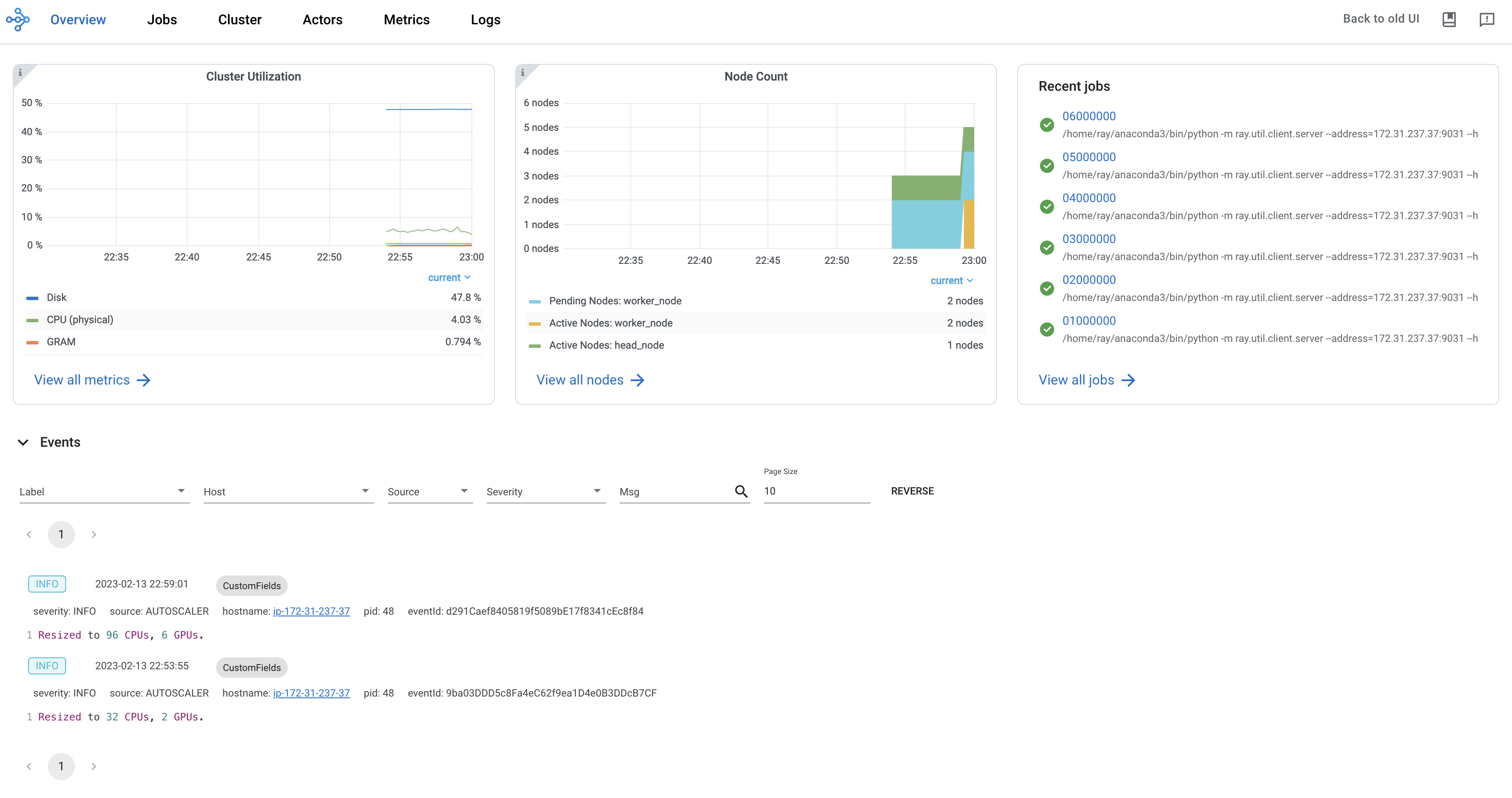
Ray dashboard provides a visual interface that displays real-time system metrics, node-level resource monitoring, job profiling, and task visualizations. The dashboard is designed to help users understand the performance of their Ray applications and identify potential issues.
Note
To get started with the dashboard, install the default installation as follows:
pip install -U "ray[default]" The dashboard automatically becomes available when running Ray scripts. Access the dashboard through the default URL, http://localhost:8265.
Ray State APIs: CLI to access cluster states
Ray state APIs allow users to conveniently access the current state (snapshot) of Ray through CLI or Python SDK.
Note
To get started with the state API, install the default installation as follows:
pip install -U "ray[default]" Run the following code.
import ray import time ray.init(num_cpus=4) @ray.remote def task_running_300_seconds(): print("Start!") time.sleep(300) @ray.remote class Actor: def __init__(self): print("Actor created") # Create 2 tasks tasks = [task_running_300_seconds.remote() for _ in range(2)] # Create 2 actors actors = [Actor.remote() for _ in range(2)] ray.get(tasks) See the summarized statistics of Ray tasks using ray summary tasks in a terminal.
ray summary tasks ======== Tasks Summary: 2022-07-22 08:54:38.332537 ======== Stats: ------------------------------------ total_actor_scheduled: 2 total_actor_tasks: 0 total_tasks: 2 Table (group by func_name): ------------------------------------ FUNC_OR_CLASS_NAME STATE_COUNTS TYPE 0 task_running_300_seconds RUNNING: 2 NORMAL_TASK 1 Actor.__init__ FINISHED: 2 ACTOR_CREATION_TASK Learn More#
Ray has a rich ecosystem of resources to help you learn more about distributed computing and AI scaling.
Blog and Press#
Modern Parallel and Distributed Python: A Quick Tutorial on Ray
Ray: A Distributed System for AI (Berkeley Artificial Intelligence Research, BAIR)
Implementing A Parameter Server in 15 Lines of Python with Ray
RayOnSpark: Running Emerging AI Applications on Big Data Clusters with Ray and Analytics Zoo
Tune: a Python library for fast hyperparameter tuning at any scale
Videos#
Unifying Large Scale Data Preprocessing and Machine Learning Pipelines with Ray Data | PyData 2021 (slides)
Programming at any Scale with Ray | SF Python Meetup Sept 2019
Ray: A Cluster Computing Engine for Reinforcement Learning Applications | Spark Summit
Enabling Composition in Distributed Reinforcement Learning | Spark Summit 2018
Slides#
Papers#
If you encounter technical issues, post on the Ray discussion forum. For general questions, announcements, and community discussions, join the Ray community on Slack.