Overview
The Agents framework lets you add any Python or Node.js program to LiveKit rooms as full realtime participants. Build agents with code using the Python and Node.js SDKs, or use LiveKit Agent Builder to prototype and deploy agents directly in your browser without writing code. The framework provides tools and abstractions for feeding realtime media and data through an AI pipeline that works with any provider, and publishing realtime results back to the room.
Use LiveKit Cloud to start building agents right away, with managed deployment, built-in observability with transcripts and traces, and LiveKit Inference for running AI models without API keys. You can deploy your agents to LiveKit Cloud or any custom environment of your choice.
If you want to get your hands on the code for building an agent right away, follow the Voice AI quickstart guide or try out Agent Builder and build your first voice agent in minutes.. It takes just a few minutes to build your first voice agent.
Voice AI quickstart
Build and deploy a simple voice assistant with Python or Node.js in less than 10 minutes.
LiveKit Agent Builder
Prototype and deploy voice agents directly in your browser, without writing any code.
Deeplearning.ai course
Learn to build and deploy voice agents with LiveKit in this free course from Deeplearning.ai.
Deploying to LiveKit Cloud
Run your agent on LiveKit Cloud's global infrastructure.
GitHub repository
Python source code and examples for the LiveKit Agents SDK.
SDK reference
Python reference docs for the LiveKit Agents SDK.
Use cases
Some applications for agents include:
- Multimodal assistant: Talk, text, or screen share with an AI assistant.
- Telehealth: Bring AI into realtime telemedicine consultations, with or without humans in the loop.
- Call center: Deploy AI to the front lines of customer service with inbound and outbound call support.
- Realtime translation: Translate conversations in realtime.
- NPCs: Add lifelike NPCs backed by language models instead of static scripts.
- Robotics: Put your robot's brain in the cloud, giving it access to the most powerful models.
The following recipes demonstrate some of these use cases:
Medical Office Triage
Restaurant Agent
Company Directory
Pipeline Translator
Framework overview

Your agent code operates as a stateful, realtime bridge between powerful AI models and your users. While AI models typically run in data centers with reliable connectivity, users often connect from mobile networks with varying quality.
WebRTC ensures smooth communication between agents and users, even over unstable connections. LiveKit WebRTC is used between the frontend and the agent, while the agent communicates with your backend using HTTP and WebSockets. This setup provides the benefits of WebRTC without its typical complexity.
The agents SDK includes components for handling the core challenges of realtime voice AI, such as streaming audio through an STT-LLM-TTS pipeline, reliable turn detection, handling interruptions, and LLM orchestration. It supports plugins for most major AI providers, with more continually added. The framework is fully open source and supported by an active community.
Other framework features include:
- Voice, video, and text: Build agents that can process realtime input and produce output in any modality.
- Tool use: Define tools that are compatible with any LLM, and even forward tool calls to your frontend.
- Multi-agent handoff: Break down complex workflows into simpler tasks.
- Extensive integrations: Integrate with nearly every AI provider there is for LLMs, STT, TTS, and more.
- State-of-the-art turn detection: Use the custom turn detection model for lifelike conversation flow.
- Made for developers: Build your agents in code, not configuration.
- Production ready: Includes built-in agent server orchestration, load balancing, and Kubernetes compatibility.
- Open source: The framework and entire LiveKit ecosystem are open source under the Apache 2.0 license.
How agents connect to LiveKit
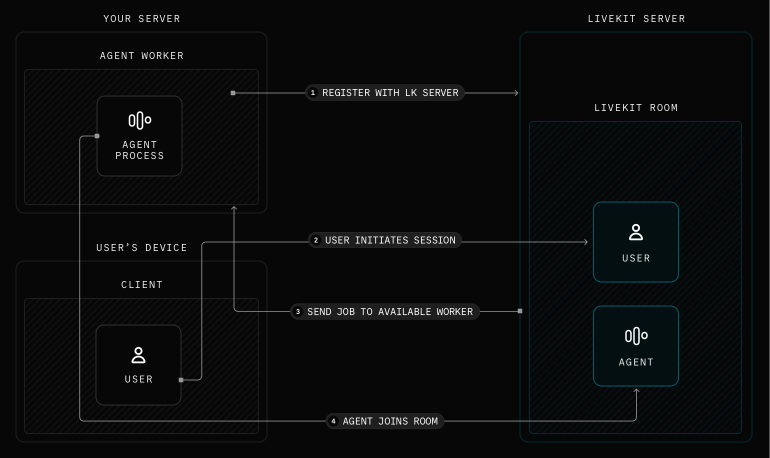
When your agent code starts, it first registers with a LiveKit server (either self hosted or LiveKit Cloud) to run as an "agent server" process. The agent server waits until it receives a dispatch request. To fulfill this request, the agent server boots a "job" subprocess which joins the room. By default, your agent servers are dispatched to each new room created in your LiveKit Cloud project (or self-hosted server). To learn more about agent servers, see the Server lifecycle guide.
After your agent and user join a room, the agent and your frontend app can communicate using LiveKit WebRTC. This enables reliable and fast realtime communication in any network conditions. LiveKit also includes full support for telephony, so the user can join the call from a phone instead of a frontend app.
To learn more about how LiveKit works overall, see the Intro to LiveKit guide.
Key concepts
Understand these core concepts to build effective agents with the LiveKit Agents framework.
Multimodality
Agents can communicate through multiple channels—speech and audio, text and transcriptions, and vision. Just as humans can see, hear, speak, and read, agents can process and generate content across these modalities, enabling richer, more natural interactions where they understand context from different sources.
Multimodality overview
Learn how to configure agents to process speech, text, and vision.
Logic & structure
The framework provides powerful abstractions for organizing agent behavior, including agent sessions, tasks and task groups, workflows, tools, pipeline nodes, turn detection, agent handoffs, and external data integration.
Logic & structure overview
Learn how to structure your agent's logic and behavior.
Agent server
Agent servers manage the lifecycle of your agents, handling dispatch, job execution, and scaling. They provide production-ready infrastructure including automatic load balancing and graceful shutdowns.
Agent server overview
Learn how agent servers manage your agents' lifecycle and deployment.
Models
The Agents framework supports a wide range of AI models for LLMs, speech-to-text (STT), text-to-speech (TTS), realtime APIs, and virtual avatars. Use LiveKit Inference to access models directly through LiveKit Cloud, or use plugins to connect to a wide range of providers updated regularly.
Models overview
Explore the full list of AI models and providers available for your agents, both through LiveKit Inference and plugins.
Getting started
Follow these guides to learn more and get started with LiveKit Agents.
Voice AI quickstart
Build a simple voice assistant with Python or Node.js in less than 10 minutes.
Recipes
A comprehensive collection of examples, guides, and recipes for LiveKit Agents.
Intro to LiveKit
An overview of the LiveKit ecosystem.
Web and mobile frontends
Put your agent in your pocket with a custom web or mobile app.
Telephony integration
Your agent can place and receive calls with LiveKit's SIP integration.
Building voice agents
Comprehensive documentation to build advanced voice AI apps with LiveKit.
Agent server lifecycle
Learn how to manage your agents with agent servers and jobs.
Deploying to production
Guide to deploying your voice agent in a production environment.
AI models
Explore the full list of AI models available for LiveKit Agents.