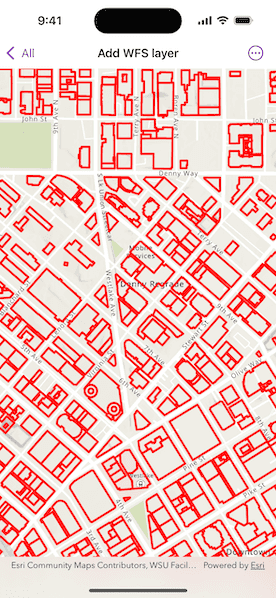
Display a layer from a WFS service, requesting only features for the current extent.
Use case
WFS is an open standard with functionality similar to ArcGIS feature services. ArcGIS Maps SDK support for WFS allows you to interoperate with open systems, which are often used in inter-agency efforts, like those for disaster relief.
How to use the sample
Pan and zoom to see features within the current map extent.
How it works
- Create a
WFSFeatureTablewith a URL. - Create a
FeatureLayerfrom the feature table and add it to the map. - Listen for the
MapView.onNavigatingChanged(action:)event to detect when the user has stopped navigating the map. - When the user is finished navigating, use
WFSFeatureTable.populateFromService(using:clearCache:outFields:)to load the table with data for the current visible extent.
Relevant API
- FeatureLayer
- MapView.onNavigatingChanged(action:)
- WFSFeatureTable
- WFSFeatureTable.populateFromService(using:clearCache:outFields:)
About the data
This service shows building footprints for downtown Seattle. For additional information, see the underlying service on ArcGIS Online.
Tags
browse, catalog, feature, interaction cache, layers, OGC, service, web, WFS
Sample Code
AddWFSLayerView.swift
// Copyright 2025 Esri // // Licensed under the Apache License, Version 2.0 (the "License"); // you may not use this file except in compliance with the License. // You may obtain a copy of the License at // // https://www.apache.org/licenses/LICENSE-2.0 // // Unless required by applicable law or agreed to in writing, software // distributed under the License is distributed on an "AS IS" BASIS, // WITHOUT WARRANTIES OR CONDITIONS OF ANY KIND, either express or implied. // See the License for the specific language governing permissions and // limitations under the License. import ArcGIS import SwiftUI @MainActor struct AddWFSLayerView: View { /// A map with a topographic basemap centered on downtown Seattle. @State private var map: Map = { let map = Map(basemapStyle: .arcGISTopographic) map.initialViewpoint = Viewpoint( boundingGeometry: Envelope( xRange: -122.341581 ... -122.332662, yRange: 47.613758...47.617207, spatialReference: .wgs84 ) ) let featureTable = WFSFeatureTable(url: .downtownSeattle, tableName: "Seattle_Downtown_Features:Buildings") // Sets the feature request mode to manual. In this mode, the table must be populated // manually. Panning and zooming won't request features automatically. featureTable.featureRequestMode = .manualCache // Sets the axis order. featureTable.axisOrder = .noSwap let wfsFeatureLayer = FeatureLayer(featureTable: featureTable) wfsFeatureLayer.renderer = SimpleRenderer( symbol: SimpleLineSymbol( style: .solid, color: .red, width: 3 ) ) map.addOperationalLayer(wfsFeatureLayer) return map }() /// The visible area on the map. @State private var visibleArea: ArcGIS.Polygon? /// A feature table of building footprints for downtown Seattle. private var featureTable: WFSFeatureTable { (map.operationalLayers[0] as! FeatureLayer).featureTable as! WFSFeatureTable } /// The extent with which to populate the WFS layer. @State private var populateExtent: Envelope? /// A Boolean value indicating whether the feature table is being populated. @State private var isPopulating = false /// The error shown in the error alert. @State private var error: Error? var body: some View { MapView(map: map) .onVisibleAreaChanged { if visibleArea == nil { // Populate the initial extent. populateExtent = $0.extent } // Update visible area state. visibleArea = $0 } .onNavigatingChanged { isNavigating in if !isNavigating { // Populate when the user stops navigating. populateExtent = visibleArea?.extent } } .task(id: populateExtent) { do { guard let populateExtent else { return } try await populateFeatures(within: populateExtent) } catch { self.error = error } } .overlay(alignment: .center) { if isPopulating { VStack { Text("Populating") ProgressView() .progressViewStyle(.circular) } .padding() .background(.ultraThickMaterial) .clipShape(.rect(cornerRadius: 10)) .shadow(radius: 50) } } .errorAlert(presentingError: $error) } /// Populates the feature table using queried features contained within a given extent. /// - Parameter extent: The extent used to filter the results. private func populateFeatures(within extent: Envelope) async throws { isPopulating = true defer { isPopulating = false } let queryParameters = QueryParameters() queryParameters.geometry = extent queryParameters.spatialRelationship = .intersects _ = try await featureTable.populateFromService( using: queryParameters, clearCache: false, outFields: [] ) } } private extension URL { /// Downtown Seattle feature service URL used to create a feature layer. static var downtownSeattle: URL { URL(string: "https://dservices2.arcgis.com/ZQgQTuoyBrtmoGdP/arcgis/services/Seattle_Downtown_Features/WFSServer?service=wfs&request=getcapabilities")! } } #Preview { AddWFSLayerView() }