Create a feature collection layer from a feature collection table, and add it to a map.
Use case
A Feature Collection allows easily importing external data (such as CSV files), as well as creating custom schema for data that is in non-standardized format. This data can then be used to populate a Feature Collection Table, and displayed in a Feature Collection Layer using the attributes and geometries provided in the external data source. For example, an electricity supplier could use this functionality to visualize existing location data of coverage areas (polygons), power stations (points), transmission lines (polylines), and others.
How to use the sample
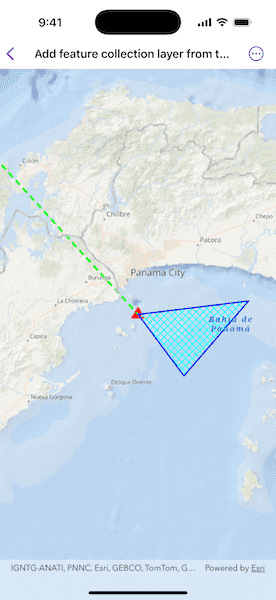
When launched, this sample displays a FeatureCollectionLayer with a Point, Polyline and Polygon geometry. Pan and zoom to explore the scene.
How it works
- Create a
FeatureCollectionTablefor thePoint,Polyline, andPolygongeometry types.- Create the schema for each feature collection table by creating an array of
Fields. - Create a
FeatureCollectionTablewith the fields created. - Create a
SimpleRendererfrom various symbols. - Create a new feature using
makeFeature(attributes:geometry:). - Add the feature to the
FeatureCollectionTable.
- Create the schema for each feature collection table by creating an array of
- Create a
FeatureCollectionfrom theFeatureCollectionTables. - Create a
FeatureCollectionLayerusing the tables. - Add the feature collection layer to the map's operational layers.
Relevant API
- Feature
- FeatureCollection
- FeatureCollectionLayer
- FeatureCollectionTable
- Field
- SimpleRenderer
Tags
collection, feature, layers, table
Sample Code
// Copyright 2025 Esri // // Licensed under the Apache License, Version 2.0 (the "License"); // you may not use this file except in compliance with the License. // You may obtain a copy of the License at // // https://www.apache.org/licenses/LICENSE-2.0 // // Unless required by applicable law or agreed to in writing, software // distributed under the License is distributed on an "AS IS" BASIS, // WITHOUT WARRANTIES OR CONDITIONS OF ANY KIND, either express or implied. // See the License for the specific language governing permissions and // limitations under the License. import ArcGIS import SwiftUI struct AddFeatureCollectionLayerFromTableView: View { /// A map with an ocean basemap style. @State private var map: Map = { let map = Map(basemapStyle: .arcGISOceans) map.initialViewpoint = Viewpoint( latitude: 8.849289, longitude: -79.497238, scale: 1e6 ) return map }() /// The error shown in the error alert. @State private var error: Error? var body: some View { MapView(map: map) .task { do { // Adds feature collection layer to the map. async let pointsTable = pointsCollectionTable() async let linesTable = linesCollectionTable() async let polygonsTable = polygonsCollectionTable() let featureCollectionTables = try await [pointsTable, linesTable, polygonsTable] let featureCollectionLayer = FeatureCollectionLayer( featureCollection: FeatureCollection(featureCollectionTables: featureCollectionTables) ) map.addOperationalLayer(featureCollectionLayer) } catch { // Updates the error and shows an alert if any failure occurs. self.error = error } } .errorAlert(presentingError: $error) } /// Creates a points feature collection table. /// - Returns: A feature collection table with points. private func pointsCollectionTable() async throws -> FeatureCollectionTable { // Creates a schema for points feature collection table. let placeField = Field( type: .text, name: "Place", alias: "Place name", length: 40, isEditable: true, isNullable: false ) // Initializes a feature collection table with the fields created and // point geometry type. let pointsCollectionTable = FeatureCollectionTable( fields: [placeField], geometryType: Point.self, spatialReference: .wgs84 ) pointsCollectionTable.renderer = SimpleRenderer( symbol: SimpleMarkerSymbol(style: .triangle, color: .red, size: 18) ) // Creates a new point with geometry and attribute values. let pointFeature = pointsCollectionTable.makeFeature( attributes: ["Place": "Current location"], geometry: Point(latitude: 8.849289, longitude: -79.497238) ) // Adds feature to the feature collection table. try await pointsCollectionTable.add(pointFeature) return pointsCollectionTable } /// Creates a polylines feature collection table. /// - Returns: A feature collection table with polylines. private func linesCollectionTable() async throws -> FeatureCollectionTable { // Creates a schema for polylines feature collection table. let boundaryField = Field( type: .text, name: "Boundary", alias: "Boundary name", length: 40, isEditable: true, isNullable: false ) // Initializes a feature collection table with the fields created and // polyline geometry type. let linesCollectionTable = FeatureCollectionTable( fields: [boundaryField], geometryType: Polyline.self, spatialReference: .wgs84 ) linesCollectionTable.renderer = SimpleRenderer( symbol: SimpleLineSymbol(style: .dash, color: .green, width: 3) ) // Creates a new polyline with geometry and attribute values. let lineFeature = linesCollectionTable.makeFeature( attributes: ["Boundary": "AManAPlanACanalPanama"], geometry: Polyline( points: [ Point(latitude: 8.849289, longitude: -79.497238), Point(latitude: 9.432302, longitude: -80.035568) ] ) ) // Adds feature to the feature collection table. try await linesCollectionTable.add(lineFeature) return linesCollectionTable } /// Creates a polygons feature collection table. /// - Returns: A feature collection table with polygons. private func polygonsCollectionTable() async throws -> FeatureCollectionTable { // Creates a schema for polygons feature collection table. let areaField = Field( type: .text, name: "Area", alias: "Area name", length: 40, isEditable: true, isNullable: false ) // Initializes a feature collection table with the fields created and // polygon geometry type. let polygonsCollectionTable = FeatureCollectionTable( fields: [areaField], geometryType: Polygon.self, spatialReference: .wgs84 ) let lineSymbol = SimpleLineSymbol(style: .solid, color: .blue, width: 2) let fillSymbol = SimpleFillSymbol(style: .diagonalCross, color: .cyan, outline: lineSymbol) polygonsCollectionTable.renderer = SimpleRenderer(symbol: fillSymbol) // Creates a new polygon with geometry and attribute values. let polygonFeature = polygonsCollectionTable.makeFeature( attributes: ["Area": "Restricted area"], geometry: Polygon( points: [ Point(latitude: 8.849289, longitude: -79.497238), Point(latitude: 8.638903, longitude: -79.337936), Point(latitude: 8.895422, longitude: -79.11409) ] ) ) // Adds feature to the feature collection table. try await polygonsCollectionTable.add(polygonFeature) return polygonsCollectionTable } } #Preview { AddFeatureCollectionLayerFromTableView() }