Use a geoprocessing service and a set of features to identify statistically significant hot spots and cold spots.
Use case
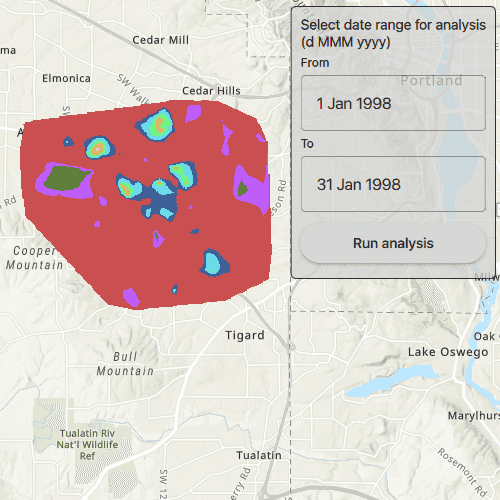
This tool identifies statistically significant spatial clusters of high values (hot spots) and low values (cold spots). For example, a hotspot analysis based on the frequency of 911 calls within a set region.
How to use the sample
Select a date range (between 1998-01-01 and 1998-05-31) from the dialog and tap on Analyze. The results will be shown on the map upon successful completion of the GeoprocessingJob.
How it works
- Create a
GeoprocessingTaskwith the URL set to the endpoint of a geoprocessing service. - Create a query string with the date range as an input of
GeoprocessingParameters. - Use the
GeoprocessingTaskto create aGeoprocessingJobwith theGeoprocessingParametersinstance. - Start the
GeoprocessingJoband wait for it to complete and return aGeoprocessingResult. - Get the resulting
ArcGISMapImageLayerusingGeoprocessingResult.getMapImageLayer. - Add the layer to the map's operational layers.
Relevant API
- GeoprocessingJob
- GeoprocessingParameters
- GeoprocessingResult
- GeoprocessingTask
Tags
analysis, density, geoprocessing, hot spots, hotspots
Sample Code
// [WriteFile Name=AnalyzeHotspots, Category=Analysis] // [Legal] // Copyright 2017 Esri. // // Licensed under the Apache License, Version 2.0 (the "License"); // you may not use this file except in compliance with the License. // You may obtain a copy of the License at // http://www.apache.org/licenses/LICENSE-2.0 // // Unless required by applicable law or agreed to in writing, software // distributed under the License is distributed on an "AS IS" BASIS, // WITHOUT WARRANTIES OR CONDITIONS OF ANY KIND, either express or implied. // See the License for the specific language governing permissions and // limitations under the License. // [Legal] #ifdef PCH_BUILD #include "pch.hpp" #endif // PCH_BUILD // sample headers #include "AnalyzeHotspots.h" // ArcGIS Maps SDK headers #include "ArcGISMapImageLayer.h" #include "Envelope.h" #include "Error.h" #include "GeoprocessingJob.h" #include "GeoprocessingResult.h" #include "GeoprocessingString.h" #include "GeoprocessingTask.h" #include "GeoprocessingTypes.h" #include "LayerListModel.h" #include "Map.h" #include "MapQuickView.h" #include "MapTypes.h" #include "TaskTypes.h" // Qt headers #include <QFuture> using namespace Esri::ArcGISRuntime; AnalyzeHotspots::AnalyzeHotspots(QQuickItem* parent /* = nullptr */): QQuickItem(parent) { } AnalyzeHotspots::~AnalyzeHotspots() = default; void AnalyzeHotspots::init() { qmlRegisterType<MapQuickView>("Esri.Samples", 1, 0, "MapView"); qmlRegisterType<AnalyzeHotspots>("Esri.Samples", 1, 0, "AnalyzeHotspotsSample"); } void AnalyzeHotspots::componentComplete() { QQuickItem::componentComplete(); // find QML MapView component m_mapView = findChild<MapQuickView*>("mapView"); // Create a map using the topographic basemap m_map = new Map(BasemapStyle::ArcGISTopographic, this); // Set map to map view m_mapView->setMap(m_map); // Create the Geoprocessing Task m_hotspotTask = new GeoprocessingTask(QUrl("https://sampleserver6.arcgisonline.com/arcgis/rest/services/911CallsHotspot/GPServer/911%20Calls%20Hotspot"), this); // Connect to the GP Task's errorOccurred signal connect(m_hotspotTask, &GeoprocessingTask::errorOccurred, this, [this](const Error& error) { emit displayErrorDialog("Geoprocessing Task failed", error.message()); }); } void AnalyzeHotspots::executeTaskWithDates(const QString& fromDate, const QString& toDate) { // Create the GP Parameters GeoprocessingParameters hotspotParameters = createParameters(fromDate, toDate); // Create the GP Job and connect to the status signals GeoprocessingJob* job = m_hotspotTask->createJob(hotspotParameters); connect(job, &GeoprocessingJob::statusChanged, this, [this, job](JobStatus jobStatus) { switch (jobStatus) { case JobStatus::Failed: emit displayErrorDialog("Geoprocessing Task failed", !job->error().isEmpty() ? job->error().additionalMessage() : "Unknown error."); m_jobInProgress = false; m_jobStatus = "Job failed"; break; case JobStatus::Started: m_jobInProgress = true; m_jobStatus = "Job in progress..."; break; case JobStatus::Paused: m_jobInProgress = false; m_jobStatus = "Job paused..."; break; case JobStatus::Succeeded: m_jobInProgress = false; m_jobStatus = "Job succeeded"; // handle the results processResults(job->result()); break; default: break; } // emit signals emit jobInProgressChanged(); emit statusChanged(); }); // Start the job job->start(); m_jobInProgress = true; emit jobInProgressChanged(); m_jobStatus = "Job in progress..."; emit statusChanged(); } GeoprocessingParameters AnalyzeHotspots::createParameters(const QString& fromDate, const QString& toDate) { // Create the GeoprocessingParameters and set the execution type GeoprocessingParameters hotspotParameters = GeoprocessingParameters(GeoprocessingExecutionType::AsynchronousSubmit); // create the query string QString queryString("(\"DATE\" > date '%1 00:00:00' AND \"DATE\" < date '%2 00:00:00')"); queryString = queryString.arg(fromDate, toDate); // Add query that contains the date range and the days of the week that are used in analysis QMap<QString, GeoprocessingParameter*> inputs; inputs["Query"] = new GeoprocessingString(queryString, this); hotspotParameters.setInputs(inputs); // return the GeoprocessingParameters return hotspotParameters; } void AnalyzeHotspots::processResults(GeoprocessingResult* result) { // Clear the map's operational layers m_mapView->map()->operationalLayers()->clear(); // Extract the layer from the result and add to the map m_layer = result->mapImageLayer(); connect(m_layer, &ArcGISMapImageLayer::doneLoading, this, [this](const Error& error) { if (error.isEmpty()) { m_mapView->setViewpointGeometryAsync(m_layer->fullExtent()); } }); m_mapView->map()->operationalLayers()->append(m_layer); }