Display common symbols for all graphics in a graphics overlay with a renderer.
Use case
Graphics are often used to display data that changes location regularly because they are held in memory instead of being persisted to the map. When a number of graphics are required to share the same style, a simple renderer can be applied to the graphics overlay containing the graphics. For example, the location of mobile taxis from a same company could be plotted on a map with each taxi marked by a relevant symbol.
How to use the sample
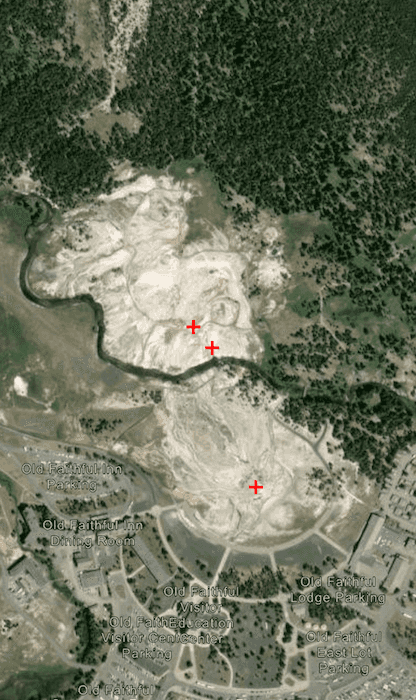
The sample loads with a predefined simple renderer, which displays a red cross simple marker symbol for the graphics in the graphics overlay.
How it works
- Create a
GraphicsOverlay. - Create a number of
Pointobjects with x, y, and spatial reference parameters. - Create a number of
Graphicobjects with the points from step 2. - Add the graphics to the graphics overlay.
- Create a
SimpleMarkerSymbolpassing in style, color, and size as parameters. - Create a
SimpleRenderer. - Set the simple renderer to the graphics overlay.
Relevant API
- Graphic
- GraphicsOverlay
- Point
- SimpleMarkerSymbol
- SimpleRenderer
Additional information
Renderers are used to display graphics that don't already have a symbol set. A renderer will not override a graphic's symbol if one has been set.
Tags
graphics, marker, renderer, symbol, symbolize, symbology
Sample Code
/* Copyright 2025 Esri * * Licensed under the Apache License, Version 2.0 (the "License"); * you may not use this file except in compliance with the License. * You may obtain a copy of the License at * * http://www.apache.org/licenses/LICENSE-2.0 * * Unless required by applicable law or agreed to in writing, software * distributed under the License is distributed on an "AS IS" BASIS, * WITHOUT WARRANTIES OR CONDITIONS OF ANY KIND, either express or implied. * See the License for the specific language governing permissions and * limitations under the License. * */ package com.esri.arcgismaps.sample.applysimplerenderertographicsoverlay.components import android.app.Application import androidx.lifecycle.AndroidViewModel import androidx.lifecycle.viewModelScope import com.arcgismaps.Color import com.arcgismaps.geometry.Point import com.arcgismaps.geometry.SpatialReference import com.arcgismaps.mapping.ArcGISMap import com.arcgismaps.mapping.BasemapStyle import com.arcgismaps.mapping.Viewpoint import com.arcgismaps.mapping.symbology.SimpleMarkerSymbol import com.arcgismaps.mapping.symbology.SimpleMarkerSymbolStyle import com.arcgismaps.mapping.symbology.SimpleRenderer import com.arcgismaps.mapping.view.Graphic import com.arcgismaps.mapping.view.GraphicsOverlay import com.esri.arcgismaps.sample.sampleslib.components.MessageDialogViewModel import kotlinx.coroutines.launch class ApplySimpleRendererToGraphicsOverlayViewModel(app: Application) : AndroidViewModel(app) { // ArcGISMap centered on Yellowstone National Park val arcGISMap = ArcGISMap(BasemapStyle.ArcGISImagery).apply { initialViewpoint = Viewpoint(latitude = 44.462, longitude = -110.829, scale = 1e4) } // GraphicsOverlay with a simple renderer (red cross marker) val graphicsOverlay = GraphicsOverlay().apply { // Create points for geysers in Yellowstone val oldFaithful = Point(-110.828140, 44.460458, SpatialReference.wgs84()) val cascadeGeyser = Point(-110.829004, 44.462438, SpatialReference.wgs84()) val plumeGeyser = Point(-110.829381, 44.462735, SpatialReference.wgs84()) // Add graphics for each point graphics.addAll( listOf( Graphic(oldFaithful), Graphic(cascadeGeyser), Graphic(plumeGeyser) ) ) // Create a simple renderer with a red cross symbol renderer = SimpleRenderer( symbol = SimpleMarkerSymbol( style = SimpleMarkerSymbolStyle.Cross, color = Color.red, size = 12f ) ) } // Message dialog for error handling val messageDialogVM = MessageDialogViewModel() init { viewModelScope.launch { arcGISMap.load().onFailure { messageDialogVM.showMessageDialog(it) } } } }