

MQTT协议下OTA升级流程如下图所示:
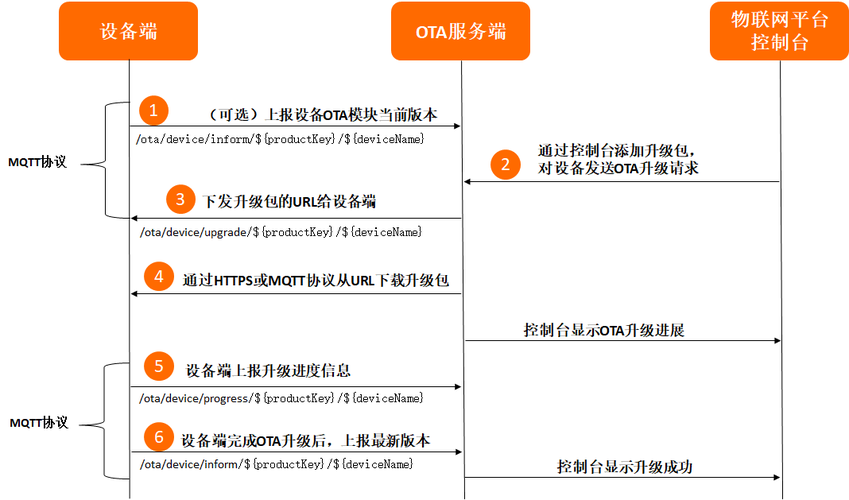
在物联网平台控制台上,添加升级包、验证升级包并发起批量升级任务。具体操作,请参见推送升级包到设备端。
下面是通过https下载升级包的过程:
package com.aliyun.alinkSdk; import com.alibaba.fastjson.JSONObject; import com.aliyun.alink.dm.api.DeviceInfo; import com.aliyun.alink.dm.api.InitResult; import com.aliyun.alink.linkkit.api.ILinkKitConnectListener; import com.aliyun.alink.linkkit.api.IoTMqttClientConfig; import com.aliyun.alink.linkkit.api.LinkKit; import com.aliyun.alink.linkkit.api.LinkKitInitParams; import com.aliyun.alink.linksdk.cmp.connect.channel.MqttPublishRequest; import com.aliyun.alink.linksdk.cmp.connect.channel.MqttSubscribeRequest; import com.aliyun.alink.linksdk.cmp.core.base.*; import com.aliyun.alink.linksdk.cmp.core.listener.*; import com.aliyun.alink.linksdk.tools.AError; import com.aliyun.alink.linksdk.tools.ALog; import org.apache.commons.codec.binary.Base64; import java.io.*; import java.net.HttpURLConnection; import java.net.URL; public class OTA { // ===================需要用户填写的参数,开始=========================== // 产品productKey,设备证书参数之一 private static String productKey = "xxx"; // 设备名字deviceName,设备证书参数之一 private static String deviceName = "xxx"; // 设备密钥deviceSecret,设备证书参数之一 private static String deviceSecret = "xxx"; // 设备密钥productSecret,设备证书参数之一 private static String productSecret = ""; private static boolean isLoginSuccess = false; //OTA 升级 //设备上报固件升级信息 private static String topic = "/ota/device/inform/" + productKey + "/" + deviceName; //固件升级信息下行 private static String subscribeTopic = "/ota/device/upgrade/" + productKey + "/" + deviceName; //设备上报固件升级进度 private static String topic1 = "/ota/device/progress/" + productKey + "/" + deviceName; //设备主动拉取固件升级信息 private static String topic2 = "/sys/" + productKey + "/" + deviceName + "/thing/ota/firmware/get"; private static String subscribeTopic2 = "/sys/" + productKey + "/" + deviceName + "/thing/ota/firmware/get_reply"; //设备主动拉取固件升级信息 private static String topic3 = "/sys/" + productKey + "/" + deviceName + "/thing/file/download"; private static String subscribeTopic3 = "/sys/" + productKey + "/" + deviceName + "/thing/file/download_reply"; private static String module = "default"; private String version = "1.0"; private String streamId = ""; private int streamFileId = 0; private int fizeSize = 0; private int curFileSize = 0; private static OTA airC = new OTA(); // ===================需要用户填写的参数,结束=========================== public static void main(String[] args) throws InterruptedException, IOException { ALog.setLevel(ALog.LEVEL_DEBUG); //初始化 airC.init(productKey, deviceName, deviceSecret); //下行数据监听 airC.registerNotifyListener(); while(true){ if(isLoginSuccess) { break; } Thread.sleep(100); } //消息订阅 airC.subscribe(subscribeTopic); airC.subscribe(subscribeTopic2); airC.subscribe(subscribeTopic3); //ota升级,推送当前设备OTA模块版本号 String payload = "{\"id\":\"100\",\"params\":{\"version\":\""+airC.version+"\",\"module\":\""+module+"\"}}"; airC.publish(topic, false, payload); payload = "{\"id\":\"100\",\"params\":{\"module\":\""+module+"\"},\"version\":\"1.0\",\"method\": \"thing.ota.firmware.get\"}"; airC.publish(topic2, false, payload); } /** * 初始化 * * @param pk productKey * @param dn devcieName * @param ds deviceSecret * @throws InterruptedException */ public void init(String pk, String dn, String ds) throws InterruptedException { LinkKitInitParams params = new LinkKitInitParams(); // 设置 MQTT 初始化参数 IoTMqttClientConfig config = new IoTMqttClientConfig(); config.productKey = pk; config.deviceName = dn; config.deviceSecret = ds; //config.channelHost = "xxx:1883"; config.channelHost = productKey+".iot-as-mqtt.cn-shanghai.aliyuncs.com:1883"; config.receiveOfflineMsg = true; params.mqttClientConfig = config; //MqttConfigure.setKeepAliveInterval(90); // 设置初始化设备证书信息,用户传入 DeviceInfo deviceInfo = new DeviceInfo(); deviceInfo.productKey = pk; deviceInfo.deviceName = dn; deviceInfo.deviceSecret = ds; params.deviceInfo = deviceInfo; LinkKit.getInstance().init(params, new ILinkKitConnectListener() { public void onError(AError aError) { isLoginSuccess = false; System.out.println("init failed !! code=" + aError.getCode() + ",msg=" + aError.getMsg() + ",subCode=" + aError.getSubCode() + ",subMsg=" + aError.getSubMsg()); } public void onInitDone(InitResult initResult) { System.out.println("init success !!"); isLoginSuccess = true; } }); } /** * 监听下行数据 */ public void registerNotifyListener() { LinkKit.getInstance().registerOnNotifyListener(new IConnectNotifyListener() { @Override public boolean shouldHandle(String connectId, String topic) { //处理所有Topic的消息 System.out.println("registerNotifyListener registerOnNotifyListener "+connectId); System.out.println("registerNotifyListener registerOnNotifyListener "+topic); return true; } @Override public void onNotify(String connectId, String topic, AMessage aMessage) { //打印一下Topic和message System.out.println("registerNotifyListener onNotify connectId: " + connectId); System.out.println("registerNotifyListener onNotify topic: " + topic); System.out.println("registerNotifyListener onNotify message: " + new String((byte[]) aMessage.getData())); if (topic.contains("/ota/device/upgrade/")) { String content = new String((byte[]) aMessage.getData()); JSONObject request = JSONObject.parseObject(content); System.out.println("content==="+content); String dProtocol = ""; String url = ""; String code = request.getString("code"); JSONObject data = request.getJSONObject("data"); if(data.containsKey("dProtocol")){ dProtocol = data.getString("dProtocol"); } if(data.containsKey("streamId")){ airC.streamId = data.getString("streamId"); } if(data.containsKey("streamFileId")){ airC.streamFileId = data.getInteger("streamFileId"); } if(data.containsKey("url")){ url = data.getString("url"); } if(data.containsKey("version")){ airC.version = data.getString("version"); } if(data.containsKey("size")){ airC.fizeSize = data.getInteger("size"); } System.out.println("code==="+code); System.out.println("dProtocol==="+dProtocol); System.out.println("url==="+url); if(code.equals("1000") && dProtocol == "mqtt"){ } else if(code.equals("1000") && !url.isEmpty()){ try { airC.saveUrlFile(url,"D:\\2.zip"); topic = "/ota/device/progress/" + productKey + "/" + deviceName; String payload = "{\"id\":\"100\",\"params\":{\"step\":\"100\",\"desc\":\"test\",\"module\":\""+module+"\"}}"; airC.publish(topic, false, payload); topic = "/ota/device/inform/" + productKey + "/" + deviceName; payload = "{\"id\":\"100\",\"params\":{\"version\":\""+airC.version+"\",\"module\":\""+module+"\"}}"; airC.publish(topic, false, payload); } catch (Exception e) { e.printStackTrace(); } } }else if (topic.contains("/ota/firmware/get_reply")) { String content = new String((byte[]) aMessage.getData()); JSONObject request = JSONObject.parseObject(content); System.out.println("content==="+content); String dProtocol = ""; String url = ""; int code = request.getInteger("code"); JSONObject data = request.getJSONObject("data"); if(data.containsKey("dProtocol")){ dProtocol = data.getString("dProtocol"); } if(data.containsKey("streamId")){ airC.streamId = data.getString("streamId"); } if(data.containsKey("streamFileId")){ airC.streamFileId = data.getInteger("streamFileId"); } if(data.containsKey("url")){ url = data.getString("url"); } if(data.containsKey("version")){ airC.version = data.getString("version"); } if(data.containsKey("size")){ airC.fizeSize = data.getInteger("size"); } if(code == 200 && dProtocol == "mqtt"){ } else if(code == 200 && !url.isEmpty()){ try { airC.saveUrlFile(url,"D:\\3.zip"); topic = "/ota/device/progress/" + productKey + "/" + deviceName; String payload = "{\"id\":\"100\",\"params\":{\"step\":\"100\",\"desc\":\"test\",\"module\":\""+module+"\"}}"; airC.publish(topic, false, payload); topic = "/ota/device/inform/" + productKey + "/" + deviceName; payload = "{\"id\":\"100\",\"params\":{\"version\":\""+airC.version+"\",\"module\":\""+module+"\"}}"; airC.publish(topic, false, payload); } catch (Exception e) { e.printStackTrace(); } } }else if (topic.contains("/thing/file/download_reply")) { } } @Override public void onConnectStateChange(String connectId, ConnectState connectState) { System.out.println("registerNotifyListener onConnectStateChange "+connectId); System.out.println("registerNotifyListener onConnectStateChange "+connectState.toString()); if(connectState==ConnectState.DISCONNECTED) { try { //LinkKit.getInstance().deinit(); Thread.sleep(10000); OTA airC = new OTA(); airC.init(productKey, deviceName, deviceSecret); } catch (InterruptedException e) { e.printStackTrace(); } } } }); } /** * 发布消息 * * @param topic 发送消息的Topic * @param payload 发送的消息内容 */ public void publish(String topic, boolean isRPC, String payload) { MqttPublishRequest request = new MqttPublishRequest(); request.topic = topic; request.payloadObj = payload; //request.qos = 1; //request.replyTopic = topic+"_reply"; //request.isRPC = isRPC; System.out.println("publish start"); LinkKit.getInstance().getMqttClient().publish(request, new IConnectSendListener() { @Override public void onResponse(ARequest aRequest, AResponse aResponse) { System.out.println("publish aRequest: " + (aRequest==null?"":aRequest.toString())); System.out.println("publish onResponse: " + (aResponse==null?"":aResponse.data)); } @Override public void onFailure(ARequest aRequest, AError aError) { System.out.println("publish onFailure: " + (aError==null?"":(aError.getCode()+aError.getMsg()))); } }); System.out.println("publish end"); } /** * 发布消息 * * @param topic 发送消息的Topic * @param bytes 发送的消息内容 */ public void publishBytes(String topic, byte[] bytes) { MqttPublishRequest request = new MqttPublishRequest(); request.topic = topic; request.payloadObj = bytes; //request.qos = 0; //request.replyTopic = replyTopic; //request.isRPC = false; System.out.println("publishBytes start"); LinkKit.getInstance().getMqttClient().publish(request, new IConnectSendListener() { @Override public void onResponse(ARequest aRequest, AResponse aResponse) { System.out.println("publishBytes onResponse: " + (aResponse==null?"":aResponse.data)); } @Override public void onFailure(ARequest aRequest, AError aError) { System.out.println("publishBytes onFailure: " + (aError==null?"":(aError.getCode()+aError.getMsg()))); } }); System.out.println("publishBytes end"); } /** * 订阅消息 * * @param topic 订阅消息的Topic */ public void subscribe(String topic) { MqttSubscribeRequest request = new MqttSubscribeRequest(); request.topic = topic; //是否订阅Topic,默认为true,如果设置为false,则不会订阅这个Topic request.isSubscribe = true; System.out.println("subscribe start"); LinkKit.getInstance().getMqttClient().subscribe(request, new IConnectSubscribeListener() { @Override public void onSuccess() { System.out.println("subscribe onSuccess"); } @Override public void onFailure(AError aError) { System.out.println("subscribe onFailure"); } }); System.out.println("subscribe end"); } /** * 取消订阅消息 * * @param topic 订阅消息的Topic */ public void unsubscribe(String topic) { MqttSubscribeRequest request = new MqttSubscribeRequest(); request.topic = topic; //是否订阅Topic,默认为true,如果设置为false,则不会订阅这个Topic request.isSubscribe = false; System.out.println("unsubscribe start"); LinkKit.getInstance().getMqttClient().unsubscribe(request, new IConnectUnscribeListener() { @Override public void onSuccess() { System.out.println("unsubscribe onSuccess"); } @Override public void onFailure(AError aError) { System.out.println("unsubscribe onFailure"); } }); System.out.println("unsubscribe end"); } /** * hex字符串转byte数组 * @param inHex 待转换的Hex字符串 * @return 转换后的byte数组结果 */ public static byte[] hexToByteArray(String inHex){ int hexlen = inHex.length(); byte[] result; if (hexlen % 2 == 1){ //奇数 hexlen++; result = new byte[(hexlen/2)]; inHex="0"+inHex; }else { //偶数 result = new byte[(hexlen/2)]; } int j=0; for (int i = 0; i < hexlen; i+=2){ result[j]=hexToByte(inHex.substring(i,i+2)); j++; } return result; } public static byte hexToByte(String inHex) { return (byte) Integer.parseInt(inHex, 16); } /** * 字节数组转16进制 * @param bytes 需要转换的byte数组 * @return 转换后的Hex字符串 */ public static String bytesToHex(byte[] bytes) { StringBuffer sb = new StringBuffer(); for(int i = 0; i < bytes.length; i++) { String hex = Integer.toHexString(bytes[i] & 0xFF); if(hex.length() < 2){ sb.append(0); } sb.append(hex); } return sb.toString(); } //需要使用2字节表示b public static String numToHex16(int b) { return String.format("%04x", b); } public static byte[] byteMergerAll(byte[]... values){ int length_byte=0; for(int i=0; i<values.length; i++){ length_byte+=values[i].length; } byte[]all_byte = new byte[length_byte]; int countLength = 0; for(int i=0; i<values.length; i++){ System.arraycopy(values[i],0, all_byte, countLength, values[i].length); countLength += values[i].length; } return all_byte; } /*请求url获取返回的内容*/ public static String getReturn(HttpURLConnection connection) throws IOException { StringBuffer buffer = new StringBuffer(); //将返回的输入流转换成字符串 try (InputStream inputStream = connection.getInputStream(); InputStreamReader inputStreamReader = new InputStreamReader(inputStream, "UTF-8"); BufferedReader bufferedReader = new BufferedReader(inputStreamReader);) { String str = null; while ((str = bufferedReader.readLine()) != null) { buffer.append(str); } String result = buffer.toString(); System.out.println("result" + result); OTA airC = new OTA(); String topic = "/a1y4bqYyUTc/329391A46675430DE581A44248DF3A6B/user/upward"; String payload = "{\"title\":\"position\",\"data\":{\"longitude\":\"113.450761\",\"latitude\":\"23.103239\",\"altitude\":\"0.000000\",\"coordsys\":2,\"positionType\":4}}"; airC.publish(topic, false, payload); return result; } } public static String newStringByBase64(byte[] bytes) throws UnsupportedEncodingException { if (bytes == null || bytes.length == 0) { return null; } return new String(Base64.encodeBase64(bytes, false), "utf8"); } public static byte[] getContent(String filePath) throws IOException { File file = new File(filePath); long fileSize = file.length(); if (fileSize > Integer.MAX_VALUE) { System.out.println("file too big..."); return null; } FileInputStream fi = new FileInputStream(file); byte[] buffer = new byte[(int) fileSize]; int offset = 0; int numRead = 0; while (offset < buffer.length && (numRead = fi.read(buffer, offset, buffer.length - offset)) >= 0) { offset += numRead; } // 确保所有数据均被读取 if (offset != buffer.length) { throw new IOException("Could not completely read file " + file.getName()); } fi.close(); return buffer; } //获取网络文件,转存到fileDes中,fileDes需要带文件后缀名 public static void saveUrlFile(String fileUrl,String fileDes) throws Exception { File toFile = new File(fileDes); if (toFile.exists()) { //throw new Exception("file exist"); return; } toFile.createNewFile(); FileOutputStream outImgStream = new FileOutputStream(toFile); System.out.println(getUrlFileData(fileUrl)); outImgStream.write(getUrlFileData(fileUrl)); outImgStream.close(); } //获取链接地址文件的byte数据 public static byte[] getUrlFileData(String fileUrl) throws Exception { URL url = new URL(fileUrl); HttpURLConnection httpConn = (HttpURLConnection) url.openConnection(); httpConn.connect(); InputStream cin = httpConn.getInputStream(); ByteArrayOutputStream outStream = new ByteArrayOutputStream(); byte[] buffer = new byte[1024]; int len = 0; while ((len = cin.read(buffer)) != -1) { outStream.write(buffer, 0, len); } cin.close(); byte[] fileData = outStream.toByteArray(); outStream.close(); return fileData; } }
![[※]记一次网站全站http升级为https的过程,websocket : ws升级为wss遇到的问题等](https://ucc.alicdn.com/pic/developer-ecology/b5gebelia3yvq_c606db4cbd02471798cebd3617c1427b.png?x-oss-process=image/format,webp/resize,h_160,m_lfit)