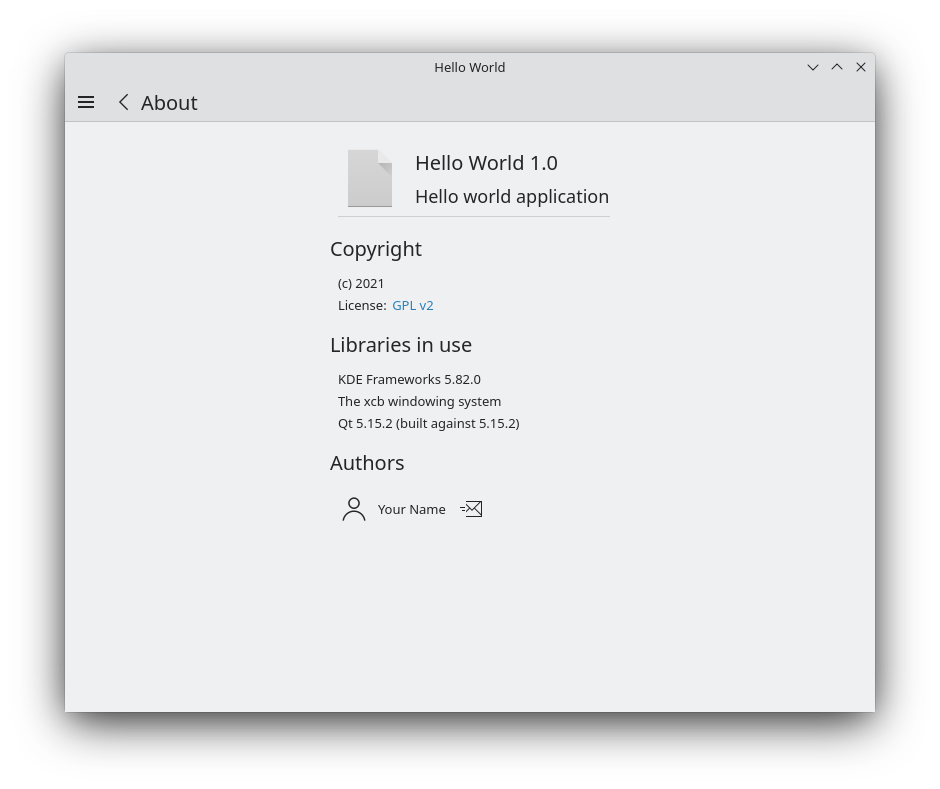
Kirigami.AboutPage le permite tener una página que muestra información sobre el copyright de la aplicación junto a la lista de colaboradores y cierta información sobre la plataforma en la que se está ejecutando.
En primer lugar, vamos a editar nuestro archivo main.cpp de los tutoriales anteriores.
#include<QApplication>#include<QQmlApplicationEngine>#include<QtQml>#include<QUrl>#include<KAboutData>#include<KLocalizedContext>#include<KLocalizedString>intmain(intargc,char*argv[]){QCoreApplication::setAttribute(Qt::AA_EnableHighDpiScaling);QApplicationapp(argc,argv);KLocalizedString::setApplicationDomain("helloworld");QCoreApplication::setOrganizationName(QStringLiteral("KDE"));QCoreApplication::setOrganizationDomain(QStringLiteral("kde.org"));QCoreApplication::setApplicationName(QStringLiteral("Hello World"));if(qEnvironmentVariableIsEmpty("QT_QUICK_CONTROLS_STYLE")){QQuickStyle::setStyle(QStringLiteral("org.kde.desktop"));}KAboutDataaboutData(QStringLiteral("helloworld"),i18nc("@title","Hello World"),QStringLiteral("1.0"),i18n("Hello world application"),KAboutLicense::GPL,i18n("(c) 2021"));aboutData.addAuthor(i18nc("@info:credit","Your name"),i18nc("@info:credit","Author Role"),QStringLiteral("your@email.com"),QStringLiteral("https://yourwebsite.com"));// Set aboutData as information about the app KAboutData::setApplicationData(aboutData);// Register a singleton that will be accessible from QML. qmlRegisterSingletonType("org.kde.example",// How the import statement should look like 1,0,// Major and minor versions of the import "About",// The name of the QML object [](QQmlEngine*engine,QJSEngine*)->QJSValue{// Here we retrieve our aboutData and give it to the QML engine // to turn it into a QML type returnengine->toScriptValue(KAboutData::applicationData());});// Load an application from a QML file QQmlApplicationEngineengine;engine.rootContext()->setContextObject(newKLocalizedContext(&engine));engine.load(QUrl(QStringLiteral("qrc:/main.qml")));if(engine.rootObjects().isEmpty()){return-1;}returnapp.exec();}
En el archivo main.cpp incluimos KAboutData, un componente principal de KDE Frameworks que nos permite guardar información sobre nuestra aplicación. Esta información la pueden reutilizar otros componentes de KDE Frameworks. Creamos una instancia de un nuevo objeto aboutData con su constructor predeterminado, que es bastante completo, y añadimos información sobre el autor.
A continuación creamos un qmlRegisterSingletonType(). Esto se usa para permitirnos importar el código C++ como un módulo en nuestro main.qml con import org.kde.example 1.0.
Su primer argumento es el URI que se usará para la importación; el segundo y tercer argumentos son, respectivamente, las versiones mayor y menor; el cuarto es el nombre del tipo, el nombre que llamaremos para acceder a nuestro tipo About; y el último es una referencia al objeto de C++ que se expone a QML. En el caso de este último, usamos una lambda para instanciar el aboutData de nuestra aplicación en el mismo lugar.
importQtQuickimportQtQuick.LayoutsimportQtQuick.ControlsasControlsimportorg.kde.kirigamiasKirigamiimportorg.kde.example1.0Kirigami.ApplicationWindow{id: roottitle:i18nc("@title:window","Day Kountdown")globalDrawer:Kirigami.GlobalDrawer{isMenu:trueactions:[Kirigami.Action{text:i18n("Quit")icon.name:"gtk-quit"shortcut:StandardKey.QuitonTriggered:Qt.quit()},Kirigami.Action{// <==== Action to open About page text:i18n("About")icon.name:"help-about"onTriggered:pageStack.layers.push(aboutPage)}]}Component{// <==== Component that instantiates the Kirigami.AboutPage id: aboutPageKirigami.AboutPage{aboutData:About}}ListModel{id: kountdownModel}AddEditSheet{id: addEditSheetonAdded:kountdownModel.append({"name":name,"description":description,"date":Date.parse(kdate)});onEdited:kountdownModel.set(index,{"name":name,"description":description,"date":Date.parse(kdate)});onRemoved:kountdownModel.remove(index,1)}functionopenPopulatedSheet(mode,index=-1,listName="",listDesc="",listDate=""){addEditSheet.mode=modeaddEditSheet.index=index;addEditSheet.name=listNameaddEditSheet.description=listDescaddEditSheet.kdate=listDateaddEditSheet.open()}pageStack.initialPage:Kirigami.ScrollablePage{title:i18nc("@title","Kountdown")actions:[Kirigami.Action{id: addActionicon.name:"list-add"text:i18nc("@action:button","Add kountdown")onTriggered:openPopulatedSheet("add")}]Kirigami.CardsListView{id: layoutmodel:kountdownModeldelegate:KountdownDelegate{}}}}
En primer lugar, usamos la importación que definimos en el archivo main.cpp; es decir, org.kde.example. A continuación añadimos una Kirigami.Action a nuestro cajón global, que nos enviará a la página «Acerca de», y creamos un componente con una Kirigami.AboutPage en él, que espera un objeto KAboutData::applicationData(). Ya expusimos precisamente eso en nuestro main.cpp y lo llamamos About, para poder pasarlo aquí.
En el archivo CMakeLists.txt de nuestra carpeta principal, nos aseguramos de tener CoreAddons en la llamada a find_package(). Es necesario para KAboutData.