LINE DC Generative AI Meetup #6 で「LINE Messaging API × OpenAI APIで入力音声の文字起こしBot作ってみた」というテーマで登壇しました

2025.06.19
リテールアプリ共創部のるおんです。
2025/06/18 に行われたLINE DC Generative AI Meetup #6 で「LINE Messaging API × OpenAI APIで入力音声の文字起こしBot作ってみた」というテーマで登壇しました
登壇資料
概要
- LINE Messaging API: LINEのWebhookを使うことでユーザーのメッセージを取得することができます。
- OpenAI Speech to Text API: OpenAIのSpeech to Textを使用することで高精度音声文字起こしが可能です
- AWS サーバーレス環境: Lambda + API Gatewayで運用コストを抑えることが可能です。
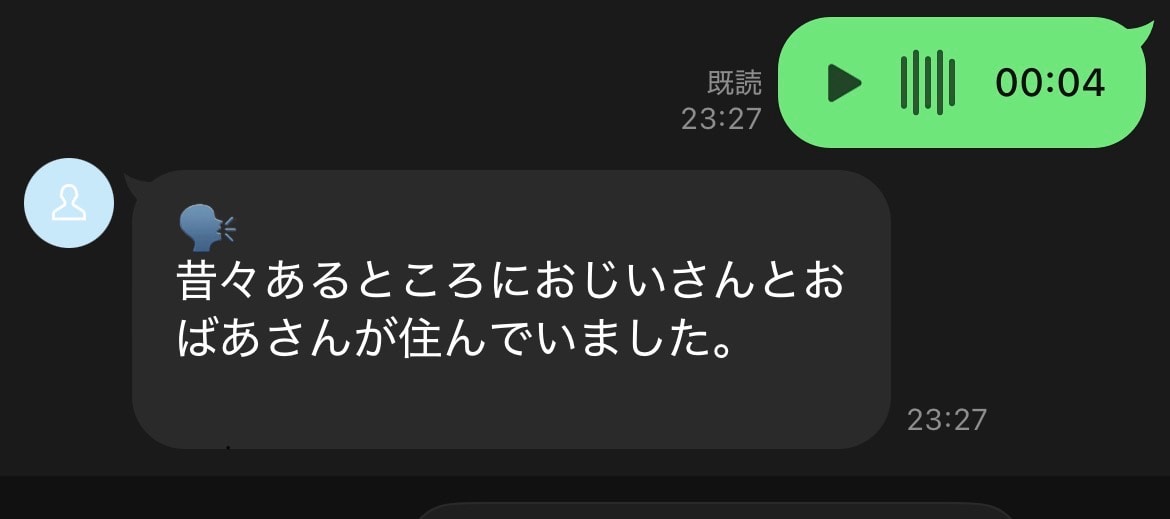
これらを組み合わせることで、画像のような音声文字起こしbotが作成可能です
実装コード
プロジェクト構成
line-transcriptions-bot/ ├── infra/ // インフラ │ ├── lib/ │ │ └── infra-stack.ts // スタック定義 │ ├── bin/ │ │ └── infra.ts │ └── config.ts ├── server/ // バックエンド │ ├── src/ │ │ ├── index.ts // handler │ │ └── services/ │ │ └── openai.ts └── └── package.json インフラ定義
infraディレクトリではAWS CDKを用いてAWSリソースを定義してます。
今回はAWS LambdaとAmazon API Gatewayを用いたサーバーレス構成で実装します。
infra/lib/infra-stack.ts:diff
import * as cdk from 'aws-cdk-lib'; import * as lambda from 'aws-cdk-lib/aws-lambda'; import { NodejsFunction } from 'aws-cdk-lib/aws-lambda-nodejs'; import * as apigateway from 'aws-cdk-lib/aws-apigateway'; import { Construct } from 'constructs'; import { Config } from '../config-type'; type InfraStackProps = cdk.StackProps & { config: Config; }; export class InfraStack extends cdk.Stack { constructor(scope: Construct, id: string, props: InfraStackProps) { super(scope, id, props); // Lambda関数の作成 const lineTranscriptionLambda = new NodejsFunction(this, 'LineTranscriptionFunction', { runtime: lambda.Runtime.NODEJS_LATEST, entry: '../server/src/index.ts', handler: 'handler', timeout: cdk.Duration.seconds(30), environment: { + LINE_CHANNEL_ACCESS_TOKEN: props.config.LINE_CHANNEL_ACCESS_TOKEN, + LINE_CHANNEL_SECRET: props.config.LINE_CHANNEL_SECRET, + OPENAI_API_KEY: props.config.OPENAI_API_KEY, }, }); // API Gatewayの作成 const api = new apigateway.RestApi(this, 'LineTranscriptionApi', { restApiName: 'LINE Transcription Bot API', description: 'LINE音声文字起こしBot用のAPI Gateway', defaultCorsPreflightOptions: { allowOrigins: apigateway.Cors.ALL_ORIGINS, allowMethods: apigateway.Cors.ALL_METHODS, }, }); // Webhookエンドポイントの作成 const webhookIntegration = new apigateway.LambdaIntegration(lineTranscriptionLambda); // https://domain/webhook にPOSTリクエストを受け付ける + api.root.addResource('webhook').addMethod('POST', webhookIntegration); } } ポイントの部分だけハイライトしています。
Lambda関数を定義する際に、今回使用するLineのMessaging APIとOpenAIのkeyを環境変数として渡してあげる必要があります。
また、LINE Developer ConsoleでWebhookのURLを渡す必要があるので、POSTでエンドポイントを作ってあげます。
サーバーサイド
リクエストを処理するLambda関数
server/src/index.ts
import { APIGatewayProxyEvent, APIGatewayProxyResult } from 'aws-lambda'; import { WebhookEvent, MessageEvent, validateSignature, messagingApi, middleware, LINE_SIGNATURE_HTTP_HEADER_NAME } from '@line/bot-sdk'; import { transcribeAudio } from './services/openai'; const LINE_CHANNEL_ACCESS_TOKEN = process.env.LINE_CHANNEL_ACCESS_TOKEN ?? ""; const LINE_CHANNEL_SECRET = process.env.LINE_CHANNEL_SECRET ?? ""; const client = new messagingApi.MessagingApiClient({ channelAccessToken: LINE_CHANNEL_ACCESS_TOKEN, }); const blobClient = new messagingApi.MessagingApiBlobClient({ channelAccessToken: LINE_CHANNEL_ACCESS_TOKEN, }); middleware({ channelSecret: LINE_CHANNEL_SECRET, }); export const handler = async ( event: APIGatewayProxyEvent ): Promise<APIGatewayProxyResult> => { console.debug("handler開始", event); try { // リクエストボディの取得 const body = event.body; if (!body) { return { statusCode: 400, body: JSON.stringify({ message: 'Request body is required' }), }; } // LINEのWebhookからのリクエストであることを検証 @see: https://dev.classmethod.jp/articles/line-messaging-api-for-nodejs/ + const signature = event.headers[LINE_SIGNATURE_HTTP_HEADER_NAME] + if (!validateSignature(event.body!, LINE_CHANNEL_SECRET, signature!)) { + console.error("Invalid signature"); + return { + statusCode: 403, + body: 'Invalid signature', + }; + } // Webhookイベントの解析 const webhookEvents: WebhookEvent[] = JSON.parse(body).events; // 各イベントを処理 await Promise.all( webhookEvents.map(async (webhookEvent) => { if (webhookEvent.type === 'message' && webhookEvent.message.type === 'audio') { + await handleAudioMessage(webhookEvent); } }) ); const response = { statusCode: 200, body: JSON.stringify({ message: 'OK' }), }; console.debug("handler終了", response); return response; } catch (error) { console.error('Error processing webhook:', error); return { statusCode: 500, body: JSON.stringify({ message: 'Internal server error' }), }; } }; async function handleAudioMessage(event: MessageEvent) { console.debug("handleAudioMessage開始", event); try { const messageId = event.message.id; const replyToken = event.replyToken; // LINEから音声データを取得 const audioStream = await blobClient.getMessageContent(messageId); // 音声データをバッファに変換 const audioBuffer = await streamToBuffer(audioStream); // OpenAI APIで文字起こし + const transcription = await transcribeAudio(audioBuffer); // 結果をLINEに返信 + await client.replyMessage({ + replyToken: replyToken, + messages: [{ + type: 'text', + text: `🗣️\n${transcription}`, + }] + }); } catch (error) { console.error('Error handling audio message:', error); // エラーメッセージを返信 if ('replyToken' in event) { await client.replyMessage({ replyToken: event.replyToken, messages: [{ type: 'text', text: '音声の文字起こしに失敗しました。もう一度お試しください。', }] }); } } } async function streamToBuffer(stream: NodeJS.ReadableStream): Promise<Buffer> { return new Promise((resolve, reject) => { const chunks: Buffer[] = []; stream.on('data', (chunk) => chunks.push(chunk)); stream.on('end', () => resolve(Buffer.concat(chunks))); stream.on('error', reject); }); } OpenAIのAPIを叩く関数
server/src/services/openai.ts
import OpenAI from 'openai'; import { toFile } from 'openai'; const openai = new OpenAI({ apiKey: process.env.OPENAI_API_KEY!, }); export async function transcribeAudio(audioBuffer: Buffer): Promise<string> { try { // BufferをOpenAI SDKが期待するFile形式に変換 const audioFile = await toFile(audioBuffer, 'audio.m4a', { type: 'audio/m4a' }); // OpenAI gpt-4o-transcribeで文字起こし + const transcription = await openai.audio.transcriptions.create({ + file: audioFile, + model: 'gpt-4o-transcribe', + response_format: 'text', + language: 'ja', // 日本語を指定 + prompt: '以下は日本語の音声です。正確に文字起こししてください。', + }); return transcription; } catch (error) { console.error('Error transcribing audio:', error); // フォールバックとして異なる音声形式を試す(mp3) try { const audioFile = await toFile(audioBuffer, 'audio.mp3', { type: 'audio/mp3' }); const transcription = await openai.audio.transcriptions.create({ file: audioFile, model: 'gpt-4o-transcribe', response_format: 'text', language: 'ja', prompt: '以下は日本語の音声です。正確に文字起こししてください。', }); return transcription; } catch (fallbackError) { console.error('Error with fallback transcription:', fallbackError); throw new Error('音声の文字起こしに失敗しました'); } } } おわりに
以上、LINE DC Generative AI Meetup #6 で発表した登壇レポートでした!
AIとLINEを組み合わせた発表がたくさん聞けて非常に楽しいイベントになりました。
LINE Developer Communityでは毎月いくつものイベントを開催してますのでぜひ足を運んでいただけると嬉しいです。