Azure Event Grid esp-mqtt-arduino Client – Transient fail

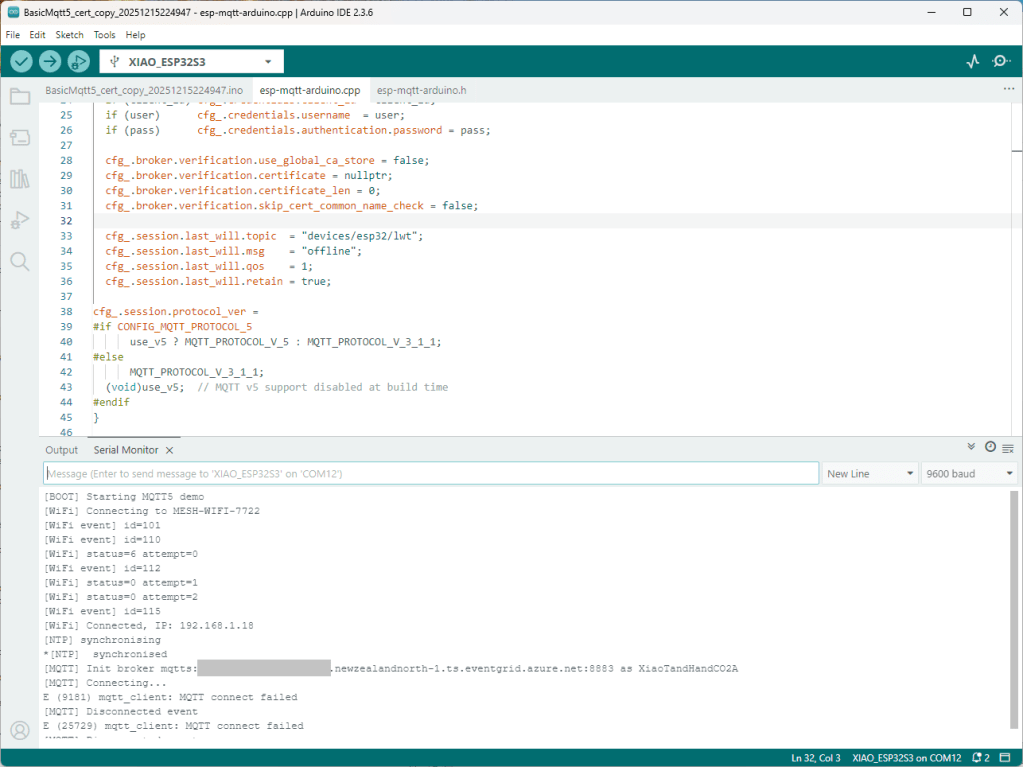
I couldn’t figure out why my code was failing so I gave up. Then the following day the application worked which was really odd. I then fired up my original Arduino PubSubClient library based application to do some testing and went to make a coffee. The application was failing to connect as XiaoTandHandCO2A and even when the bug was fixed (last will setup configuration commented out) it still wouldn’t connect.
The Azure EventGrid MQTT Broker client configuration looked fine

Accidentally the configuration was changed XiaoTandHandCO2B and the application worked which was unexpected. I still couldn’t figure out why my code was failing XiaoTandHandCO2A so I gave up.

The following morning the XiaoTandHandCO2A configuration worked which was a bit odd. My best guess is that after a number of failed attempts the device is “disabled” for a while (but this is not displayed in the client configuration) and the following morning enough time had passed for the device to be “re-enabled”.

For testing I usually split my constants & secrets into two files, constants has the certificate chains for the Azure Event Grid MQTT Broker and secrets has certificate chains for devices and the Azure EventGrid MQTT Broker. I did consider have a secrets.h file for each device or splitting the device intermediate certificates, but as I was debugging and testing, it was just easier to duplicate them.

 // constants.h #pragma once const uint16_t MQTT_PORT = 8883; // This certificate is used to authenticate the host static const char CA_ROOT_PEM[] PROGMEM = R"PEM( -----BEGIN CERTIFICATE----- ... -----END CERTIFICATE----- -----BEGIN CERTIFICATE----- ... -----END CERTIFICATE----- )PEM"; 

 // Secrets.h #pragma once // Wi-Fi credentials const char* WIFI_SSID = "SSID"; const char* WIFI_PASSWORD = "Password"; // MQTT settings //const char* MQTT_SERVER_URI = "MyBroker.newzealandnorth-1.ts.eventgrid.azure.net"; const char* MQTT_SERVER_URL = "mqtts://MyBroker.newzealandnorth-1.ts.eventgrid.azure.net:8883"; /* // This is A setup, below are B, C, D, & E const char* MQTT_CLIENTID = "XiaoTandHandCO2A"; const char* MQTT_TOPIC_PUBLISH = "devices/XiaoTandHandCO2A/sequence"; const char* MQTT_TOPIC_SUBSCRIBE = "devices/XiaoTandHandCO2A/configuration"; static const char CLIENT_CERT_PEM[] PROGMEM = R"PEM( -----BEGIN CERTIFICATE----- -----END CERTIFICATE----- -----BEGIN CERTIFICATE----- Intermediate certificate -----END CERTIFICATE----- )PEM"; static const char CLIENT_KEY_PEM[] PROGMEM = R"PEM( -----BEGIN PRIVATE KEY----- -----END PRIVATE KEY----- )PEM"; */ const char* MQTT_CLIENTID = "XiaoTandHandCO2B"; const char* MQTT_TOPIC_PUBLISH = "devices/XiaoTandHandCO2B/sequence"; const char* MQTT_TOPIC_SUBSCRIBE = "devices/XiaoTandHandCO2V/configuration"; static const char CLIENT_CERT_PEM[] PROGMEM = R"PEM( -----BEGIN CERTIFICATE----- -----END CERTIFICATE----- -----BEGIN CERTIFICATE----- Intermediate certificate -----END CERTIFICATE----- )PEM"; static const char CLIENT_KEY_PEM[] PROGMEM = R"PEM( -----BEGIN PRIVATE KEY----- -----END PRIVATE KEY----- )PEM"; /* const char* MQTT_CLIENTID = "XiaoTandHandCO2C"; const char* MQTT_TOPIC_PUBLISH = "devices/XiaoTandHandCO2C/sequence"; const char* MQTT_TOPIC_SUBSCRIBE = "devices/XiaoTandHandCO2V/configuration"; static const char CLIENT_CERT_PEM[] PROGMEM = R"PEM( -----BEGIN CERTIFICATE----- -----END CERTIFICATE----- -----BEGIN CERTIFICATE----- Intermediate certificate -----END CERTIFICATE----- )PEM"; static const char CLIENT_KEY_PEM[] PROGMEM = R"PEM( -----BEGIN PRIVATE KEY----- -----END PRIVATE KEY----- )PEM"; */ /* const char* MQTT_CLIENTID = "XiaoTandHandCO2D"; const char* MQTT_TOPIC_PUBLISH = "devices/XiaoTandHandCO2D/sequence"; const char* MQTT_TOPIC_SUBSCRIBE = "devices/XiaoTandHandCO2V/configuration"; static const char CLIENT_CERT_PEM[] PROGMEM = R"PEM( -----BEGIN CERTIFICATE----- -----END CERTIFICATE----- -----BEGIN CERTIFICATE----- Intermediate certificate -----END CERTIFICATE----- )PEM"; static const char CLIENT_KEY_PEM[] PROGMEM = R"PEM( -----BEGIN PRIVATE KEY----- -----END PRIVATE KEY----- )PEM"; */ /* const char* MQTT_CLIENTID = "XiaoTandHandCO2E"; const char* MQTT_TOPIC_PUBLISH = "devices/XiaoTandHandCO2E/sequence"; const char* MQTT_TOPIC_SUBSCRIBE = "devices/XiaoTandHandCO2V/configuration"; static const char CLIENT_CERT_PEM[] PROGMEM = R"PEM( -----BEGIN CERTIFICATE----- -----END CERTIFICATE----- -----BEGIN CERTIFICATE----- Intermediate certificate -----END CERTIFICATE----- )PEM"; static const char CLIENT_KEY_PEM[] PROGMEM = R"PEM( -----BEGIN PRIVATE KEY----- -----END PRIVATE KEY----- )PEM"; */ 

To make deployments easier I have some software which stores the certificates in an optional “secure element” like the Microchip ATECC608C(The Seeedstudio Edgebox100 documentation refers to an optional Microchip ATECC680A but these are “not recommended for new designs”). This isn’t a great solution but deployments easier and is “better” than a string constant in the binary.
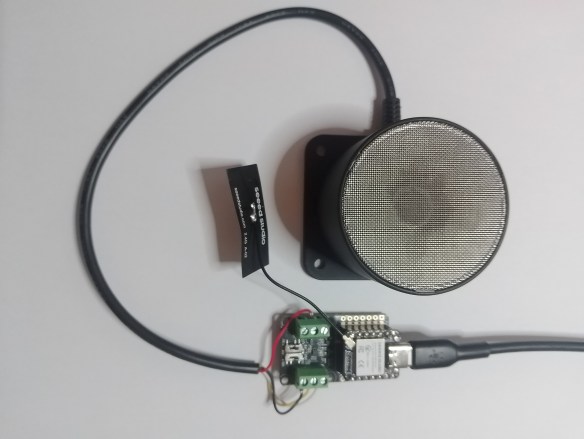
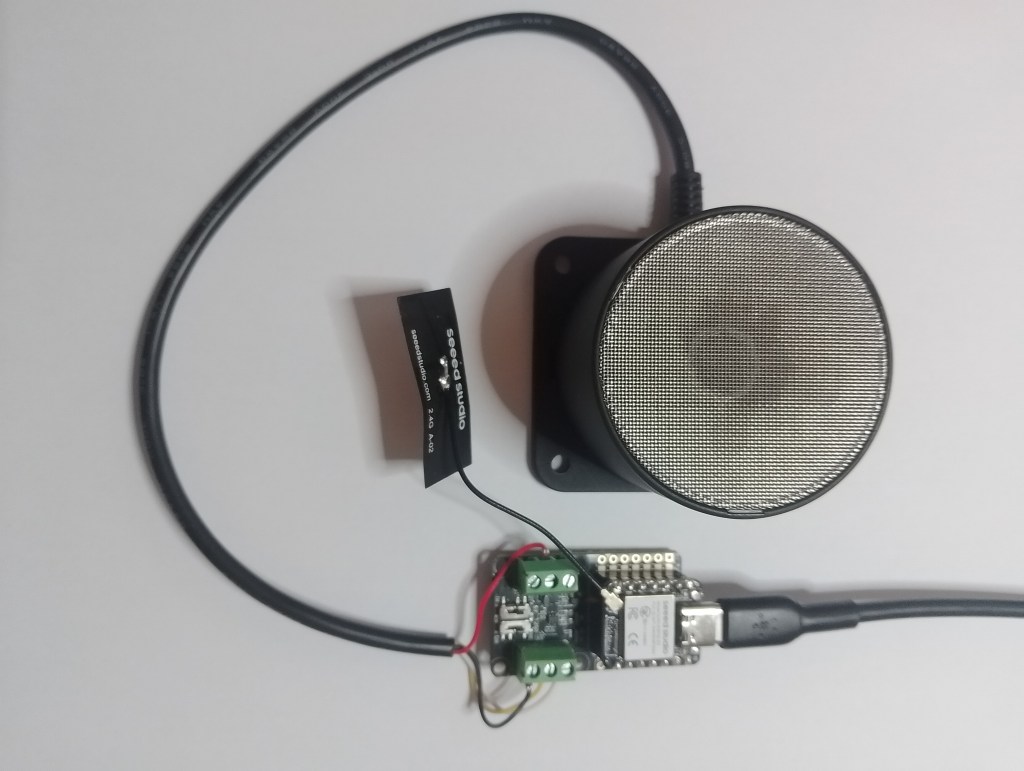
Arduino RS485 500cm Ultrasonic Level Sensor

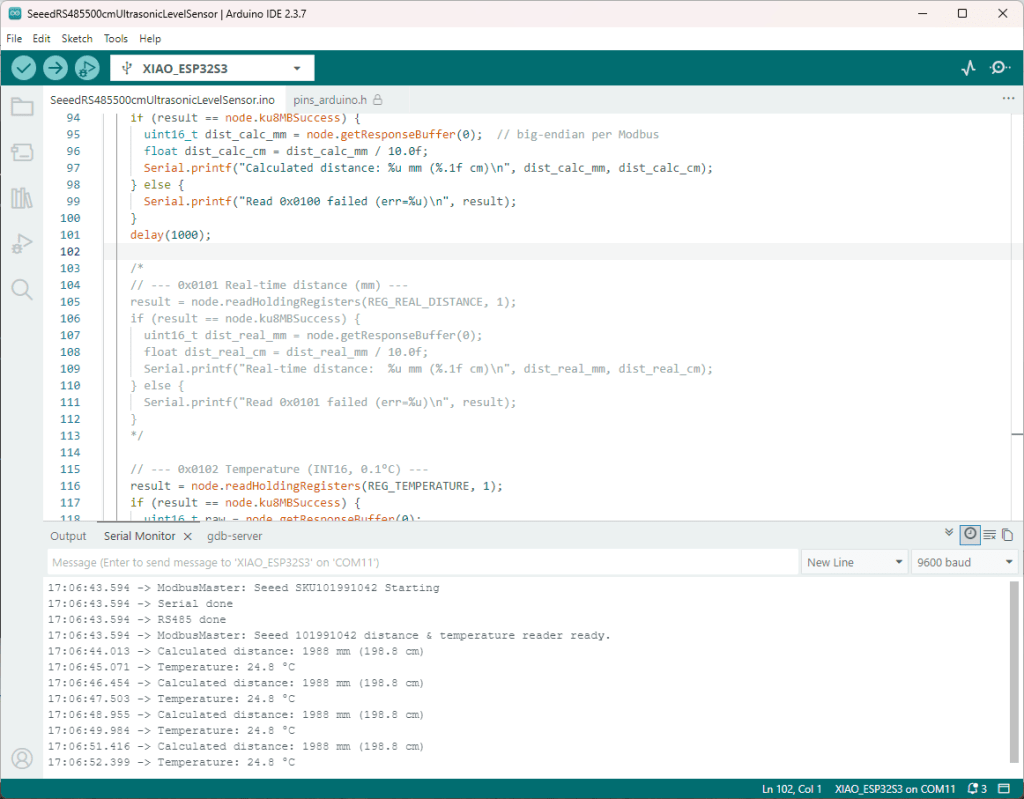
As part of this series of samples comparing Arduino to nanoFramework to .NET IoT Device “Proof of Concept (PoC) applications, the next couple of posts use an RS485 500cm Ultrasonic Level Sensor (SKU 101991042). I started with this sensor because its uses MODBUS and has an operating voltage of 3.3~24 V so it can be powered by the 5V output of a RS485 Breakout Board for Seeed Studio XIAO (SKU 113991354)

Initially the ModBusMaster based application didn’t work but after correcting the pin assignments based on the Seeedstudio XIAO ESP32 S3 RS-485 test harness(Arduino) reading one sensor worked reliably.

 #include <HardwareSerial.h> #include <ModbusMaster.h> HardwareSerial RS485Serial(1); ModbusMaster node; // Pin mapping for XIAO RS485 breakout const int RS485_RX = 6; // UART1 RX const int RS485_TX = 5; // UART1 TX const int RS485_EN = D2; // DE/RE control (single pin) // Sensor/Modbus parameters (from datasheet) const uint8_t SLAVE_ADDR = 0x01; // default address const uint16_t REG_CALC_DISTANCE = 0x0100; //const uint16_t REG_REAL_DISTANCE = 0x0101; const uint16_t REG_TEMPERATURE = 0x0102; const uint16_t REG_SLAVE_ADDR = 0x0200; // Forward declarations for ModbusMaster callbacks void preTransmission(); void postTransmission(); void setup() { Serial.begin(9600); delay(5000); Serial.println("ModbusMaster: Seeed SKU101991042 Starting"); // Wait for the hardware serial to be ready while (!Serial) ; Serial.println("Serial done"); // RS485 transceiver enable pin pinMode(RS485_EN, OUTPUT); digitalWrite(RS485_EN, LOW); // start in RX mode // Datasheet: 9600 baud, 8N1 RS485Serial.begin(9600, SERIAL_8N1, RS485_RX, RS485_TX); while (!RS485Serial) ; Serial.println("RS485 done"); // Tie ModbusMaster to the UART we just configured node.begin(SLAVE_ADDR, RS485Serial); // Register callbacks for half-duplex direction control node.preTransmission(preTransmission); node.postTransmission(postTransmission); Serial.println("ModbusMaster: Seeed 101991042 distance & temperature reader ready."); } // Toggle DE/RE around TX per ModbusMaster design void preTransmission() { digitalWrite(RS485_EN, HIGH); // enable driver (TX) delayMicroseconds(250); // transceiver turn-around margin } void postTransmission() { delayMicroseconds(250); // ensure last bit left the wire digitalWrite(RS485_EN, LOW); // back to receive } void loop() { static uint32_t last = 0; //if (millis() - last >= 1000) { // poll at 1 Hz if (millis() - last >= 360000) { // poll at 0.2 Hz last = millis(); // --- 0x0100 Calculated distance (mm) --- uint8_t result = node.readHoldingRegisters(REG_CALC_DISTANCE, 1); if (result == node.ku8MBSuccess) { uint16_t dist_calc_mm = node.getResponseBuffer(0); // big-endian per Modbus float dist_calc_cm = dist_calc_mm / 10.0f; Serial.printf("Calculated distance: %u mm (%.1f cm)\n", dist_calc_mm, dist_calc_cm); } else { Serial.printf("Read 0x0100 failed (err=%u)\n", result); } delay(1000); /* // --- 0x0101 Real-time distance (mm) --- result = node.readHoldingRegisters(REG_REAL_DISTANCE, 1); if (result == node.ku8MBSuccess) { uint16_t dist_real_mm = node.getResponseBuffer(0); float dist_real_cm = dist_real_mm / 10.0f; Serial.printf("Real-time distance: %u mm (%.1f cm)\n", dist_real_mm, dist_real_cm); } else { Serial.printf("Read 0x0101 failed (err=%u)\n", result); } */ // --- 0x0102 Temperature (INT16, 0.1°C) --- result = node.readHoldingRegisters(REG_TEMPERATURE, 1); if (result == node.ku8MBSuccess) { uint16_t raw = node.getResponseBuffer(0); int16_t temp_i16 = (int16_t)raw; float temp_c = temp_i16 / 10.0f; Serial.printf("Temperature: %.1f °C\n", temp_c); } else { Serial.printf("Read 0x0102 failed (err=%u)\n", result); } delay(1000); } } 

I had to add a short delay between each MODBUS sensor read to stop timeout errors.

Azure Event Grid esp-mqtt-arduino Client – Success

Still couldn’t figure out why my code was failing so I turned up logging to 11 and noticed a couple of messages which didn’t make sense. The device was connecting than disconnecting which indicated a another problem. As part of the Message Queue Telemetry Transport(MQTT) specification there is a “feature” Last Will and Testament(LWT) which a client can configure so that the MQTT broker sends a message to a topic if the device disconnects unexpectedly.

I was looking at the code and noticed that LWT was being used and that the topic didn’t exist in my Azure Event Grid MQTT Broker namespace. When the LWT configuration was commented out the application worked.

 void Mqtt5ClientESP32::begin(const char* uri, const char* client_id, const char* user, const char* pass, bool use_v5) { connected_ = false; insecure_ = false; cfg_.broker.address.uri = uri; if (client_id) cfg_.credentials.client_id = client_id; if (user) cfg_.credentials.username = user; if (pass) cfg_.credentials.authentication.password = pass; cfg_.broker.verification.use_global_ca_store = false; cfg_.broker.verification.certificate = nullptr; cfg_.broker.verification.certificate_len = 0; cfg_.broker.verification.skip_cert_common_name_check = false; /* cfg_.session.last_will.topic = "devices/esp32/lwt"; cfg_.session.last_will.msg = "offline"; cfg_.session.last_will.qos = 1; cfg_.session.last_will.retain = true; */ cfg_.session.protocol_ver = #if CONFIG_MQTT_PROTOCOL_5 use_v5 ? MQTT_PROTOCOL_V_5 : MQTT_PROTOCOL_V_3_1_1; #else MQTT_PROTOCOL_V_3_1_1; (void)use_v5; // MQTT v5 support disabled at build time #endif } 

Two methods were added so that the LWT could be configured if required

 void SetLWT(const char *topic, const char *msg, int msg_len,int qos, int retain); 
 void Mqtt5ClientESP32::SetLWT(const char *topic, const char *msg, int msg_len,int qos, int retain){ cfg_.session.last_will.topic = topic; cfg_.session.last_will.msg = msg; cfg_.session.last_will.msg_len= msg_len; cfg_.session.last_will.qos = qos; cfg_.session.last_will.retain = retain; } 

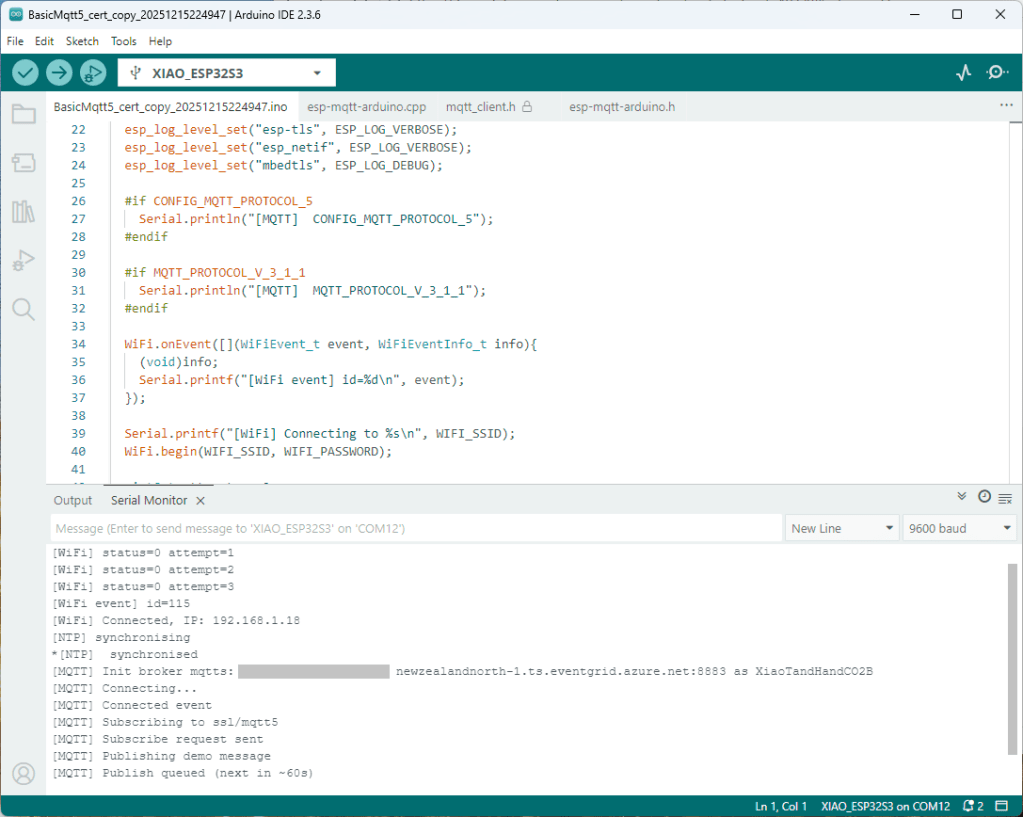
Paying close attention to the logging I noticed the “Subscribing to ssl/mqtts” followed by “Subscribe request sent”

I checked the sample application and found that if the connect was successful the application would then try and subscribe to a topic that didn’t exist.

 mqtt.onConnected([]{ Serial.println("[MQTT] Connected event"); mqttReady = true; /* Serial.println("[MQTT] Subscribing to ssl/mqtt5"); if (mqtt.subscribe("ssl/mqtt5", 1, true)) { Serial.println("[MQTT] Subscribe request sent"); } else { Serial.println("[MQTT] Subscribe request failed"); } */ 

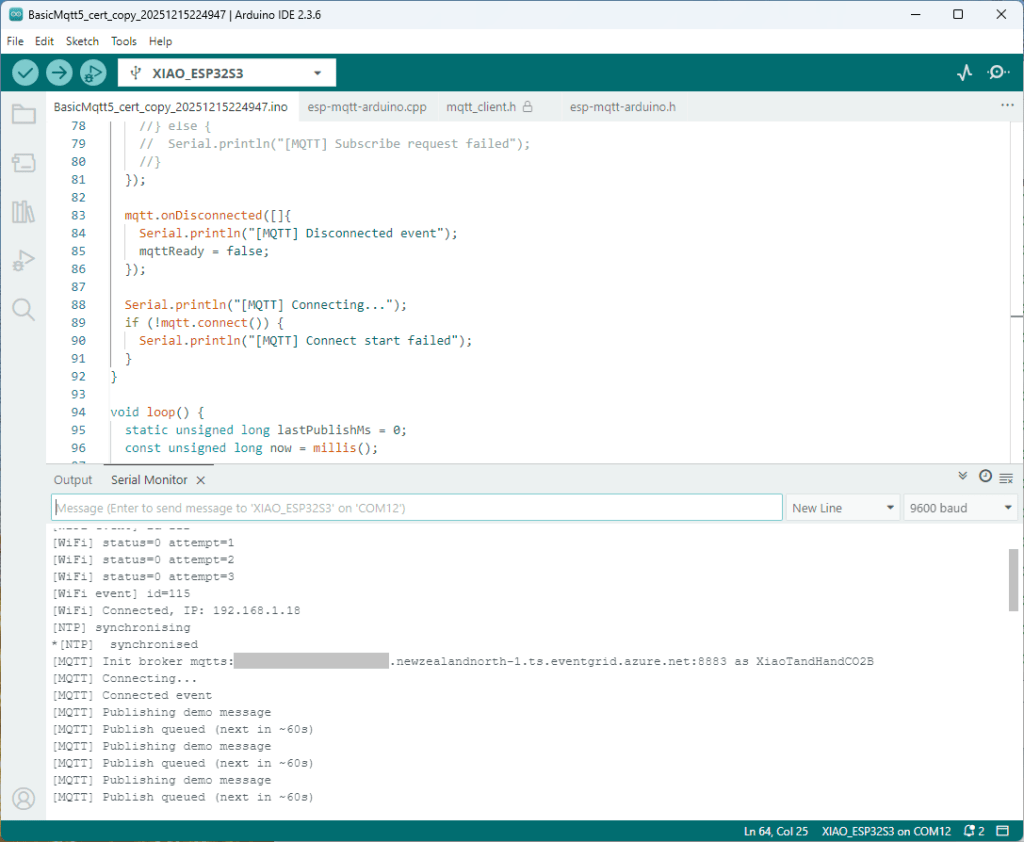
I commented out that code and the application started without any messages

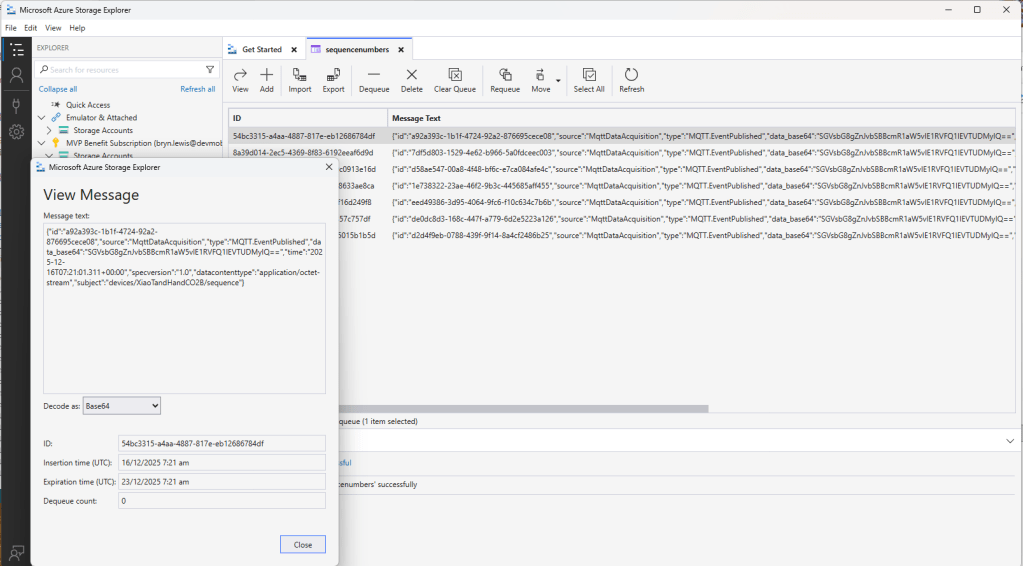
Just to make sure I checked that the message count in the Azure Storage Queue was increasing and the payload client ID matched my device

Yet again a couple of hours lost from my life which I can never get back

Azure Event Grid esp-mqtt-arduino Client – Finding fail

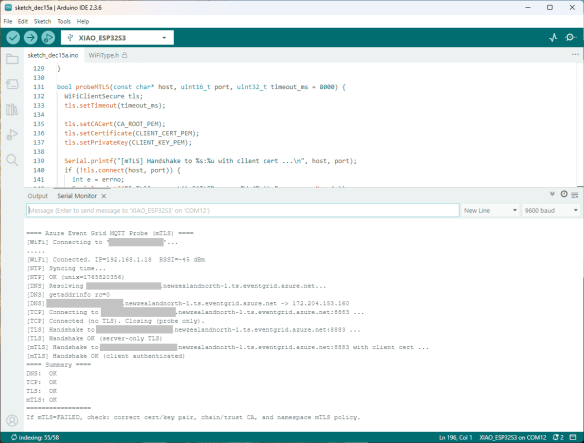
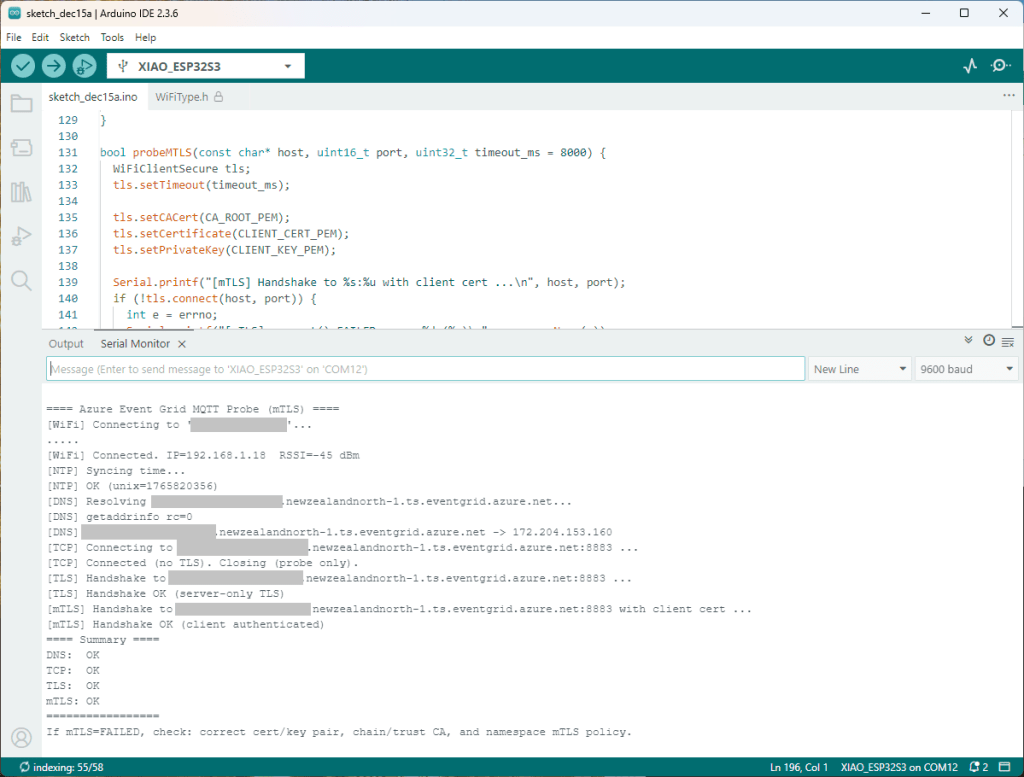
Still couldn’t figure out why my code was failing so I built a test harness which connected to the wifi, set the time with the Network Time Protocol(NTP), established a Transport Layer Security(TLS) connection with the Azure Event Grid MQTT Broker then finally Authenticated (using Client Certificate authentication). Basically, it was The joy of certs without the Arduino PubSubClient library and with authentication

 /* Azure Event Grid MQTT Endpoint Probe with mTLS - Wi-Fi connect - SNTP time sync - DNS resolve - TCP reachability (port 8883) - TLS (server-only) handshake using CRT bundle (or custom CA) - TLS (mTLS) handshake with client certificate & private key Notes: - Client certificate must be PEM and match private key. - Private key must be PEM and UNENCRYPTED (no passphrase). - SNI uses HOSTNAME automatically; do NOT use raw IP. */ #include <Arduino.h> #include <WiFi.h> #include <WiFiClient.h> #include <WiFiClientSecure.h> #include <../constants.h> #include <../secrets.h> extern "C" { #include <lwip/netdb.h> #include <lwip/sockets.h> #include <lwip/inet.h> #include <lwip/errno.h> #include <time.h> } static const char* HOSTNAME = "ThisIsNotTheMQTTBrokerYouAreLookingFor.newzealandnorth-1.ts.eventgrid.azure.net"; static const uint16_t PORT = 8883; // Time servers (for TLS validity window) static const char* NTP_1 = "pool.ntp.org"; static const char* NTP_2 = "time.cloudflare.com"; static const char* errnoName(int e) { switch (e) { case 5: return "EIO"; case 101: return "ENETUNREACH"; case 104: return "ECONNRESET"; case 110: return "ETIMEDOUT"; case 111: return "ECONNREFUSED"; case 113: return "EHOSTUNREACH"; default: return "?"; } } bool waitForWifi(uint32_t timeout_ms = 20000) { uint32_t start = millis(); Serial.printf("[WiFi] Connecting to '%s'...\n", WIFI_SSID); WiFi.begin(WIFI_SSID, WIFI_PASSWORD); while (WiFi.status() != WL_CONNECTED && (millis() - start) < timeout_ms) { delay(250); Serial.print("."); } Serial.println(); return WiFi.status() == WL_CONNECTED; } void syncTime() { configTime(0, 0, NTP_1, NTP_2); Serial.println("[NTP] Syncing time..."); for (int i = 0; i < 20; ++i) { time_t now = time(nullptr); if (now > 1609459200) { // > Jan 1, 2021 Serial.printf("[NTP] OK (unix=%ld)\n", (long)now); return; } delay(500); } Serial.println("[NTP] Time sync may have failed; continuing."); } bool probeDNS(const char* host, char outIp[16]) { struct addrinfo hints = {}; hints.ai_family = AF_INET; // IPv4 struct addrinfo* res = nullptr; Serial.printf("[DNS] Resolving %s...\n", host); int rc = getaddrinfo(host, NULL, &hints, &res); Serial.printf("[DNS] getaddrinfo rc=%d\n", rc); if (rc != 0 || !res) { Serial.println("[DNS] FAILED"); return false; } struct sockaddr_in* sin = (struct sockaddr_in*)res->ai_addr; inet_ntop(AF_INET, &sin->sin_addr, outIp, 16); Serial.printf("[DNS] %s -> %s\n", host, outIp); freeaddrinfo(res); return true; } bool probeTCP(const char* host, uint16_t port, uint32_t timeout_ms = 5000) { WiFiClient cli; cli.setTimeout(timeout_ms); Serial.printf("[TCP] Connecting to %s:%u ...\n", host, port); if (!cli.connect(host, port)) { Serial.printf("[TCP] connect() FAILED\n"); return false; } Serial.println("[TCP] Connected (no TLS). Closing (probe only)."); cli.stop(); return true; } bool probeTLS(const char* host, uint16_t port, uint32_t timeout_ms = 7000) { WiFiClientSecure tls; tls.setTimeout(timeout_ms); tls.setCACert(CA_ROOT_PEM); Serial.printf("[TLS] Handshake to %s:%u ...\n", host, port); if (!tls.connect(host, port)) { int e = errno; Serial.printf("[TLS] connect() FAILED errno=%d (%s)\n", e, errnoName(e)); return false; } Serial.println("[TLS] Handshake OK (server-only TLS)"); tls.stop(); return true; } bool probeMTLS(const char* host, uint16_t port, uint32_t timeout_ms = 8000) { WiFiClientSecure tls; tls.setTimeout(timeout_ms); tls.setCACert(CA_ROOT_PEM); tls.setCertificate(CLIENT_CERT_PEM); tls.setPrivateKey(CLIENT_KEY_PEM); Serial.printf("[mTLS] Handshake to %s:%u with client cert ...\n", host, port); if (!tls.connect(host, port)) { int e = errno; Serial.printf("[mTLS] connect() FAILED errno=%d (%s)\n", e, errnoName(e)); Serial.println("[mTLS] If errno=ETIMEDOUT/ECONNRESET, server may be closing due to cert policy mismatch."); return false; } Serial.println("[mTLS] Handshake OK (client authenticated)"); tls.stop(); return true; } void setup() { Serial.begin(9600); delay(5000); Serial.println(); Serial.println("==== Azure Event Grid MQTT Probe (mTLS) ===="); WiFi.mode(WIFI_STA); if (!waitForWifi()) { Serial.println("[WiFi] FAILED to connect within timeout"); } else { Serial.printf("[WiFi] Connected. IP=%s RSSI=%d dBm\n", WiFi.localIP().toString().c_str(), WiFi.RSSI()); } // TLS sanity: time syncTime(); // DNS char ip[16] = {0}; bool dnsOk = probeDNS(HOSTNAME, ip); // TCP reachability bool tcpOk = probeTCP(HOSTNAME, PORT); // TLS (server-only) bool tlsOk = probeTLS(HOSTNAME, PORT); // TLS (mTLS with client cert/key) bool mtlsOk = probeMTLS(HOSTNAME, PORT); Serial.println("==== Summary ===="); Serial.printf("DNS: %s\n", dnsOk ? "OK" : "FAILED"); Serial.printf("TCP: %s\n", tcpOk ? "OK" : "FAILED"); Serial.printf("TLS: %s\n", tlsOk ? "OK" : "FAILED"); Serial.printf("mTLS: %s\n", mtlsOk ? "OK" : "FAILED"); Serial.println("================="); Serial.println("If mTLS=FAILED, check: correct cert/key pair, chain/trust CA, and namespace mTLS policy."); } void loop() { delay(1000); } 

The test harness worked which meant the issue was with my “re-factoring” of the BasicMqtt5_cert example.

Azure Event Grid esp-mqtt-arduino Client – Hours of fail

I wanted to get other Arduino base clients (e.g. my SeeedStudio XiaoESP32S3) for Azure Event Grid MQTT Broker working (for MQTT 5 support) so installed the esp-mqtt-arduino library.

The library doesn’t support client authentication with certificates, so I added two methods setClientCert and setClientKey to the esp-mqtt-arduino.h and esp-mqtt-arduino.cpp files

 class Mqtt5ClientESP32 { public: Mqtt5ClientESP32(); ~Mqtt5ClientESP32(); //... void useCrtBundle(bool enable = true); void setCACert(const char* cert, size_t len = 0); void setClientCert(const char* cert, size_t len = 0); void setClientKey(const char* key, size_t len = 0); void setInsecure(bool enable = true); void setKeepAlive(uint16_t seconds); private: 
 void Mqtt5ClientESP32::setClientCert(const char* cert, size_t len) { insecure_ = false; cfg_.credentials.authentication.certificate = cert; if (cert) { cfg_.credentials.authentication.certificate_len = len ? len : strlen(cert) + 1; } else { cfg_.credentials.authentication.certificate_len = 0; } cfg_.broker.verification.skip_cert_common_name_check = false; } void Mqtt5ClientESP32::setClientKey(const char* key, size_t len) { insecure_ = false; cfg_.credentials.authentication.key = key; if (key) { cfg_.credentials.authentication.key_len = len ? len : strlen(key) + 1; } else { cfg_.credentials.authentication.key_len = 0; } cfg_.broker.verification.skip_cert_common_name_check = false; } 

I had started with the basic_mqtt5_cert example stripping it back to the bare minimum hacking out all the certificate bundle support et.c

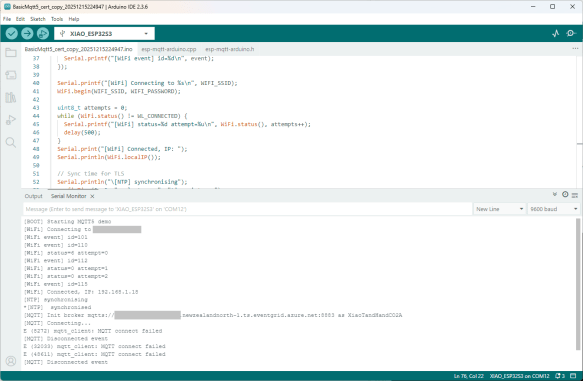
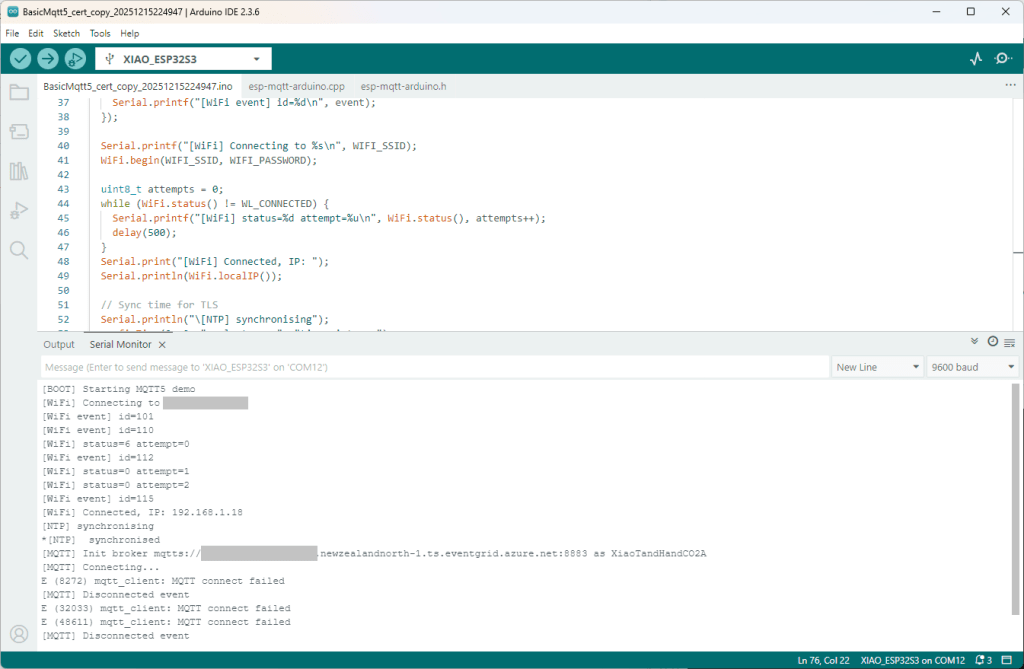
 #include <WiFi.h> #include <esp-mqtt-arduino.h> #include <esp_log.h> #include "sdkconfig.h" #include "../secrets.h" #include "../constants.h" Mqtt5ClientESP32 mqtt; volatile bool mqttReady = false; volatile bool mqttSubscribed = false; void setup() { Serial.begin(9600); delay(5000); Serial.setDebugOutput(true); Serial.println("[BOOT] Starting MQTT5 demo"); esp_log_level_set("*", ESP_LOG_INFO); esp_log_level_set("MQTT_CLIENT", ESP_LOG_VERBOSE); WiFi.onEvent([](WiFiEvent_t event, WiFiEventInfo_t info){ (void)info; Serial.printf("[WiFi event] id=%d\n", event); }); Serial.printf("[WiFi] Connecting to %s\n", WIFI_SSID); WiFi.begin(WIFI_SSID, WIFI_PASSWORD); uint8_t attempts = 0; while (WiFi.status() != WL_CONNECTED) { Serial.printf("[WiFi] status=%d attempt=%u\n", WiFi.status(), attempts++); delay(500); } Serial.print("[WiFi] Connected, IP: "); Serial.println(WiFi.localIP()); // Sync time for TLS Serial.println("\[NTP] synchronising"); configTime(0, 0, "pool.ntp.org", "time.nist.gov"); Serial.print("*"); while (time(nullptr) < 100000) { delay(500); Serial.print("*"); } Serial.println("\[NTP] synchronised"); Serial.printf("[MQTT] Init broker %s as %s\n", MQTT_SERVER_URL,MQTT_CLIENTID); mqtt.begin(MQTT_SERVER_URL, MQTT_CLIENTID); mqtt.setKeepAlive(45); mqtt.setCACert(CA_ROOT_PEM); mqtt.setClientCert(CLIENT_CERT_PEM); mqtt.setClientKey(CLIENT_KEY_PEM); mqtt.setInsecure(false); mqtt.onMessage([](const char* topic, size_t topic_len, const uint8_t* data, size_t len){ Serial.printf("[MSG] %.*s => %.*s\n", (int)topic_len, topic, (int)len, (const char*)data); }); mqtt.onConnected([]{ Serial.println("[MQTT] Connected event"); mqttReady = true; Serial.println("[MQTT] Subscribing to ssl/mqtt5"); if (mqtt.subscribe("ssl/mqtt5", 1, true)) { Serial.println("[MQTT] Subscribe request sent"); } else { Serial.println("[MQTT] Subscribe request failed"); } }); mqtt.onDisconnected([]{ Serial.println("[MQTT] Disconnected event"); mqttReady = false; }); Serial.println("[MQTT] Connecting..."); if (!mqtt.connect()) { Serial.println("[MQTT] Connect start failed"); } } void loop() { static unsigned long lastPublishMs = 0; const unsigned long now = millis(); if (mqttReady && (now - lastPublishMs) >= 60000) { const char* msg = "Hello from Arduino MQTT5 ESP32!"; Serial.println("[MQTT] Publishing demo message"); if (mqtt.publish(MQTT_TOPIC_PUBLISH, (const uint8_t*)msg, strlen(msg))) { Serial.println("[MQTT] Publish queued (next in ~60s)"); } else { Serial.println("[MQTT] Publish failed"); } lastPublishMs = now; } delay(10); } 

It was important to put the setClientCert & setClient after the mqtt.begin because it resets the configuration

 void Mqtt5ClientESP32::begin(const char* uri, const char* client_id, const char* user, const char* pass, bool use_v5) { connected_ = false; insecure_ = false; cfg_.broker.address.uri = uri; if (client_id) cfg_.credentials.client_id = client_id; if (user) cfg_.credentials.username = user; if (pass) cfg_.credentials.authentication.password = pass; cfg_.broker.verification.use_global_ca_store = false; cfg_.broker.verification.certificate = nullptr; cfg_.broker.verification.certificate_len = 0; cfg_.broker.verification.skip_cert_common_name_check = false; cfg_.session.last_will.topic = "devices/esp32/lwt"; cfg_.session.last_will.msg = "offline"; cfg_.session.last_will.qos = 1; cfg_.session.last_will.retain = true; cfg_.session.protocol_ver = #if CONFIG_MQTT_PROTOCOL_5 use_v5 ? MQTT_PROTOCOL_V_5 : MQTT_PROTOCOL_V_3_1_1; #else MQTT_PROTOCOL_V_3_1_1; (void)use_v5; // MQTT v5 support disabled at build time #endif } 

I tried increasing the log levels to get more debugging information, adding delays on startup to make it easier to see what was going on, trying different options of protocol support.

After hours of trying I gave up.