Reusable OOP Progress Indicator for Excel VBA

Preamble

For the past couple months I’ve been pretty (very) busy with my Rubberduck project, an open-source add-in for the VBE (the VBA IDE) packed with cool features that I encourage you to explore (see the “Features” page on the official website) – but I’m not here to talk about RD, otherwise I would have posted on Rubberduck News.

I’m here to blog about the last piece of VBA code I’ve written, in response to a recent tweet from @ExcelEasy to which I replied:

@ExcelEasy well done! #Challenge: make a more #OOP one without using the form’s default/global instance! #becausewhynot

So, building on this article, I went and implemented my own – this post is essentially a walkthrough for the ProgressIndicator class, the most recent addition to my VBTools GitHub repository.

ProgressView

Designer

First step is to create the UserForm that will be used for displaying the progress – I made mine 255×78, called it ProgessView. Then I added a 228×12 Label at (12,6) and called it ProgressLabel; following @ExcelEasy’s neat UI, I added a 228×24 frame at (12,24), cleared its caption and called it DecorativeFrame; the blue highlight is a 10×20 label at (0,0); its backcolor is the system highlight color. The result looks like this at run time:
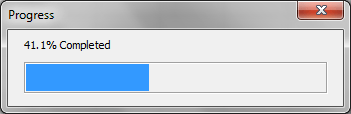
41.1% Completed progress bar

Code

Here’s the code-behind:

Option Explicit Private Const PROGRESSBAR_MAXWIDTH As Integer = 224 Public Event Activated() Public Event Cancelled() Private Sub UserForm_Activate() ProgressBar.Width = 0 RaiseEvent Activated End Sub Public Sub Update(ByVal percentValue As Single, Optional ByVal labelValue As String, Optional ByVal captionValue As String) If labelValue <> vbNullString Then ProgressLabel.Caption = labelValue End If If captionValue <> vbNullString Then Me.Caption = captionValue End If ProgressBar.Width = percentValue * PROGRESSBAR_MAXWIDTH DoEvents End Sub Private Sub UserForm_QueryClose(Cancel As Integer, CloseMode As Integer) If CloseMode = VbQueryClose.vbFormControlMenu Then Cancel = True RaiseEvent Cancelled End If End Sub

As you can see, the form isn’t responsible for anything other than updating itself, and notifying someone when it’s ready to start reporting progress, or when the “X” button is clicked – in which case whoever is handling these events can decide what to do.


Of course, that form alone doesn’t do much. It’s just a view. We need something else to implement the logic for it. Enter the ProgressIndicator class.

ProgressIndicator

I gave the class a default instance – for this to work you need to edit the class module outside the VBE (until a Rubberduck release lets you tweak module and procedure attributes at will, that is!), and import it back into your project. Here’s the listing, including a Win32API function declaration for 32-bit Office; 64-bit Office requires a PtrSafe keyword to compile them:

VERSION 1.0 CLASS BEGIN MultiUse = -1 'True END Attribute VB_Name = "ProgressIndicator" Attribute VB_GlobalNameSpace = False Attribute VB_Creatable = False Attribute VB_PredeclaredId = True Attribute VB_Exposed = True Option Explicit Private Declare Sub Sleep Lib "kernel32" (ByVal dwMilliseconds As Long) Private Const DEFAULT_CAPTION As String = "Progress" Private Const DEFAULT_LABEL As String = "Please wait..." Private Const ERR_NOT_INITIALIZED As String = "ProgressIndicator is not initialized." Private Const ERR_PROC_NOT_FOUND As String = "Specified macro or object member was not found." Private Const ERR_OPERATION_CANCELLED As String = "Operation was cancelled by the user." Public Enum ProgressIndicatorError Error_NotInitialized = vbObjectError + 1001 Error_ProcedureNotFound Error_OperationCancelled End Enum Private Type TProgressIndicator procedure As String instance As Object sleepDelay As Long canCancel As Boolean currentProgressValue As Double End Type Public Event BeforeCancel(ByRef throw As Boolean) Private this As TProgressIndicator Private WithEvents view As ProgressView Private Sub Class_Initialize() Set view = New ProgressView view.Caption = DEFAULT_CAPTION view.ProgressLabel = DEFAULT_LABEL End Sub Private Sub Class_Terminate() Set view = Nothing Set this.instance = Nothing End Sub Private Function QualifyMacroName(ByVal book As Workbook, ByVal procedure As String) As String QualifyMacroName = "'" & book.FullName & "'!" & procedure End Function Public Function Create(ByVal procedure As String, Optional instance As Object = Nothing, Optional ByVal initialLabelValue As String, Optional ByVal initialCaptionValue As String, Optional ByVal completedSleepMilliseconds As Long = 1000, Optional canCancel As Boolean = False) As ProgressIndicator Dim result As New ProgressIndicator result.Cancellable = canCancel result.SleepMilliseconds = completedSleepMilliseconds If Not instance Is Nothing Then Set result.OwnerInstance = instance ElseIf Not Framework.Strings.Contains(procedure, "'!") Then procedure = QualifyMacroName(Application.ActiveWorkbook, procedure) End If result.ProcedureName = procedure If initialLabelValue <> vbNullString Then result.ProgressView.ProgressLabel = initialLabelValue End If If initialCaptionValue <> vbNullString Then result.ProgressView.Caption = initialCaptionValue End If Set Create = result End Function Friend Property Get ProgressView() As ProgressView Set ProgressView = view End Property Friend Property Get ProcedureName() As String ProcedureName = this.procedure End Property Friend Property Let ProcedureName(ByVal value As String) this.procedure = value End Property Friend Property Get OwnerInstance() As Object Set OwnerInstance = this.instance End Property Friend Property Set OwnerInstance(ByVal value As Object) Set this.instance = value End Property Friend Property Get SleepMilliseconds() As Long SleepMilliseconds = this.sleepDelay End Property Friend Property Let SleepMilliseconds(ByVal value As Long) this.sleepDelay = value End Property Public Property Get CurrentProgress() As Double CurrentProgress = this.currentProgressValue End Property Public Property Get Cancellable() As Boolean Cancellable = this.canCancel End Property Friend Property Let Cancellable(ByVal value As Boolean) this.canCancel = value End Property Public Sub Execute() view.Show vbModal End Sub Public Sub Update(ByVal percentValue As Double, Optional ByVal labelValue As String, Optional ByVal captionValue As String) On Error GoTo CleanFail ThrowIfNotInitialized ValidatePercentValue percentValue this.currentProgressValue = percentValue view.Update this.currentProgressValue, labelValue CleanExit: If percentValue = 1 Then Sleep 1000 Exit Sub CleanFail: MsgBox Err.Number & vbTab & Err.Description, vbCritical, "Error" Resume CleanExit End Sub Public Sub UpdatePercent(ByVal percentValue As Double, Optional ByVal captionValue As String) ValidatePercentValue percentValue Update percentValue, Format(percentValue, "0.0% Completed") End Sub Private Sub ValidatePercentValue(ByRef percentValue As Double) If percentValue > 1 Then percentValue = percentValue / 100 End If End Sub Private Sub ThrowIfNotInitialized() If this.procedure = vbNullString Then Err.Raise ProgressIndicatorError.Error_NotInitialized, TypeName(Me), ERR_NOT_INITIALIZED End If End Sub Private Sub view_Activated() On Error GoTo CleanFail ThrowIfNotInitialized If Not this.instance Is Nothing Then ExecuteInstanceMethod Else ExecuteMacro End If CleanExit: view.Hide Exit Sub CleanFail: MsgBox Err.Number & vbTab & Err.Description, vbCritical, "Error" Resume CleanExit End Sub Private Sub ExecuteMacro() On Error GoTo CleanFail Application.Run this.procedure, Me CleanExit: Exit Sub CleanFail: If Err.Number = 438 Then Err.Raise ProgressIndicatorError.Error_ProcedureNotFound, TypeName(Me), ERR_PROC_NOT_FOUND Else Err.Raise Err.Number, Err.source, Err.Description, Err.HelpFile, Err.HelpContext End If Resume CleanExit End Sub Private Sub ExecuteInstanceMethod() On Error GoTo CleanFail Dim parameter As ProgressIndicator Set parameter = Me 'Me cannot be passed to CallByName directly CallByName this.instance, this.procedure, VbMethod, parameter CleanExit: Exit Sub CleanFail: If Err.Number = 438 Then Err.Raise ProgressIndicatorError.Error_ProcedureNotFound, TypeName(Me), ERR_PROC_NOT_FOUND Else Err.Raise Err.Number, Err.source, Err.Description, Err.HelpFile, Err.HelpContext End If Resume CleanExit End Sub Private Sub view_Cancelled() If Not this.canCancel Then Exit Sub Dim throw As Boolean throw = True RaiseEvent BeforeCancel(throw) 'this error isn't trappable, but not raising it wouldn't cancel anything: If throw Then OnCancelledError End Sub Private Sub OnCancelledError() Err.Raise ProgressIndicatorError.Error_OperationCancelled, TypeName(Me), ERR_OPERATION_CANCELLED End Sub

The class module must have its Instancing property set to PublicNotCreatable, which makes it impossible to instantiate directly from within another VBA project – that’s why there’s this Create factory method to initialize and return an instance.

Here’s the simplest use case, to illustrate – we have a DoSomething procedure attached to some command button on a worksheet; that procedure calls the ProgressIndicator.Create factory method to return an instance of a ProgressIndicator that will call the DoWork procedure:

Public Sub DoSomething() With ProgressIndicator.Create("DoWork") .Execute End With End Sub

This DoWork procedure is located in a standard module and must take a ProgressIndicator parameter:

Public Sub DoWork(ByVal progress As ProgressIndicator) Dim i As Long For i = 1 To 1000 Cells(1, 1) = i progress.UpdatePercent i / 1000 Next End Sub

When the Execute method is called, the ProgressView is displayed and fires up its Activated event, to which the ProgressIndicator responds by running the DoWork procedure, passing itself as a parameter – so all DoWork needs to care about, is the work it’s responsible for… and when to update progress.

The user simply can’t “X-out” of the view, which closes itself automatically a whole second after DoWork completes.


Of course, there’s more to it.

If you read the ProgressIndicator code, you know it’s way more flexible than that.

Here’s a more meaty (yet very simplified) use case: here the work is encapsulated in a class module.

Option Explicit Private WithEvents indicator As ProgressIndicator Private cancelling As Boolean Public Sub DoWork(ByVal progress As ProgressIndicator) On Error GoTo CleanFail Dim i As Long For i = 1 To 10000 If cancelling Then ThrowOnCancel Cells(1, 1) = i progress.UpdatePercent i / 10000 Next CleanExit: Exit Sub CleanFail: MsgBox Err.Description, vbExclamation Resume CleanExit End Sub Private Sub indicator_BeforeCancel(throw As Boolean) throw = False cancelling = True End Sub Private Sub ThrowOnCancel() Err.Raise ProgressIndicatorError.Error_OperationCancelled, TypeName(Me), "Operation was cancelled." End Sub

Using a private field to hold the cancelling state of the ProgressIndicator, our DoWork method can now decide to act accordingly – if this method was executing a stored procedure using an ADODB database connection, we could handle Error_OperationCancelled by rolling back a transaction and properly cleaning up before we gracefully cancel the long-running task.

In this case (assuming DoWork is located in a Class1 class module), the macro that’s attached to a worksheet button would look something like this:

Public Sub DoSomething()  Dim progress As ProgressIndicator Set progress = ProgressIndicator.Create("DoWork", New Class1) progress.Execute End Sub

And now the user can “X-out” and cancel the task, and nothing blows up.


This ProgressIndicator is highly reusable, so I’ve included it in an Excel add-in that I always have open – any new VBA project that needs this can then simply reference my add-in project and use everything I’ve packed into that library. If you want to use this code as is, you’re going to need this handy function that I’ve put in my Framework.Strings module:

Public Function Contains(ByVal string_source As String, ByVal find_text As String, Optional ByVal caseSensitive As Boolean = False) As Boolean Dim compareMethod As VbCompareMethod If caseSensitive Then compareMethod = vbBinaryCompare Else compareMethod = vbTextCompare End If Contains = (InStr(1, string_source, find_text, compareMethod) <> 0) End Function

Enjoy!

Generating and calling code on the fly: VBA delegates.

That’s one of the problems I’ve been wanting to solve in VBA for ages, but never really spent the time to actually do it. This weekend I thought I’d tackle it for real, and ended up quite quickly with a working solution.

Imagine being able to wrap up a function, and pass it around as a parameter as you please. Things like this become possible:

Public Function Where(predicate As Delegate) As Enumerable Dim result As New Collection Dim element As Variant For Each element In this.Encapsulated If predicate.Execute(element) Then result.Add element Next Set Where = Enumerable.FromCollection(result) End Function

Code like this:

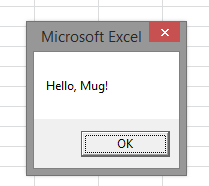
Set x = Delegate.Create("(x) => MsgBox(""Hello, "" & x & ""!"")") x.Execute("Mug")

Generating code like this:

Public Function AnonymousFunction(ByVal x As Variant) As Variant AnonymousFunction = MsgBox("Hello, " & x & "!") End Function

And outputting this when executed:

The lambda syntax is borrowed from C#, I couldn’t help it.

Here’s the Delegate class:

Option Explicit Private Type TDelegate Body As String Parameters As New Collection End Type Private Const methodName As String = "AnonymousFunction" Private this As TDelegate Friend Property Get Body() As String Body = this.Body End Property Friend Property Let Body(ByVal value As String) this.Body = value End Property Public Function Create(ByVal expression As String) As Delegate Dim result As New Delegate Dim regex As New RegExp regex.Pattern = "\((.*)\)\s\=\>\s(.*)" Dim regexMatches As MatchCollection Set regexMatches = regex.Execute(expression) If regexMatches.Count = 0 Then Err.Raise 5, "Delegate", "Invalid anonymous function expression." End If Dim regexMatch As Match For Each regexMatch In regexMatches If regexMatch.SubMatches(0) = vbNullString Then result.Body = methodName & " = " & Right(expression, Len(expression) - 6) Else Dim params() As String params = Split(regexMatch.SubMatches(0), ",") Dim i As Integer For i = LBound(params) To UBound(params) result.AddParameter Trim(params(i)) Next result.Body = methodName & " = " & regexMatch.SubMatches(1) End If Next Set Create = result End Function Public Function Execute(ParamArray params()) As Variant On Error GoTo CleanFail Dim paramCount As Integer paramCount = UBound(params) + 1 GenerateAnonymousMethod 'cannot break beyond this point Select Case paramCount Case 0 Execute = Application.Run(methodName) Case 1 Execute = Application.Run(methodName, params(0)) Case 2 Execute = Application.Run(methodName, params(0), params(1)) Case 3 Execute = Application.Run(methodName, params(0), params(1), params(2)) Case 4 Execute = Application.Run(methodName, params(0), params(1), params(2), _ params(3)) Case 5 Execute = Application.Run(methodName, params(0), params(1), params(2), _ params(3), params(4)) Case 6 Execute = Application.Run(methodName, params(0), params(1), params(2), _ params(3), params(4), params(5)) Case 7 Execute = Application.Run(methodName, params(0), params(1), params(2), _ params(3), params(4), params(5), _ params(6)) Case 8 Execute = Application.Run(methodName, params(0), params(1), params(2), _ params(3), params(4), params(5), _ params(6), params(7)) Case 9 Execute = Application.Run(methodName, params(0), params(1), params(2), _ params(3), params(4), params(5), _ params(6), params(7), params(8)) Case 10 Execute = Application.Run(methodName, params(0), params(1), params(2), _ params(3), params(4), params(5), _ params(6), params(7), params(8), _ params(9)) Case Else Err.Raise 5, "Execute", "Too many parameters." End Select CleanExit: DestroyAnonymousMethod Exit Function CleanFail: Resume CleanExit End Function Friend Sub AddParameter(ByVal paramName As String) this.Parameters.Add "ByVal " & paramName & " As Variant" End Sub Private Sub GenerateAnonymousMethod() Dim component As VBComponent Set component = Application.VBE.VBProjects("Reflection").VBComponents("AnonymousCode") Dim params As String If this.Parameters.Count > 0 Then params = Join(Enumerable.FromCollection(this.Parameters).ToArray, ", ") End If Dim signature As String signature = "Public Function " & methodName & "(" & params & ") As Variant" & vbNewLine Dim content As String content = vbNewLine & signature & this.Body & vbNewLine & "End Function" & vbNewLine component.CodeModule.DeleteLines 1, component.CodeModule.CountOfLines component.CodeModule.AddFromString content End Sub Private Sub DestroyAnonymousMethod() Dim component As VBComponent Set component = Application.VBE.VBProjects("Reflection").VBComponents("AnonymousCode") component.CodeModule.DeleteLines 1, component.CodeModule.CountOfLines End Sub

This code lives in a VBProject called Reflection, saved as an Excel add-in (so other VBA code can reference it). It requires an empty code module (in the same project) called AnonymousCode, to generate the functions on the fly.

Comments? If anything strikes you as weird in this code, review it on Code Review!

Enhancing VBA String Handling

I like the way everything in the .NET framework is an object. This allows for string instances to expose their own methods, a lot of which are implementable in VBA.


Finding a String

As much as *InStr* is easy to use, it doesn’t make very pleasant code to read:

Contains = (InStr(1, sourceText, findText, compareMethod) <> 0)

Most of the time that magic 1 (the start parameter value) is a 1. It’s nice that there’s this flexibility for starting a search anywhere in a string, but 99% of the time, you won’t care for that, and you won’t actually need to know at what index the string was found, so “not equal to zero” is all over the code. The start parameter is optional, but because it’s the first parameter in the signature, unless you name the parameters you’ll have to specify it:

Contains = (InStr(String1:=sourceText, String2:=findText, Compare:=compareMethod) <> 0)

Unless it’s absolutely necessary, I prefer not to name the parameters in a function call. I find them disruptingly annoying to read. Redundant. Named parameters can enhance readability… when your own variables are named “a”, “b”, “x” and “y”.

So I wrote a Contains method that returns a Boolean:

Public Function Contains(ByVal sourceText As String, _ ByVal findText As String, _ Optional ByVal caseSensitive As Boolean = False) _ As Boolean Dim compareMethod As VbCompareMethod If caseSensitive Then compareMethod = vbBinaryCompare Else compareMethod = vbTextCompare End If Contains = (InStr(1, sourceText, findText, compareMethod) <> 0) End Function

And if didn’t take too long until I needed a ContainsAny function:

Public Function ContainsAny(ByVal sourceText As String, _ ByVal caseSensitive As Boolean, _ ParamArray searchStrings() As Variant) _ As Boolean Dim i As Integer Dim found As Boolean For i = LBound(searchStrings) To UBound(searchStrings) found = Contains(sourceText, CStr(searchStrings(i)), caseSensitive) If found Then Exit For Next ContainsAny = found End Function

Consider something like this:

If InStr(1,foo,"ABC") <> 0 _ Or InStr(1,foo,"DEF") <> 0 _ Or InStr(1,foo,"GHI") <> 0 _ Or InStr(1,foo,"JKL") <> 0 _ Or InStr(1,foo,"MNO") <> 0 _ Or InStr(1,foo,"PQR") <> 0 _ Or InStr(1,foo,"STU") <> 0 _ Or InStr(1,foo,"VWX") <> 0 _ Or InStr(1,foo,"YZ") <> 0 _ Then DoSomething End If 

In VBA, a chain of calls like the above will be executed entirely, even if “foo” contains “ABC”. This code is more efficient then:

If ContainsAny(foo, False, _ "ABC", "DEF", "GHI", _ "JKL", "MNO", "PQR", _ "STU", "VWX", "YZ") _ Then DoSomething End If

Formatting Strings

I wrote this code a while back, because I had to format strings in VBA and had had a taste of System.String.Format in .NET, so I decided to implement something like it.

The code is on Stack Oveflow, written as a single method. I’ve also made a more OOP version (read: overkill) on Code Review. They both work like this:

?StringFormat("(C) Currency: . . . . . . . . {0:C}\n" & _ "(D) Decimal:. . . . . . . . . {0:D}\n" & _ "(E) Scientific: . . . . . . . {1:E}\n" & _ "(F) Fixed point:. . . . . . . {1:F}\n" & _ "(N) Number: . . . . . . . . . {0:N}\n" & _ "(P) Percent:. . . . . . . . . {1:P}\n" & _ "(R) Round-trip: . . . . . . . {1:R}\n" & _ "(X) Hexadecimal:. . . . . . . {0:X}\n",-123, -123.45)

Output:

(C) Currency: . . . . . . . . -123.00$ (D) Decimal:. . . . . . . . . -123 (E) Scientific: . . . . . . . -1.23450E2 (F) Fixed point:. . . . . . . -123 (N) Number: . . . . . . . . . -123 (P) Percent:. . . . . . . . . -12,345% (R) Round-trip: . . . . . . . -123.45 (X) Hexadecimal:. . . . . . . &HFFFFFF85

And also like this:

?StringFormat("(c) Custom format: . . . . . .{0:cYYYY-MM-DD (MMMM)}\n" & _ "(d) Short date: . . . . . . . {0:d}\n" & _ "(D) Long date:. . . . . . . . {0:D}\n" & _ "(T) Long time:. . . . . . . . {0:T}\n" & _ "(f) Full date/short time: . . {0:f}\n" & _ "(F) Full date/long time:. . . {0:F}\n" & _ "(s) Sortable: . . . . . . . . {0:s}\n", Now())

Output:

(c) Custom format: . . . . . .2013-01-26 (January) (d) Short date: . . . . . . . 1/26/2013 (D) Long date:. . . . . . . . Saturday, January 26, 2013 (T) Long time:. . . . . . . . 8:28:11 PM (f) Full date/short time: . . 1/26/2013 8:28:11 PM (F) Full date/long time:. . . Saturday, January 26, 2013 8:28:11 PM (s) Sortable: . . . . . . . . 2013-01-26T20:28:11

It’s also possible to specify alignment (/padding) and to use escape sequences:

?StringFormat ("\q{0}, {1}!\x20\n'{2,10:C2}'\n'{2,-10:C2}'", "hello", "world", 100) "hello, world!" ' 100.00$' '100.00$ '

Counting occurrences of a string

This function has been useful a couple of times, too:

Public Function Count(ByVal sourceText As String, ByVal findText As String) As Long Dim result As Long Dim findLength As Long findLength = Len(findText) Dim i As Long For i = 1 To Len(sourceText) - findLength + 1 If Mid(sourceText, i, findLength) = findText Then result = result + 1 i = i + findLength - 1 End If Next Count = result End Function

Organizing these functions

I’d have to paste these functions in every VBAProject I make, so instead I put them in a separate project that I saved as an Excel add-in (.xlam), so I could call them like this:

 If Strings.Contains(foo, False, "ABC") Then

But to avoid possible name clashes with VBA.Strings I decided to create a Framework module, and let it expose a Strings member, so I’d actually write it like this to make it clear I’m not talking about VBA.Strings:

 If Framework.Strings.Contains(foo, False, "ABC") Then

That ends up somewhat simulating namespaces.

framework-strings

Object-Oriented VBA: Down the Rabbit Hole

Why VBA?

VBA is poorly tooled, has poor support for anything object-oriented, and is written in an IDE that hasn’t evolved in the past decade or so. There are no namespaces, so anything that would be large enough to be called a “project” is inherently doomed to become a huge mess of tangled spaghetti code. Error handling is from another century, there’s no support for unit testing, data access is overly verbose (if you’ve been spoiled with toys like Entity Framework and LINQ), and writing anything other than a Smart UI with all the logic in a form’s code-behind, feels like a hack.

So why bother? Write everything in C# with VSTO instead! Or write a VB.NET COM-visible library and call that from VBA!

Thing is, despite all its flaws, I have to admit I like VBA. When I was working in the retail industry, be it as an analyst or a merchandise planner, my primary working tool was Microsoft Excel, and I didn’t have access to fancypants VSTO, let alone Visual Studio: VBA was all I had then, and after some years working with an actual OOP language, and some time maintaining a legacy VB6 spaghetti monster, I decided to go back to VBA and see how far I could push it into OOP.


Forget everything you know.

Consider this code:

'@TestMethod '@ExpectedError(1098) Public Sub CannotRegisterLoggerTwice() Dim logger As ILogger Set logger = MockLogger.Create("TestLogger", TraceLevel) LogManager.Register logger LogManager.Register logger End Sub 

That’s right. It’s a unit test, for some LogManager class. And it’s 100% VBA, and I can assure you that it works perfectly well, exactly as intended. What’s involved here?

  • Magic comments / “attributes” and reflection
  • Interfaces and some degree of polymorphism
  • Static classes / default instances, factory methods and immutable types

runalltests

2014-10-05 18:59:44 CannotRegisterLoggerTwice: [PASS] 2014-10-05 18:59:44 MustRegisterLogger: [PASS] 2014-10-05 18:59:44 TraceLoggerEnablesAllLogLevels: [PASS] 2014-10-05 18:59:44 LogManagerPassesSpecifiedMessage: [PASS] 2014-10-05 18:59:44 OnlySpecifiedLoggerLogs: [PASS]

The key to unlock VBA’s potential, in my opinion, is to regroup functionality in a toolbox – a “framework”, a set of add-ins loaded with the host application (say, Excel) and that any VBAProject can reference.

I will use this blog to document my work and findings as I keep going down the rabbit hole.